Inside sales teams — representatives who sell primarily through phone calls, emails, and video meetings rather than in-person visits — require CRM tools that prioritize communication speed and volume over the complex account management and field service features that enterprise CRM platforms emphasize. The most critical capability for inside sales is not sophisticated pipeline visualization or advanced reporting but rather the ability to reach more prospects, have more conversations, and follow up faster than competitors who are pursuing the same buyers. Close CRM was built specifically for this high-velocity inside sales environment, integrating calling, email, and SMS directly into the CRM to create a communication-first selling platform that eliminates the tool switching and manual logging that slow inside sales teams down.
Founded in 2013 by Steli Efti and the team behind Elastic Sales (an outsourced sales company), Close was born from the practical experience of running a high-volume inside sales operation and discovering that existing CRM tools created friction rather than reducing it for communication-intensive selling. This origin story shapes Close’s design philosophy — every feature is evaluated against the standard of whether it helps inside sales representatives have more and better conversations with prospects. Understanding Close’s capabilities helps inside sales teams evaluate whether this communication-first CRM approach serves their high-velocity selling needs better than general-purpose CRM platforms that treat communication as one feature among many rather than as the central activity around which the entire CRM experience is organized.
Built-In Calling
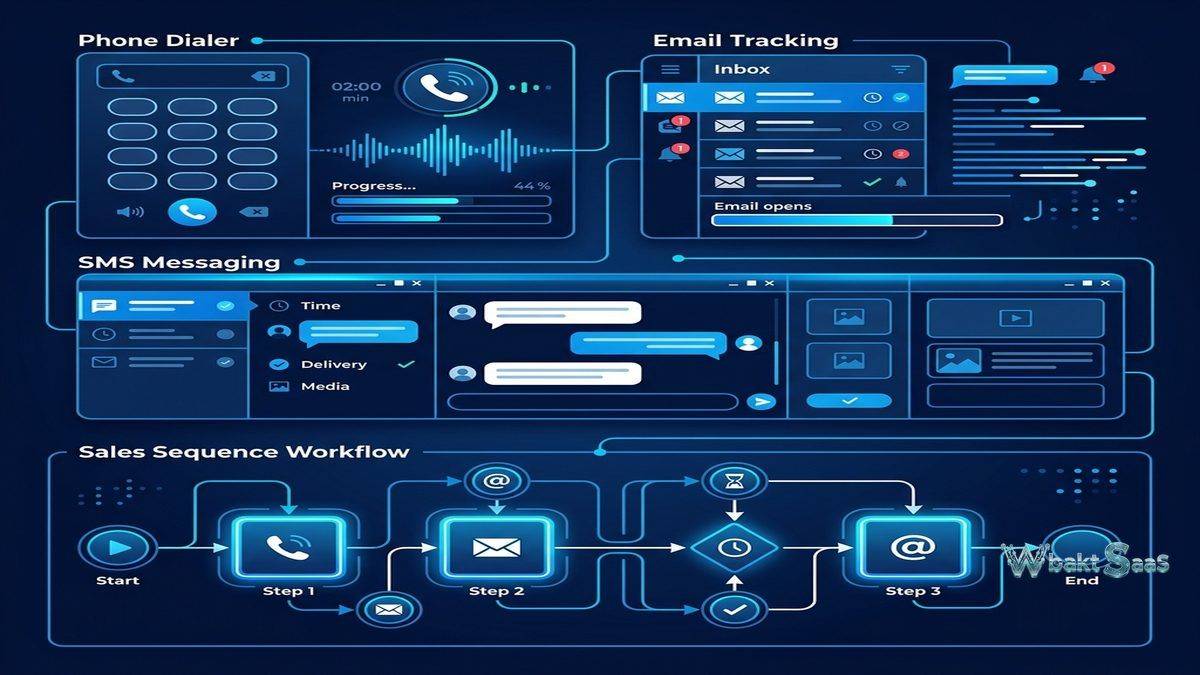
Close includes native VoIP calling that enables sales representatives to make and receive calls directly from the CRM without third-party telephony tools or browser extensions. Click-to-call from any contact or lead record initiates calls instantly, and call activity — duration, recording, notes, outcome disposition — is automatically logged to the appropriate record without manual entry. Call recording captures every conversation for coaching, quality assurance, and reference purposes. Voicemail drop enables pre-recording voicemail messages and leaving them with a single click, saving the 30-60 seconds per voicemail that manual recording requires — a significant time savings for teams making dozens or hundreds of calls daily.
Local presence dialing displays a local area code to the prospect being called, significantly improving answer rates compared to calls from unfamiliar or toll-free numbers. International calling supports sales teams pursuing prospects across multiple countries. Call forwarding routes incoming calls to mobile devices when representatives are away from their desks, ensuring that prospect callbacks reach a live person rather than voicemail.
Power Dialer
The Power Dialer automates the dialing process by calling the next lead in a list immediately after the previous call ends. Representatives load a Smart View (filtered lead list) into the Power Dialer, and the system automatically advances through the list — dialing each number, waiting for an answer or voicemail, and moving to the next lead without manual number selection. This automation eliminates the dead time between calls that accumulates when representatives manually search for and dial each prospect, typically increasing daily call volume by 200-300% compared to manual dialing workflows.
Predictive Dialer
The Predictive Dialer takes automated dialing further by calling multiple numbers simultaneously and connecting the representative only when a live person answers. The system uses algorithms to predict answer rates and adjusts the number of simultaneous outbound calls to minimize representative idle time while avoiding situations where multiple prospects answer simultaneously. Predictive dialing maximizes talk time per hour for teams that prioritize conversation volume, though it requires sufficient call volume to be statistically effective and is most appropriate for high-volume outbound calling campaigns.

Email Integration
Close provides bi-directional email sync with Gmail and Outlook that automatically logs all email correspondence to the appropriate lead records. Email tracking provides open and click notifications that indicate prospect engagement and suggest optimal follow-up timing. Email templates with personalization merge fields enable rapid personalized outreach. Bulk email sends personalized emails to filtered lead lists, combining the scale of email marketing with the personalization of individual sales outreach.
SMS Messaging
Built-in SMS enables sending and receiving text messages directly from the CRM, with SMS conversations logged to lead records alongside email and call history. SMS templates enable quick message sending for common communication scenarios — meeting confirmations, follow-up reminders, quick updates. For prospects who prefer text communication over phone calls or email, SMS provides an additional channel that maintains the complete communication record within the CRM context.
Sequences
Close Sequences automate multi-step outreach campaigns that combine emails, calls, and SMS messages into coordinated workflows. A prospecting sequence might send an initial email, schedule a call task for two days later, send a follow-up email after the call attempt, send an SMS reminder, and create a final email — automatically progressing through steps while pausing when the prospect responds. Sequence enrollment can be manual or automated through workflow triggers, and sequence performance analytics track response rates, meeting conversion, and pipeline generation for each sequence template.
Smart Views
Smart Views are saved, dynamic lead filters that create targeted lists for specific selling activities. Representatives create Smart Views for different workflow scenarios: “Leads contacted today with no response,” “Leads in demo stage for more than 7 days,” “Leads from inbound marketing with no call attempt,” or “High-value leads with recent email opens.” Smart Views update dynamically as lead data changes, ensuring that filtered lists always reflect current CRM data. Smart Views integrate with the Power Dialer, enabling representatives to load filtered lists directly into automated calling sessions for focused, efficient outreach.
Pipeline Management
Close provides visual pipeline management with customizable stages, drag-and-drop deal progression, and pipeline-level analytics. Multiple pipelines support different sales processes. Pipeline metrics include conversion rates between stages, average deal value, average time in each stage, and win/loss analysis. While Close’s pipeline visualization is functional, the platform’s primary strength is communication workflow rather than pipeline sophistication — teams that need advanced pipeline analytics may find dedicated pipeline tools like Pipedrive more feature-rich for pure pipeline management.
Reporting
Close reporting emphasizes activity metrics that inside sales teams track most closely: calls made, emails sent, SMS messages, response rates, talk time, and the conversion from activity to pipeline to revenue. Leaderboards display team rankings by activity volume and outcome metrics, creating healthy competition and visibility into team performance. Activity comparison reports show performance trends over time, identifying whether individual representatives and the overall team are maintaining, increasing, or declining in selling activity levels.
Custom reports enable creating filtered, grouped, and calculated views for specific analytical questions. Revenue reports track pipeline value, forecasted revenue, and won/lost deal analysis. Export capabilities provide data for external analysis in spreadsheets or business intelligence tools.
Workflow Automation
Workflow automation triggers actions based on lead events and conditions — automatically assigning leads based on criteria, sending welcome emails when leads are created from specific sources, creating follow-up tasks when deals reach specific stages, and updating lead status when activity milestones are completed. Automation reduces the manual administrative tasks that consume selling time and ensures that process steps execute consistently regardless of individual representative discipline.
Integrations
Close integrates with popular business tools including Slack, Zoom, Google Workspace, Zapier, HubSpot, Segment, Drift, and many more. The Close API provides comprehensive programmatic access for custom integrations. Zapier connectivity extends integration to thousands of additional applications. For inside sales teams that use specialized tools for lead generation, data enrichment, or marketing automation, Close’s integration capabilities ensure that the CRM connects with the broader sales technology stack.
Call Coaching
Call coaching features enable sales managers to listen to live calls without the prospect hearing them, whisper coaching advice that only the representative can hear, and barge into calls when direct manager intervention is needed. Call recording review enables systematic coaching based on actual prospect conversations rather than self-reported call summaries. These coaching capabilities help sales managers develop representative skills through real-time guidance and post-call review, accelerating the ramp time for new hires and continuously improving the performance of experienced representatives.
Custom Activities
Custom activity types extend Close’s activity tracking beyond standard calls, emails, and SMS to include any interaction type relevant to the organization’s sales process — product demos, proposal reviews, contract negotiations, LinkedIn outreach, or industry-specific activities. Custom activities appear in the lead timeline alongside standard communication activities, maintaining a complete interaction history that encompasses every touchpoint in the selling relationship regardless of the communication channel or interaction type used.
Mobile Application
Close’s mobile app provides CRM access on iOS and Android with calling capability, email access, pipeline management, and activity logging from mobile devices. Mobile calling uses the built-in VoIP system, maintaining call recording and automatic logging capabilities even when representatives are away from their desktop. Push notifications alert representatives to important events — new inbound leads, prospect email replies, task reminders — ensuring timely response to engagement signals regardless of location.
Data Import and Migration
Close provides data import tools for migrating from other CRM platforms, spreadsheets, and CSV files. Dedicated migration paths exist for organizations transitioning from Salesforce, HubSpot, Pipedrive, and other major CRM platforms. Import tools map source fields to Close fields, handle data transformation, and manage duplicate detection. For organizations with complex migration requirements, Close’s professional services team provides migration assistance to ensure data integrity and relationship preservation during the transition.
Custom Fields and Lead Organization
Custom fields capture information specific to the organization’s selling context — industry-specific data, qualification criteria, competitive intelligence, and process-specific attributes. Choice fields, date fields, number fields, and text fields accommodate different data types. Lead statuses organize leads into categorical groups that reflect the organization’s sales process stages, enabling filtered views and reporting based on lead progression through the qualification and selling process.
Roles and Permissions
Role-based access control defines user permissions including data visibility, feature access, and administrative capabilities. Organization-level settings control team-wide defaults including call recording policies, email tracking preferences, and data sharing rules. User roles include Admin, Member, and Restricted Member access levels that align with organizational hierarchy and data governance requirements.
Common Use Cases
High-Volume Outbound Sales: Outbound sales teams making hundreds of daily calls use Close’s Power Dialer and Predictive Dialer to maximize daily call volume, talk time, and prospect conversation rates.
SaaS Inside Sales: SaaS companies with inside sales teams use Close to manage the demo-to-close process, combining email sequences, call campaigns, and pipeline tracking for subscription sales workflows.
Startup Sales Teams: Early-stage startups with small, scrappy sales teams use Close for its all-in-one communication capability — eliminating the need to purchase separate phone, email tracking, and CRM tools during the resource-constrained early growth stage.
Lead Qualification Teams: Sales development representative (SDR) and business development representative (BDR) teams use Close’s communication tools and sequences to qualify inbound leads and generate outbound pipeline for account executives.
Recruiting and Staffing: Recruiting agencies adapt Close’s communication-intensive workflow for candidate outreach, managing high-volume phone and email campaigns to connect with potential candidates across multiple job requisitions.
Financial Services: Financial advisors and insurance agents use Close for client prospecting and relationship management, leveraging built-in calling and compliance-friendly call recording for regulated industry sales communication requirements.
Agency New Business: Marketing agencies and creative firms use Close to manage new business pipeline development, tracking prospect outreach through the proposal and pitch process with communication-heavy sales workflows that align with Close’s strengths.
Education and Training Sales: Education technology companies and training providers use Close to manage enrollment sales processes, combining phone outreach with email nurturing sequences to convert prospective students and corporate training buyers.
Pricing
Close offers three tiers — Startup, Professional, and Enterprise — with per-user, per-month pricing that includes built-in calling minutes. Each tier adds features: Professional includes Power Dialer, call coaching, advanced sequences, and custom activities; Enterprise adds Predictive Dialer, custom roles, call transfers, and dedicated support. Calling credits are included with each plan, with additional credits available for purchase as needed for high-volume calling operations. A 14-day free trial is available without credit card requirements, enabling teams to evaluate the platform with their actual workflow before committing.
Pricing and features are subject to change. Please verify current plan details on the official Close website before making purchasing decisions.
Limitations
- Inside sales focus: Close is designed specifically for inside sales. Field sales teams, account management, and customer success teams may find the platform too communication-centric for their broader workflow needs.
- Marketing capabilities: Close does not include marketing automation. Organizations needing lead nurturing, campaign management, or content marketing tools require separate marketing platforms and integration.
- Enterprise complexity: Very large enterprises with complex hierarchies, territory management, and multi-division reporting may need more sophisticated enterprise CRM platforms like Salesforce.
- Customer service: Close does not include help desk or service management features. Post-sale customer support requires separate tooling and data synchronization.
- Customization depth: While Close provides essential customization through custom fields and activities, the platform offers less deep customization than Salesforce or Zoho CRM for organizations with highly specialized data model requirements.
Summary
Close provides a communication-first CRM purpose-built for inside sales teams that prioritize conversation volume and outreach velocity above all other CRM capabilities. The integration of calling (including Power Dialer and Predictive Dialer), email, SMS, and sequences directly into the CRM creates a unified selling workspace that eliminates the tool switching, manual logging, and workflow fragmentation that reduce selling productivity in communication-intensive sales roles.
The platform’s dialer technology represents its most distinctive competitive advantage. Power Dialer and Predictive Dialer capabilities increase daily call volumes dramatically compared to manual dialing, and the combination of local presence dialing, voicemail drop, and automatic call logging creates an outbound calling workflow that maximizes the amount of time representatives spend in live conversations rather than in administrative tasks between calls.
The platform’s inside sales specialization creates both its greatest strength and its most significant limitation. Teams that sell primarily through phone, email, and SMS find Close’s workflow dramatically more efficient than general-purpose CRM platforms where communication tools are add-ons rather than core features. However, organizations needing field sales support, marketing automation, customer service, or enterprise account management should evaluate whether Close’s communication focus addresses enough of their CRM requirements or whether a broader platform better serves their multi-functional needs.
CRM platforms including Close, HubSpot, Salesforce, Pipedrive, and Freshsales each approach sales CRM with different design priorities and target audiences. Close’s advantages center on built-in communication tools, dialer technology, sequence automation, and the workflow efficiency that comes from purpose-built inside sales design. Organizations evaluating CRM platforms should consider whether their primary selling motion is inside sales communication and whether the productivity gains from integrated calling and messaging justify selecting a specialist tool over a more generalized CRM platform.
Features, pricing, and availability discussed in this review reflect information available at the time of writing. Software products evolve continuously, and details may have changed since publication. Please verify current information directly on the official Close website. WBAKT SaaS is an independent review platform with no affiliate relationships with any software company mentioned in this article.
For related CRM tools, see our reviews of Freshsales CRM, Pipedrive CRM, and HubSpot CRM.
About the Author