Traditional CRM platforms impose rigid data structures and predetermined workflows that sales teams must adapt to, creating friction when the organization’s actual selling process does not align with the CRM’s assumptions about how sales should work. Monday Sales CRM takes a fundamentally different approach by building CRM functionality on top of monday.com’s flexible Work Operating System (Work OS), where the data structure, views, automations, and workflows adapt to how each organization actually sells rather than requiring organizations to adapt to a fixed CRM framework. This flexibility makes Monday Sales CRM particularly attractive to organizations whose sales processes are unique, evolving, or cross-functional in ways that traditional CRM structures cannot easily accommodate.
Monday.com launched in 2014 as a visual work management platform that quickly gained popularity for its intuitive, colorful board interface and powerful automation capabilities. Monday Sales CRM extends this Work OS foundation into dedicated CRM functionality — adding deal tracking, contact management, email integration, sales analytics, and pipeline visualization while maintaining the visual flexibility and ease of use that made the core monday.com platform successful. Understanding Monday Sales CRM’s capabilities helps sales teams evaluate whether this Work OS approach to CRM delivers sufficient sales-specific functionality while providing the workflow flexibility and visual experience that conventional CRM platforms often lack.
Visual Board Interface
Monday Sales CRM’s board interface displays CRM data in a visually rich, spreadsheet-like format where rows represent records (deals, contacts, accounts) and columns represent data fields. Unlike traditional CRM interfaces that display individual record pages, the board view provides a tabular overview of multiple records simultaneously, enabling quick scanning, inline editing, and batch operations. Column types include status, date, number, text, dropdown, formula, dependency, timeline, and many more — each with color-coded visual indicators that make data patterns immediately visible.
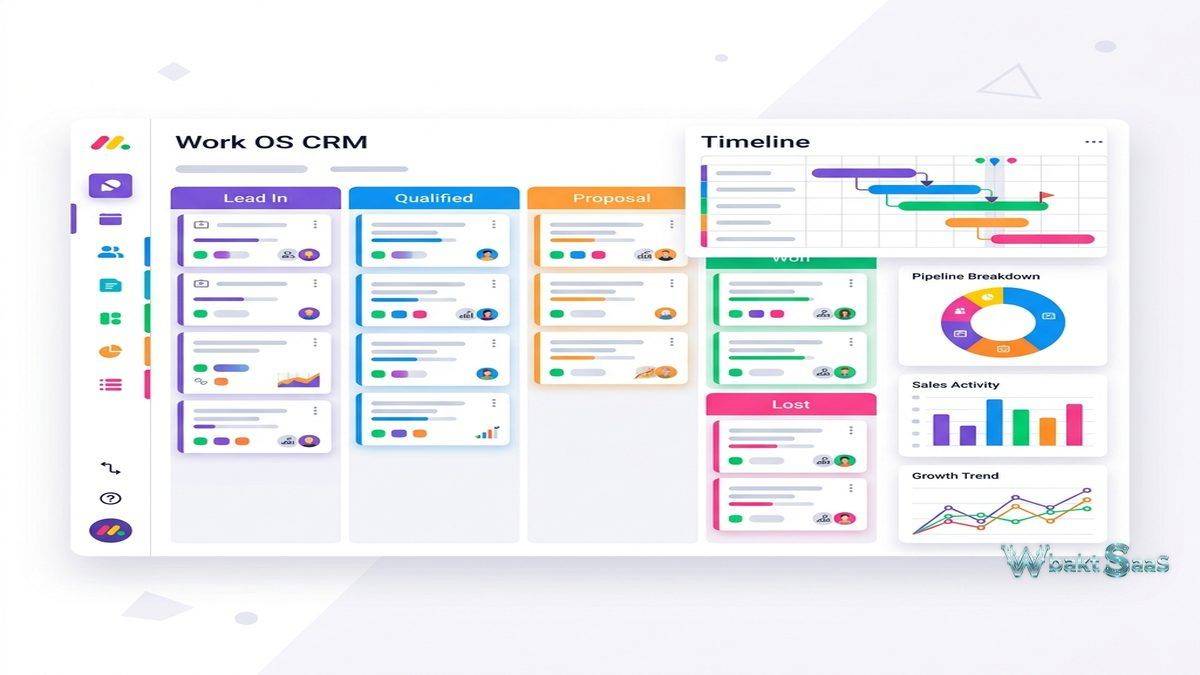
Multiple views of the same data enable different perspectives without duplicating records: Table view for detailed data management, Kanban view for pipeline visualization, Timeline view for deal scheduling, Calendar view for activity planning, Chart view for visual analytics, Map view for geographic analysis, and Form view for data capture. This multi-view capability means that sales managers, representatives, and executives can each view the same pipeline data in the format most useful to their role without requiring separate dashboards or reports.
Deal Tracking and Pipeline
Deal tracking uses status columns that represent pipeline stages — color-coded visual indicators show deal progression at a glance. Kanban view arranges deals in pipeline columns that support drag-and-drop stage progression. Deal records store value, expected close date, probability, associated contacts, activity history, files, notes, and custom fields. Pipeline analytics show total value, weighted value, conversion rates, and stage distribution through dashboard widgets that update in real time as deal data changes.
Multiple pipelines support different sales processes, product lines, or business units. Each pipeline has independent stage configurations, color schemes, and automation rules. Mirror columns enable connecting data across boards — linking deals to contacts, contacts to accounts, and accounts to projects — creating relational data views without traditional CRM entity relationship complexity.

Contact Management
Contact and account management uses dedicated boards with customizable columns for contact information, company details, relationship status, and communication history. Contact records link to associated deals through board connections, providing visibility into all commercial activity associated with each contact and company. Duplicate detection identifies potential duplicate records during import and creation, maintaining data quality as the contact database grows.
Email and Activities
Email integration syncs with Gmail and Outlook, enabling sending and receiving emails directly from deal and contact records. Email tracking provides open and click notifications. Email templates enable personalized outreach at scale. Activity management tracks calls, meetings, tasks, and custom activity types with logging and scheduling capabilities. Activity tracking views show team and individual activity volumes, enabling managers to monitor selling activity levels and identify coaching opportunities.
Automation Recipes
Monday Sales CRM’s automation engine uses “recipes” — configurable trigger-action combinations that automate routine workflows. Recipe structure follows a natural language format: “When [trigger] happens, then [action] is performed.” Triggers include status changes, date arrivals, item creation, column value changes, and email events. Actions include sending notifications, creating items, moving items, updating columns, sending emails, and assigning ownership. Pre-built recipe templates address common CRM workflows — notifying managers when high-value deals are created, creating follow-up tasks when deals move stages, sending welcome emails when new contacts are added, and archiving lost deals automatically.
Custom automations combine multiple conditions and actions into sophisticated workflows that reflect the organization’s specific process requirements. Integration-based automations connect CRM workflows with external tools — creating Slack notifications when deals close, updating accounting systems when deal values change, or triggering marketing sequences when contacts reach specific lifecycle stages.
Dashboards and Reporting
Dashboard builder creates visual analytics displays using widgets — charts, numbers, tables, timelines, and embedded boards — that pull data from CRM boards. Sales dashboards typically include pipeline value, deal count, win/loss ratio, forecast, activity metrics, and leaderboard widgets. Dashboard widgets update in real time as underlying CRM data changes, providing always-current performance visibility. Multiple dashboards serve different roles — executive dashboards showing high-level metrics, manager dashboards showing team performance, and representative dashboards showing individual activity and pipeline progress.
monday.com Work OS Ecosystem
Monday Sales CRM operates within the broader monday.com ecosystem that includes monday Work Management, monday Dev, and monday Marketer. Organizations already using monday.com for project management, operations, or development can extend their existing platform into CRM functionality, maintaining a unified Work OS for all business operations. Cross-board connections enable linking CRM data to project boards, marketing boards, and operational workflows, creating visibility across business functions that siloed tools cannot provide.
Integrations
The monday.com Marketplace provides integrations with popular business tools including Slack, Microsoft Teams, Zoom, Google Workspace, Mailchimp, HubSpot, Salesforce, DocuSign, Stripe, Twilio, and many more. Zapier and Make (formerly Integromat) integrations extend connectivity to thousands of additional applications. The monday.com API provides programmatic access for custom integrations and workflows that marketplace apps do not address.
Subitems and Dependencies
Subitems create hierarchical task structures within deal records — breaking complex deals into sub-tasks like proposal preparation, technical evaluation, legal review, and contract negotiation. Each subitem has its own status, assignee, due date, and custom fields, enabling granular tracking of the steps required to advance each deal. Dependencies between subitems define sequential relationships — ensuring that legal review cannot begin until the proposal is approved, for example — creating structured deal progression workflows that enforce process discipline.
Time Tracking
Built-in time tracking enables logging time spent on deal-related activities — prospect research, proposal creation, demo preparation, and client meetings. Time tracking data feeds into reporting dashboards, providing visibility into the time investment required per deal and per client. For professional services organizations where time is directly billable, time tracking integration with CRM data connects client relationship management with revenue-generating activity measurement in a single platform.
Board Templates
Monday.com provides pre-built CRM board templates that accelerate setup for common sales workflows — sales pipeline, contacts directory, customer onboarding, lead management, and partner tracking. Templates include pre-configured columns, automations, views, and dashboard widgets that represent best-practice CRM configurations. Custom templates enable organizations to save their optimized board configurations as templates for replication across teams, departments, or new business units, ensuring consistent CRM setup without repeated manual configuration.
Permissions and Guest Access
Board-level permissions control who can view, edit, and manage each CRM board. Column permissions restrict editing of sensitive data fields to authorized users. Guest access enables inviting external collaborators — partners, contractors, clients — to specific boards with controlled visibility, enabling collaborative workflows that extend beyond internal team boundaries. Workspace organization groups boards into functional areas, providing structural organization for CRM boards alongside other business operation boards.
Notifications and Updates
The updates section within each record provides a conversation thread where team members discuss deal progress, share observations, and coordinate next steps. @mentions notify specific team members, and update history creates an auditable conversation trail for each deal. Custom notification preferences control which events trigger alerts — new deal assignments, stage changes, approaching deadlines, mentions — preventing notification overload while ensuring that important events receive attention. Weekly summary emails provide digest-format overviews of CRM activity for users who prefer periodic updates over real-time notifications.
Formulas and Calculations
Formula columns enable calculated fields that derive values from other columns — commission calculations, deal age computation, weighted pipeline values, and conditional status indicators. Formula support includes mathematical operations, conditional logic, date calculations, and text manipulation. These calculated fields update automatically when source values change, providing real-time derived metrics without manual recalculation. For sales teams that need custom metrics beyond standard CRM calculations, formula columns provide spreadsheet-like calculation capabilities within the CRM context.
Mobile Application
Monday.com’s mobile app provides CRM access on iOS and Android with full board interaction, deal updates, contact management, notifications, and communication capabilities. Mobile-optimized views ensure that CRM data is accessible and actionable from mobile devices. Push notifications alert users to automation triggers, deal updates, and team communications, maintaining CRM awareness during field work and travel.
Forms and Lead Capture
Monday.com forms create customizable lead capture forms that feed directly into CRM boards. Form submissions automatically create contact or deal records with the submitted information. Embeddable forms can be placed on websites, landing pages, and email campaigns. Form customization includes field selection, conditional logic, branding, and thank-you page configuration. This native lead capture capability eliminates the need for separate form tools and ensures that captured leads enter the CRM immediately for sales follow-up.
Document Management
Workdocs provides collaborative document creation within the monday.com platform — proposals, meeting notes, project briefs, and strategy documents that link directly to CRM records. Documents can embed live board data, creating proposals that automatically reflect current deal values, timelines, and specifications. File column on boards enables attaching external files — contracts, presentations, specifications — to deal and contact records, maintaining document context within the CRM.
Common Use Cases
Cross-Functional Teams: Organizations where sales processes involve collaboration across marketing, operations, product, and delivery teams use Monday Sales CRM’s board-based interface to create shared visibility into customer-facing activities across functional boundaries.
Monday.com Users: Organizations already using monday.com for work management extend into CRM functionality without adopting a separate platform, maintaining a unified Work OS experience for all business operations.
Custom Sales Processes: Companies with unique or non-standard sales processes that do not fit traditional CRM structures use Monday Sales CRM’s flexible board design to create CRM workflows that match their actual selling approach.
Small Business Teams: Small businesses seeking visual, intuitive CRM that does not require CRM administration expertise use Monday Sales CRM’s drag-and-drop configuration to build functional CRM systems without technical implementation support.
Creative Agencies: Agencies managing client relationships alongside creative project delivery use Monday Sales CRM connected to project boards, maintaining continuity from business development through project execution within a single platform.
Real Estate Teams: Real estate teams customize Monday Sales CRM boards to track property listings, buyer/seller relationships, transaction stages, and closing timelines with visual board layouts tailored to real estate workflow requirements and industry-specific data fields.
Event Management: Event companies use Monday Sales CRM to manage sponsor and exhibitor sales pipelines, tracking sponsorship deals through proposal, negotiation, contract, and fulfillment stages alongside event project management boards.
Fundraising and Development: Nonprofit development teams and fundraising organizations track donor pipelines, grant applications, and sponsorship opportunities using customized boards that visualize fundraising progress toward campaign goals.
Pricing
Monday Sales CRM pricing includes Basic, Standard, Pro, and Enterprise tiers with per-user, per-month billing (minimum 3 seats). Each tier adds features: Standard includes email integration, activity management, quotes, invoices, and 250 monthly automations; Pro adds sales forecasting, email tracking, mass emailing, formula columns, and 25,000 monthly automations; Enterprise provides advanced security, audit logs, HIPAA compliance, and dedicated support with unlimited automations. A 14-day free trial is available for all plans without credit card requirements. Annual billing provides significant savings over monthly payment options.
Pricing and features are subject to change. Please verify current plan details on the official monday.com website before making purchasing decisions.
Limitations
- CRM depth: Monday Sales CRM is newer and less feature-rich than established CRM platforms like Salesforce or HubSpot for complex enterprise sales process management and advanced forecasting.
- Sales-specific features: Advanced sales features like territory management, CPQ, predictive lead scoring, and sophisticated forecasting models are less developed than in dedicated CRM platforms.
- Enterprise scale: Very large sales organizations with complex multi-division reporting and hierarchical access requirements may find the platform less capable than enterprise-grade CRM solutions.
- Data model complexity: While boards are flexible, the flat board structure can become unwieldy for complex entity relationships that traditional CRM relational data models handle more elegantly.
- Minimum seats: The minimum 3-seat requirement means that solo sales professionals and very small teams pay for seats they may not fully utilize.
Summary
Monday Sales CRM provides a visually engaging, highly flexible CRM experience built on monday.com’s proven Work Operating System. The board-based interface, multi-view data visualization, powerful automation recipes, and intuitive drag-and-drop configuration create a CRM that adapts to the organization’s workflow rather than requiring the organization to adapt to rigid CRM structures. This flexibility makes Monday Sales CRM particularly valuable for teams with unique processes, cross-functional workflows, or existing monday.com usage that benefits from platform consolidation.
The Work OS foundation creates unique value for organizations that can consolidate multiple business tools onto a single platform. When sales CRM, project management, marketing operations, and team collaboration all operate within monday.com, the cross-functional visibility and workflow integration that results is difficult to replicate with separate specialized tools that require integration and data synchronization to communicate.
The platform’s primary strength is its balance of visual appeal and functional flexibility. Teams that value visual data presentation, intuitive interfaces, and customizable workflows find Monday Sales CRM more engaging and adoptable than traditional CRM platforms that prioritize data depth over user experience. The combination of board flexibility, automation recipes, and the broader monday.com ecosystem creates additional value for organizations that benefit from platform consolidation and visual workflow management.
CRM platforms including Monday Sales CRM, HubSpot, Salesforce, Pipedrive, and Zoho each approach customer relationship management with different design philosophies and target audiences. Monday Sales CRM’s advantages center on visual flexibility, Work OS integration, automation accessibility, and the intuitive experience that drives high adoption rates. Organizations evaluating CRM platforms should consider whether workflow flexibility and visual experience priorities align with their team’s preferences or whether deeper sales-specific functionality from dedicated CRM platforms better serves their complex selling process requirements.
Features, pricing, and availability discussed in this review reflect information available at the time of writing. Software products evolve continuously, and details may have changed since publication. Please verify current information directly on the official monday.com website. WBAKT SaaS is an independent review platform with no affiliate relationships with any software company mentioned in this article.
For related CRM tools, see our reviews of HubSpot CRM, Pipedrive CRM, and Zoho CRM Suite.
About the Author