Customer relationship management adoption has historically been challenged by the same fundamental barrier — the systems designed to help sales teams sell more effectively often require so much data entry, configuration, and administrative overhead that they slow sales teams down rather than speeding them up. HubSpot CRM was created to solve this adoption problem by providing a CRM that prioritizes usability and automation, reducing the friction that causes sales representatives to avoid their CRM rather than embrace it. The platform’s free tier provides genuinely useful CRM functionality at no cost, making professional customer management accessible to organizations of any size.
HubSpot’s CRM platform serves as the foundation for the broader HubSpot ecosystem — Marketing Hub, Sales Hub, Service Hub, CMS Hub, and Operations Hub. While each hub can function independently, the shared CRM database ensures that customer interactions across marketing, sales, and service remain connected in a unified customer record. This unified platform approach eliminates the integration challenges and data fragmentation that occur when organizations use separate tools for each customer-facing function. Understanding HubSpot CRM’s capabilities helps organizations evaluate whether this platform’s balance of usability, integration, and scalability serves their customer management requirements at their current stage and anticipated growth trajectory.
Contact and Company Management
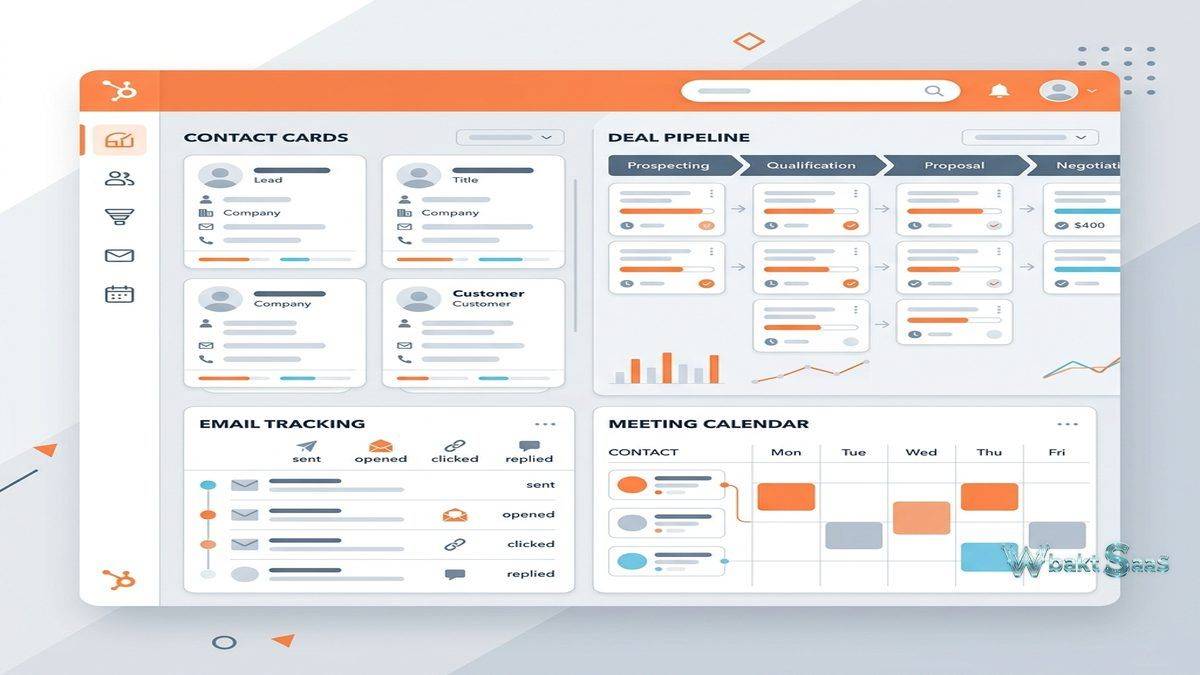
HubSpot CRM organizes customer information around Contacts (individual people), Companies (organizations), Deals (sales opportunities), and Tickets (service requests). Contact records store comprehensive information including contact details, communication history, website activity, form submissions, email interactions, and custom properties that capture business-specific information. Company records aggregate contact-level data to provide organizational-level views — how many contacts exist at a company, which deals are active, what service tickets are open, and the total engagement history across all individuals at the organization.
Automatic data enrichment populates company records with publicly available information — company size, revenue, industry, location, description, and social media profiles — reducing the manual data entry that creates adoption friction. Contact timeline views display every interaction chronologically — emails sent and received, phone calls logged, meetings scheduled, form submissions, page views, and deal stage changes — providing complete context for every customer conversation.
Deal Pipeline
The visual deal pipeline provides drag-and-drop deal management through customizable stages that reflect the organization’s sales process. Multiple pipelines support different sales processes for different products, services, or business units. Deal properties capture deal-specific information — amount, close date, deal owner, associated contacts, products, and custom fields — while deal stages track progression through the qualification and closing process.
Pipeline analytics show conversion rates between stages, average deal size, average time in each stage, and win/loss ratios that reveal where deals stall and where the sales process needs improvement. Forecast views aggregate deal values by stage with probability-weighted projections, providing revenue forecasting that sales leaders use for planning and resource allocation decisions.

Email Tracking and Templates
Email tracking notifies sales representatives when contacts open their emails, click links, or download attachments — providing real-time engagement signals that indicate prospect interest and optimal follow-up timing. The Chrome and Outlook extensions integrate email tracking directly into the sales representative’s existing email workflow, logging emails to CRM records without requiring manual copy-paste or CRM login.
Email templates store reusable email content — prospecting emails, follow-up sequences, meeting requests, proposal templates — that representatives personalize for individual recipients. Template performance analytics show which templates achieve the highest open and response rates, enabling continuous refinement of email messaging based on actual recipient engagement data rather than assumptions about what messaging works best.
Meeting Scheduling
HubSpot’s meeting scheduler integrates with Google Calendar and Office 365 to provide shareable scheduling links that prospects use to book meetings at mutually available times. Scheduling pages are customizable with branding, meeting duration options, buffer time between meetings, and availability rules. The scheduling link eliminates the back-and-forth email exchanges that delay meeting booking, and scheduled meetings automatically create CRM records with calendar events synchronized to both parties.
Round-robin scheduling distributes meeting bookings across team members based on availability and configured distribution rules. Group meeting scheduling enables booking meetings with multiple team members simultaneously. These scheduling automation features remove administrative friction from the meeting booking process that often delays sales progression.
Sequences
Sales sequences automate multi-step outreach campaigns that combine automated emails with manual task reminders. A prospecting sequence might send an initial email, wait three days, send a follow-up email, wait two more days, create a task to call the prospect, and send a final email — automatically progressing through the sequence unless the recipient replies, at which point the automation stops to prevent awkward overlap between automated and personal communication.
Sequence enrollment can be triggered manually by individual representatives or through workflow automation that enrolls contacts meeting specific criteria. Sequence performance analytics track enrollment rates, reply rates, meeting rates, and deal creation rates for each sequence, enabling sales leadership to identify which outreach approaches generate the strongest pipeline results.
Live Chat and Chatbots
HubSpot’s live chat widget enables real-time website visitor engagement, connecting visitors with sales or service team members for immediate conversation. Chatbots provide automated conversation flows that qualify visitors, answer common questions, schedule meetings, and route conversations to appropriate team members based on visitor responses. Chat conversations are automatically logged to contact records, maintaining the complete communication timeline that informs future interactions.
Reporting and Dashboards
HubSpot’s reporting tools create custom reports from CRM data — deal reports, activity reports, contact reports, and cross-object reports that combine data from multiple record types. Custom dashboards arrange report widgets to provide role-specific views — sales manager dashboards showing team performance metrics, executive dashboards showing pipeline and revenue summaries, and representative dashboards showing individual activity and deal progress.
Standard reports provide pre-built analytics for common metrics — deal forecast, sales activity, pipeline progression, and deal velocity. Custom report builder enables creating reports with filtered data, calculated fields, and visualization options (bar charts, line charts, tables, pivot tables) that answer specific business questions beyond standard report templates.
Free CRM vs. Paid Hubs
HubSpot’s free CRM includes contact management, deal tracking, email tracking, meeting scheduling, live chat, and basic reporting for unlimited users. Paid Sales Hub tiers (Starter, Professional, Enterprise) add advanced capabilities including sequences, advanced automation, custom reporting, predictive lead scoring, playbooks, call transcription, and conversation intelligence. The free tier provides genuine operational value rather than serving merely as a trial, enabling organizations to build their CRM foundation before investing in premium features.
Sales Hub Features
Playbooks provide structured sales methodologies — qualification frameworks, discovery call guides, objection handling scripts — that standardize selling approaches across the team. Call tracking and recording logs phone conversations directly to CRM records with optional transcription. Conversation intelligence analyzes call recordings to identify coaching opportunities, competitor mentions, and conversation patterns that correlate with successful outcomes.
Predictive lead scoring uses machine learning to identify which leads are most likely to convert based on historical conversion patterns and lead attribute analysis. This AI-powered scoring supplements manual lead qualification by surfacing leads that match the profile of historically successful conversions, ensuring that high-potential leads receive appropriate attention even when manual qualification has not yet occurred.
Integrations
HubSpot’s App Marketplace provides hundreds of integrations connecting HubSpot with other business tools — Slack, Zoom, Google Workspace, Microsoft 365, Salesforce, QuickBooks, Shopify, WordPress, and many more. Native integrations maintain data synchronization between HubSpot and connected platforms, ensuring that customer information remains consistent across the technology stack. HubSpot’s API provides programmatic access for custom integrations that pre-built marketplace apps do not address.
Operations Hub
Operations Hub provides data synchronization, data quality automation, and programmable automation for organizations that need their CRM data to remain clean and connected across business systems. Data sync maintains bi-directional synchronization between HubSpot and other applications, ensuring that changes made in either system are reflected in both. Data quality automation identifies and corrects data issues — formatting inconsistencies, duplicate records, missing properties — that degrade CRM data quality over time. Programmable automation enables custom-coded automation actions for complex business logic that standard workflow tools cannot accommodate.
CMS Hub
CMS Hub provides website hosting and content management integrated directly with CRM data, enabling personalized website experiences based on visitor identity and CRM status. Smart content displays different page content to different visitors based on their CRM properties, lifecycle stage, list membership, or device type. Blog hosting, landing pages, and website pages all benefit from CRM data integration, creating a content-to-conversion pipeline where website engagement feeds directly into sales pipeline activities.
Mobile Application
HubSpot’s mobile app provides CRM access on iOS and Android devices with functionality specifically designed for mobile use cases — business card scanning that creates contact records from physical cards, calling with automatic call logging, email access with tracking, and deal management with pipeline views. The mobile app ensures that sales representatives can access customer information, log activities, and update deal stages from anywhere, maintaining CRM data currency even during field work and travel.
Documents and Quotes
Document tracking enables sharing sales collateral — proposals, presentations, case studies, pricing documents — through tracked links that show when recipients view documents, which pages they spend the most time on, and whether they forward documents to colleagues. This document engagement data provides insight into prospect interest and helps sales representatives tailor follow-up conversations based on which content resonated most with the recipient.
Quote generation creates professional sales quotes from deal records, pulling product information, pricing, and contact details into branded quote documents. Electronic signature integration enables prospects to sign quotes directly, completing the proposal-to-agreement workflow without requiring external document tools. Quote templates standardize the proposal format across the sales team while allowing deal-specific customization.
Goals and Forecasting
Sales goals establish performance targets — revenue targets, deal targets, activity targets — for individual representatives, teams, and the overall organization. Goal progress tracking compares actual performance against targets, providing visibility into which representatives and teams are on track and which may need support. Revenue forecasting combines pipeline data with historical win rates and manual forecast adjustments to project expected revenue across configurable time periods, giving sales leadership the financial visibility needed for business planning and resource allocation.
Common Use Cases
Small Business CRM: Small businesses use HubSpot’s free CRM to establish professional customer management practices without upfront software costs, scaling to paid tiers as their needs grow and their operational requirements become more sophisticated.
Inbound Sales: Organizations practicing inbound sales methodology use HubSpot CRM alongside Marketing Hub to manage the complete journey from website visitor to marketing qualified lead to sales qualified lead to customer, maintaining the complete engagement history across the entire lifecycle.
Sales Team Management: Sales managers use pipeline views, activity reports, and forecasting tools to monitor team performance, identify coaching opportunities, and project revenue accurately for quarterly and annual business planning.
Startup Growth: Fast-growing startups use HubSpot as their foundational business platform, leveraging the free CRM initially and adding hubs as the organization scales and requires more sophisticated marketing automation, sales acceleration, and customer service capabilities.
Professional Services: Consulting firms, agencies, and professional services organizations use HubSpot CRM to manage client relationships, track business development activities, and coordinate service delivery alongside sales pipeline management.
E-commerce Customer Management: Online retailers integrate HubSpot with Shopify or other e-commerce platforms to combine transaction data with marketing and service interactions, creating a comprehensive view of the customer relationship that extends beyond purchase history.
HubSpot Academy
HubSpot Academy provides free education and certification programs covering inbound marketing, sales methodology, CRM administration, content marketing, and platform-specific training. Academy certifications are widely recognized in the marketing and sales profession, and the educational resources help organizations maximize their HubSpot investment by training team members on both platform usage and the business methodologies that HubSpot’s tools support. This educational investment creates a knowledgeable user community that drives higher adoption rates and more effective platform utilization.
Pricing
HubSpot CRM is free for unlimited users with core CRM functionality. Sales Hub pricing follows Starter, Professional, and Enterprise tiers with increasing feature depth and user capacity. Bundled pricing is available for organizations purchasing multiple hubs, often providing savings compared to purchasing individual hubs separately. The pricing model scales from free for individual users to significant enterprise-level investment for large teams deploying multiple hubs with advanced features. Organizations should carefully evaluate which features they need at each tier to optimize their investment.
Pricing and features are subject to change. Please verify current plan details on the official HubSpot website before making purchasing decisions.
Limitations
- Feature gating: Many advanced features are restricted to Professional and Enterprise tiers, creating significant price jumps when organizations need capabilities beyond the free and Starter tiers.
- Customization depth: While HubSpot provides good customization for mid-market needs, organizations requiring the deep platform customization available in Salesforce may find HubSpot’s customization options insufficient.
- Enterprise complexity: Very large enterprises with highly complex sales processes, multiple business units, and extensive legacy system integrations may outgrow HubSpot’s capabilities.
- Contact-based pricing: Marketing Hub pricing is based on contact count, which can become expensive as contact databases grow, particularly for organizations with large but low-engagement contact lists.
- Reporting limitations: While reporting has improved significantly, enterprise organizations with complex cross-object reporting requirements may find HubSpot’s reporting less flexible than dedicated business intelligence tools.
Summary
HubSpot CRM provides an accessible, well-designed customer relationship management platform that successfully balances ease of use with professional capability. The free CRM tier establishes a genuinely useful foundation that grows with the organization, and the broader HubSpot platform ecosystem provides expansion paths into marketing automation, sales acceleration, customer service, content management, and operations as organizational needs evolve.
HubSpot’s primary advantage is usability — the platform consistently receives the highest user satisfaction ratings in the CRM category because it reduces the administrative friction that causes CRM adoption failures. Sales representatives actually use HubSpot because it automates data entry, provides immediate value through email tracking and scheduling tools, and presents information in intuitive interfaces that accelerate daily workflows rather than complicating them.
The platform’s growth trajectory from free CRM to full business platform makes HubSpot particularly attractive for growing organizations. Companies can start with the free CRM, add Marketing Hub when they are ready for marketing automation, add Sales Hub when they need advanced sales tools, and add Service Hub when customer service formalization becomes necessary — growing their platform investment in proportion to their business growth and operational maturity.
CRM platforms including HubSpot, Salesforce, Zoho CRM, Pipedrive, and Microsoft Dynamics 365 each serve different market segments and organizational maturity levels. HubSpot’s advantages center on usability, free tier accessibility, platform integration breadth, and the growth trajectory from free CRM to full business platform. Organizations evaluating CRM solutions should consider their current team size, process complexity, budget constraints, and the importance of user adoption in their CRM selection criteria.
Features, pricing, and availability discussed in this review reflect information available at the time of writing. Software products evolve continuously, and details may have changed since publication. Please verify current information directly on the official HubSpot website. WBAKT SaaS is an independent review platform with no affiliate relationships with any software company mentioned in this article.
For related CRM tools, see our reviews of Salesforce CRM, Pipedrive CRM, and Zoho CRM Suite.
About the Author