The business intelligence market has traditionally been divided between enterprise platforms with powerful capabilities but significant complexity and cost, and simple reporting tools that lack the analytical depth needed for meaningful data exploration. This significant gap leaves many organizations — particularly startups, small and medium businesses, and technically lean teams — without an analytics platform that balances usability with analytical power at an accessible price point. Metabase directly bridges this gap by providing an open-source business intelligence platform that prioritizes simplicity and accessibility without sacrificing the analytical capabilities needed for genuine data-driven decision making. The platform enables non-technical business users to ask questions about their data and receive answers through intuitive visualization without writing SQL, while simultaneously providing SQL access for technical users who need full database query capability.
Founded in 2014 by Sameer Al-Sakran, Metabase was created with the explicit and ambitious goal of making business intelligence accessible to everyone in an organization, not just analysts and data scientists. The open-source edition provides complete analytical functionality with self-hosted deployment, while Metabase Cloud offers managed hosting that eliminates server administration. Metabase Pro and Enterprise editions provide additional features specifically for larger organizations including advanced permissions, audit logging, SAML SSO, and serialization. The platform connects directly to existing databases without requiring data warehouse infrastructure, making it particularly practical for organizations at earlier stages of data infrastructure maturity where a dedicated data warehouse may not yet exist or be justified. Understanding Metabase’s intuitive query capabilities, visualization options, and deployment simplicity helps organizations evaluate whether this accessibility-focused BI platform meets their analytics requirements.
Question Builder
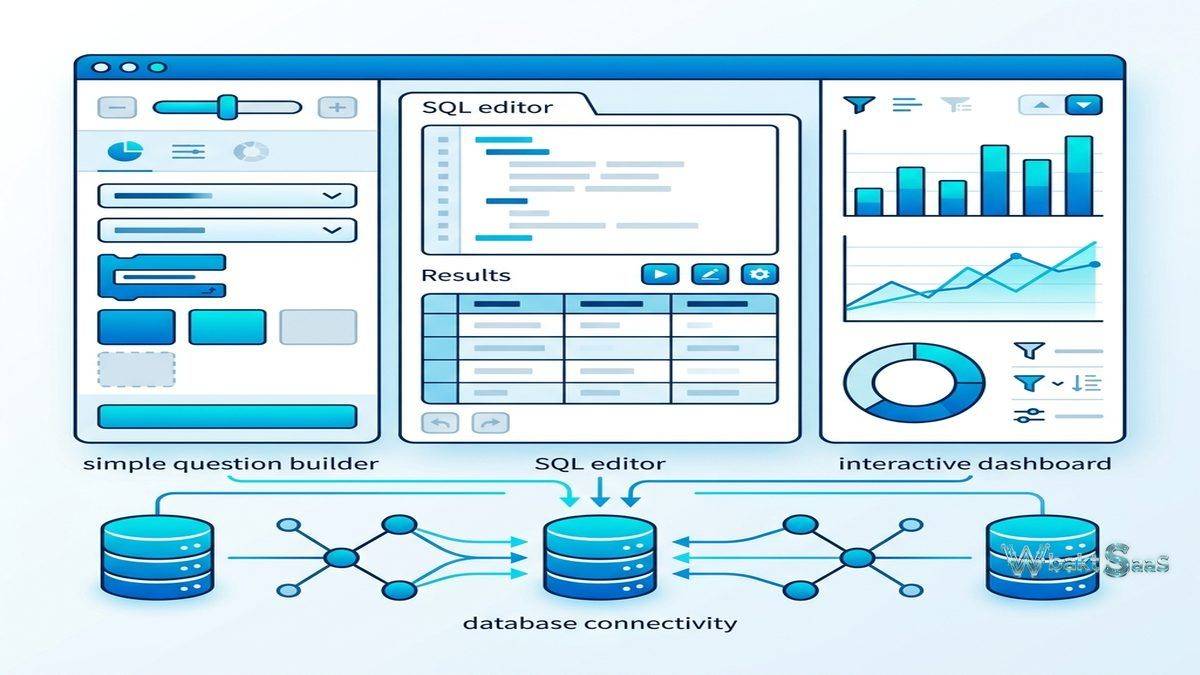
Metabase’s question builder provides a visual, guided interface for creating data queries without any SQL knowledge. Users select a database table, choose columns to display, apply filters, select aggregation functions (count, sum, average, min, max, distinct count), and add grouping dimensions through a step-by-step visual interface. The question builder translates visual selections into database queries, executing them and displaying results as tables or visualizations. Filter widgets support flexible date ranges, numeric comparisons, text matching, and categorical selection with intelligent suggestions based on data content. Drill-down capabilities enable clicking on data points to explore underlying details, providing progressive data exploration from summary to granular detail without creating separate queries.

SQL Query Mode
For technical users, Metabase provides a fully featured native SQL editor with syntax highlighting, autocomplete suggestions, and variable parameters that create interactive, parameterized queries. SQL queries can include filter variables that render as interactive widgets when the query is saved, enabling non-technical users to interact with parameterized SQL queries without understanding the underlying SQL. Template tags create dropdown filters, date pickers, and text inputs that modify query parameters dynamically. SQL snippets enable sharing commonly used query fragments across the organization for consistency and efficiency. The thoughtful dual-mode approach — visual question builder for accessibility and SQL editor for power users — serves both audiences within a single platform, eliminating the need for separate tools for different skill levels.
Dashboards
Metabase dashboards combine multiple questions (visualizations) into interactive analytical displays with shared filter controls. Dashboard filters connect to individual question parameters automatically, enabling coordinated filtering across all dashboard visualizations. Text cards, heading cards, and link cards provide contextual information and navigation within dashboards. Auto-refresh enables real-time dashboard updates at configurable intervals for operational monitoring. Configurable click behavior defines what happens when users click dashboard elements — filtering other cards, linking to other dashboards, or opening external URLs. Dashboard subscriptions automatically deliver dashboard snapshots via email and Slack on scheduled intervals, distributing analytical insights to users who may not regularly access the platform.
Data Model Management
Metabase’s data model management enables administrators to curate the database schema presentation that business users see in the question builder. Column descriptions provide business-friendly labels and useful documentation and documentation for database fields. Column visibility controls hide technical or irrelevant columns from the question builder while keeping them accessible via SQL. Custom column types define how columns are interpreted — as categories, locations, URLs, foreign keys, or other semantic types — enabling Metabase to provide appropriate filter widgets and visualization options. Table relationships explicitly define joins between tables, enabling the question builder to automatically navigate related tables for multi-table queries without requiring users to understand database join syntax.
Visualization Types
Metabase provides a comprehensive set of standard visualization types including bar charts, line charts, area charts, scatter plots, pie charts, funnel charts, maps, tables, pivot tables, gauges, progress bars, and number displays. Visualization settings control formatting, color palettes, axis configuration, legend positioning, and data labels. Smart formatting automatically selects appropriate visualization types based on query results. Map visualizations support geographic data through point maps (latitude/longitude coordinates), region maps (country, state, postal code boundaries), and custom map regions. For most analytical requirements, Metabase’s visualization library provides adequate chart variety, though specialized visualization needs may require custom visualization plugins or alternative platforms.
Collections and Permissions
Collections organize questions, dashboards, and models into hierarchical folder structures with granular permission controls. Permission levels — view, curate, and no access — apply at the collection level and inherit through the hierarchy. Data access permissions control which databases, schemas, and tables each user group can query, operating independently from content permissions that control dashboard and question access. Sandboxed access (Pro/Enterprise) provides row-level security that restricts data visibility based on user attributes — enabling a single dashboard to show different data subsets to different users based on their role, department, or other identity attributes.
Models
Metabase models are curated, reusable data definitions that simplify the question builder experience for business users. Models present a cleaned, curated, business-focused view of data — with renamed columns, hidden technical fields, documented descriptions, and pre-configured relationships — that business users interact with instead of raw database tables. Models function as virtual tables in the question builder, providing an abstraction layer between complex database schemas and business user interfaces. For organizations where database schemas are optimized for application performance rather than analytical usability, models bridge the gap by presenting analytically-oriented data views without modifying the underlying database structure.
Embedding
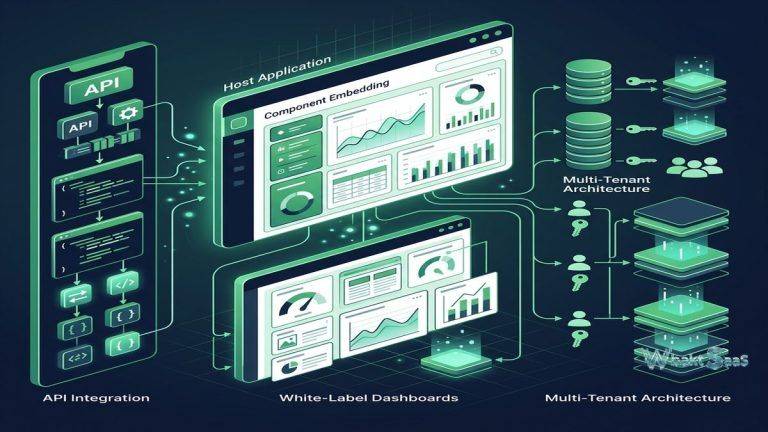
Metabase supports embedding dashboards and questions in external applications through signed embedding and full application embedding. Signed embedding provides secure, tamper-proof embedded content with locked-down filtering for static integration scenarios. Interactive embedding (Pro/Enterprise) provides full Metabase analytical experience within external applications, including the question builder, drill-down, and dashboard interactivity. JWT and API-based authentication integrate embedded analytics with host application identity management. For SaaS companies and internal application developers wanting to add analytics capabilities to their products, Metabase embedding provides a practical path to data-driven features without building analytics infrastructure from scratch.
Alerts and Notifications
Metabase alerts notify users when query results match specified conditions — when values exceed thresholds, when data appears in previously empty result sets, or when scheduled queries return results meeting defined criteria. Alert notifications deliver through email and Slack integration. Goal-line alerts on dashboards trigger when metric values cross defined targets. For operational monitoring where proactive notification is more valuable than periodic manual dashboard review, alerts provide automated surveillance that ensures critical data changes receive prompt attention from responsible stakeholders.
API and Automation
Metabase provides a REST API that exposes platform functionality for programmatic access — creating questions, managing dashboards, executing queries, administering users, and managing content. API-driven automation enables integrating Metabase into organizational workflows, development pipelines, and operational processes. Bulk content management through the API supports administrative tasks that would be tedious through the web interface. For organizations treating analytics as infrastructure rather than a standalone tool, API accessibility enables integrating Metabase capabilities into broader data operations and application ecosystems.
Deployment Options
Metabase offers multiple deployment paths. Self-hosted open-source deployment runs on Java-compatible infrastructure (JAR file, Docker container, or cloud marketplace images). Metabase Cloud provides fully managed hosting that eliminates server administration, security patching, and upgrade management. The open-source edition provides core analytical functionality for free. Self-hosted Pro and Enterprise editions add advanced features with commercial licensing. Docker deployment simplifies installation and updates through containerized packaging. Kubernetes deployment supports scalable, orchestrated production environments for larger installations.
Caching and Performance
Metabase provides query result caching that stores query results for configurable time periods, reducing database load for frequently accessed dashboards and questions. Cache invalidation policies define when cached results expire based on time duration, ensuring that analytics reflect reasonably current data while protecting database performance. For dashboards accessed by many concurrent users, caching serves pre-computed results instead of executing duplicate database queries for each viewer. Query performance analysis identifies slow-performing questions that may benefit from database indexing, query optimization, or model restructuring. For organizations where database performance is a concern, caching provides a practical buffer between analytical demand and database capacity.
Audit Trail
Metabase Pro and Enterprise editions provide audit logging that records user activities across the platform including logins, content access, query execution, permission changes, and administrative actions. Audit dashboards visualize platform usage patterns, identifying most active users, most viewed content, query performance trends, and data access patterns. For organizations with compliance requirements that mandate activity tracking and access documentation, audit capabilities provide the visibility and record-keeping needed for regulatory adherence and security monitoring across the analytics platform.
Mobile Access
Metabase provides responsive web design that enables accessing dashboards and questions from mobile browsers on smartphones and tablets. Mobile-responsive layouts automatically adapt dashboard designs for smaller screen sizes while maintaining interactive capabilities including filtering and drill-down. Push notifications through dashboard subscriptions ensure that critical metrics reach mobile users through email and Slack channels. For decision-makers who need analytics access while traveling or working remotely, mobile-responsive design ensures platform accessibility across devices without requiring dedicated mobile applications.
Actions
Metabase Actions (Pro/Enterprise) enable users to write data back to databases directly from dashboards — creating records, updating values, and executing stored procedures through button clicks and form submissions within the analytical interface. Actions transform Metabase from a read-only reporting tool into an interactive data management platform where users can both analyze data and take action on findings within the same interface. Custom actions using SQL enable flexible write-back scenarios tailored to specific business processes, while model actions provide guided forms for structured data entry with validation and error handling.
Community and Ecosystem
Metabase’s open-source community provides forums, documentation, GitHub discussions, and community contributions that support platform adoption and knowledge sharing. Community-contributed drivers extend database connectivity to additional data sources. Visualization plugins enable adding custom chart types beyond the built-in visualization library. The open-source model encourages transparency — users can review the codebase, report issues, and contribute improvements. For organizations that value community-driven development, code transparency, and community support resources alongside commercial support options, Metabase’s open-source ecosystem provides a broad support foundation.
Common Use Cases
Startups: Early-stage companies use Metabase for their first business intelligence platform, connecting directly to production or replica databases for immediate analytics without data warehouse infrastructure, enabling data-driven decision making from the earliest growth stages without significant BI investment.
Small and Medium Business: SMBs use Metabase’s open-source edition for affordable, self-hosted analytics that provides meaningful and comprehensive business intelligence capabilities without the enterprise pricing that larger BI platforms demand for equivalent functionality and user access.
Product Teams: Product managers and engineers use Metabase for product analytics — analyzing feature usage, user behavior patterns, funnel conversion rates, and retention metrics — with the SQL editor enabling complex analytical queries alongside the visual builder for routine monitoring dashboards.
Customer Success: Customer success teams create client health dashboards, usage monitoring, account performance tracking, and churn risk indicators using Metabase’s question builder without requiring dedicated data analyst support for routine analytical needs.
Engineering Teams: Development teams use Metabase for operational monitoring, database health visualization, error tracking analysis, API performance metrics, and deployment impact assessment through direct database connections and SQL queries.
SaaS Analytics: SaaS companies embed Metabase analytics into their products using the embedding API, providing customers with self-service analytics capabilities over their own data within the application experience without building analytics infrastructure from scratch.
Non-Profit Organizations: Non-profits use the free open-source edition for program impact measurement, donor analytics, grant reporting, and operational dashboards that provide data-driven insights without consuming limited organizational budgets for software licensing.
Pricing
Metabase Open Source is free and self-hosted. Metabase Cloud provides managed hosting at per-user monthly pricing. Metabase Pro provides additional features including advanced permissions, sandboxing, and serialization for self-hosted or cloud deployment. Metabase Enterprise provides SSO, audit logging, and advanced administrative controls. All paid plans include support and regular updates.
Pricing and features are subject to change. Please verify current pricing on the official Metabase website before making purchasing decisions.
Limitations
- Advanced analytics: Metabase does not provide the statistical analysis, forecasting, or machine learning capabilities that more advanced analytical platforms include for predictive and prescriptive analytics.
- Visualization customization: Chart customization options are more limited than Tableau’s extensive visual formatting controls, potentially constraining highly customized visualization requirements.
- Data preparation: Metabase does not include data transformation or ETL capabilities, requiring external tools for data preparation beyond basic model definitions.
- Enterprise features: Advanced capabilities like SAML SSO, audit logging, and row-level security require paid editions, potentially limiting governance capabilities for budget-constrained organizations using the free edition.
- Scale limitations: Very large-scale deployments with thousands of concurrent users may require careful performance optimization and potentially dedicated infrastructure beyond simple deployment.
Summary
Metabase provides an exceptionally accessibility-focused business intelligence platform that makes data exploration and visualization practical for organizations and users who find traditional BI platforms too complex, too expensive, or too dependent on specialized analytical skills. The question builder enables genuine self-service analytics for non-technical users, while the SQL editor provides full database query capability for technical users — serving both audiences effectively within a single platform that can grow from simple departmental reporting to organization-wide analytics.
The open-source model provides a free, fully functional analytical platform that organizations can evaluate, deploy, and operate without licensing cost — making meaningful business intelligence accessible to startups, small businesses, and budget-constrained teams. The commercial editions and cloud hosting options provide an upgrade path for organizations needing advanced governance, managed infrastructure, and enterprise features.
Business intelligence platforms including Metabase, Tableau, Power BI, Looker, and Redash each serve different analytics philosophies, complexity levels, and pricing structures. Metabase’s advantages center on simplicity, accessibility, open-source availability, deployment ease, direct database connectivity, and the practical approach that prioritizes getting analytics into users’ hands quickly over providing every possible analytical feature. Organizations evaluating BI platforms should consider their team’s technical capabilities, data infrastructure maturity, and the importance of ease-of-use versus analytical depth when selecting analytics tools.
Features, pricing, and availability discussed in this review reflect information available at the time of writing. Open-source projects evolve continuously, and details may have changed since publication. Please verify current information directly on the official Metabase website. WBAKT SaaS is an independent review platform with no affiliate relationships with any software company mentioned in this article.
For related analytics tools, see our reviews of Tableau, Power BI, and Looker.
About the Author