Spreadsheets are the most versatile business tools ever created. They track budgets, manage inventories, organize contacts, plan projects, analyze data, and handle thousands of other use cases that their creators never anticipated. But spreadsheets have fundamental limitations: they lack relational data connections, their flat structure creates redundancy, collaboration features are bolted on rather than built in, and they become unwieldy as data grows beyond a few hundred rows. Airtable occupies the space between spreadsheets and traditional databases, offering the familiarity of a spreadsheet interface with the structural power of a relational database — accessible to users who would never write SQL queries or configure database schemas.
Since its founding in 2012, Airtable has attracted a diverse user base spanning marketing teams tracking campaign assets, product teams managing feature backlogs, event planners coordinating logistics, HR departments managing hiring pipelines, and operations teams tracking inventory. This versatility stems from Airtable’s fundamental design principle: provide the building blocks for structured data management and let users assemble them into solutions that match their specific workflows, without requiring database expertise or programming knowledge.
Core Concepts
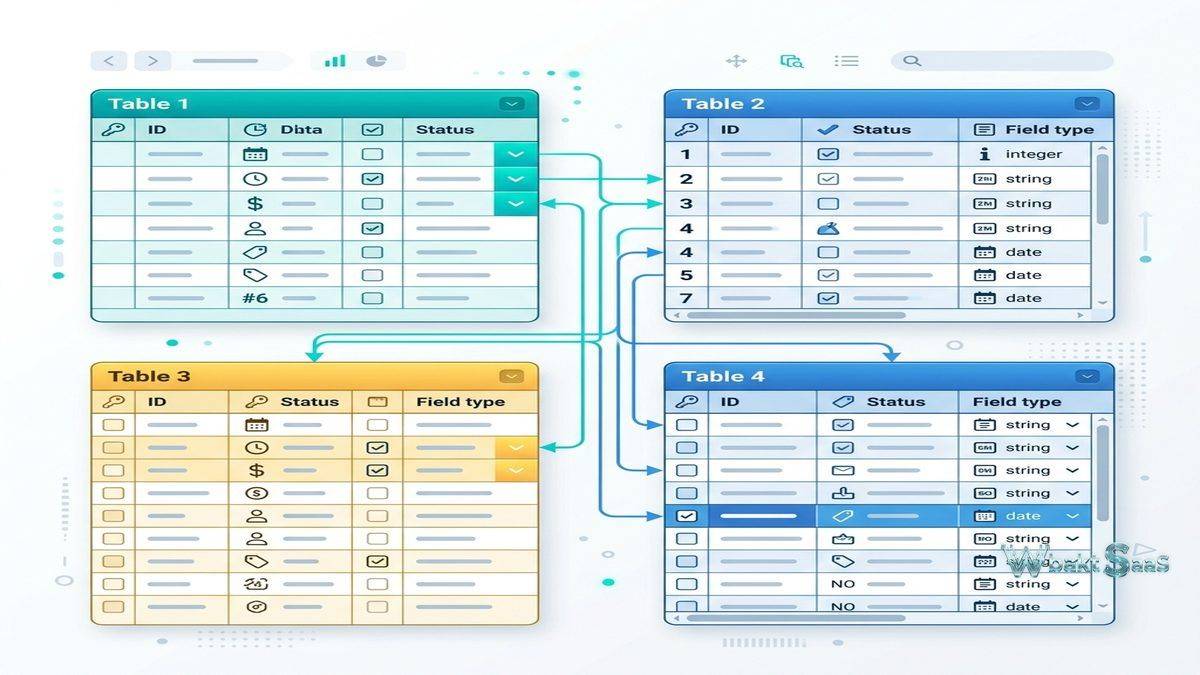
Airtable organizes data through Workspaces, Bases, Tables, Fields, and Records. A Workspace contains related Bases (databases). Each Base contains one or more Tables, which function similarly to spreadsheet tabs or database tables. Tables contain Records (rows) with data stored in Fields (columns). This terminology maps naturally to both spreadsheet and database concepts, making the transition from either paradigm relatively intuitive.
The critical difference between Airtable and spreadsheets is the concept of field types. While spreadsheet cells accept any data type — you can put text in a “number” column or a date in a “name” column — Airtable enforces data types per field. A “Date” field only accepts date values, a “Single Select” field only allows choices from a predefined dropdown, an “Attachment” field only accepts files, and a “Number” field only accepts numeric input. This type enforcement prevents the data integrity problems that plague large spreadsheets, where inconsistent data entry makes analysis unreliable.
Airtable offers over 25 field types covering common data needs: text, long text, number, currency, percent, date, email, phone, URL, checkbox, single select, multiple select, attachment, linked record, lookup, rollup, count, formula, barcode, rating, duration, auto-number, created time, last modified time, created by, and last modified by. The diversity of field types enables precise data modeling that captures the full complexity of real-world information.
Linked Records and Relational Data
The linked record field type is Airtable’s most powerful differentiator from spreadsheets. Linked records create relationships between tables, connecting data across different contexts without duplicating information. A “Projects” table can link to a “Clients” table, establishing that each project belongs to a specific client. A “Tasks” table can link to both “Projects” and “Team Members” tables, creating a three-way relationship where each task belongs to a project and is assigned to a team member.
Lookup fields pull data from linked records into the current table. If the “Clients” table contains an “Industry” field, a lookup in the “Projects” table can display each project’s client industry without manually entering that information. When the client’s industry classification changes, the lookup automatically reflects the update in every linked project. This eliminates the redundant data entry and consistency problems that plague spreadsheet-based relationship tracking.
Rollup fields perform calculations across linked records — summing, averaging, counting, or finding minimum and maximum values from related records. A project might roll up total hours logged from linked task records, or a client record might roll up total revenue from linked project records. These aggregate calculations update automatically as underlying data changes, providing real-time summary metrics without manual formula maintenance.
Views
Airtable provides multiple view types that display the same underlying data from different perspectives:
Grid View: The default spreadsheet-like interface with rows and columns. Filtering, sorting, grouping, and field visibility settings customize which data appears and how it is organized. Multiple grid views of the same table can present different perspectives — an “Active Projects” view might filter for non-completed projects, while an “Overdue Tasks” view shows items past their deadline.
Kanban View: Cards arranged in columns based on a select or status field, providing visual workflow tracking. Cards move between columns as their status changes, making Kanban view effective for pipeline management across sales, content production, hiring, and any process with defined stages.
Calendar View: Records with date fields displayed on a calendar grid, useful for deadline tracking, event planning, and schedule management. Records can be dragged between dates to reschedule, and filter settings control which records appear on the calendar.
Gallery View: Records displayed as visual cards emphasizing attachment fields, making Gallery view ideal for asset management, portfolio presentation, and any use case where visual content is primary — product catalogs, design libraries, or real estate listings.
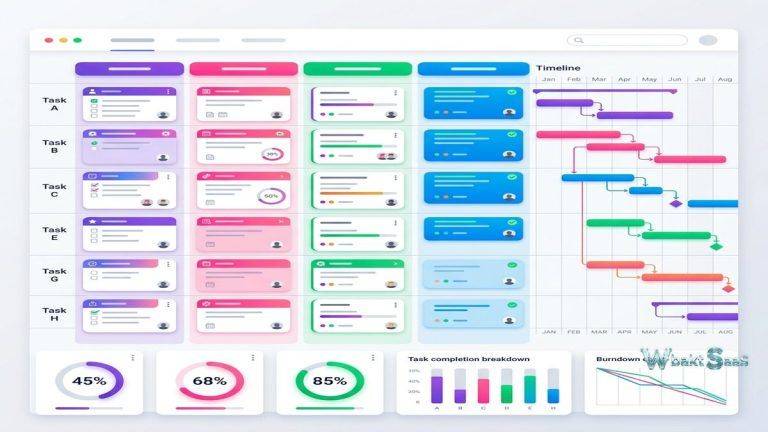
Timeline View: Records plotted along a horizontal time axis with duration bars, similar to Gantt charts. Timeline view supports dependency visualization, resource allocation planning, and project scheduling scenarios that require temporal perspective.
Form View: Generates a shareable form that creates new records in the table when submitted. Form views serve as intake mechanisms — bug report forms, project request forms, event registration forms — that populate Airtable tables directly from respondent submissions without granting table access.

Automations
Airtable Automations execute actions automatically when specified conditions are met. Triggers include record creation, record updates, field value changes, scheduled times, and form submissions. Actions include creating records, updating records, sending emails, sending Slack messages, posting to webhooks, running scripts, and calling external APIs.
Common automation patterns include: sending notification emails when new records are created, updating status fields when deadlines pass, creating linked records in related tables when specific conditions are met, posting to Slack channels when high-priority records are created, and generating summary reports on scheduled intervals. Automation run quotas are tier-dependent, with higher-tier plans providing more monthly automation runs.
For complex automation needs beyond the built-in triggers and actions, Airtable supports scripting through JavaScript-based extensions that can process data, make calculations, and interact with external APIs. This scripting capability bridges the gap between no-code automations and full custom development, serving teams with technical members who can write scripts alongside non-technical users who manage data through the visual interface.
Interfaces
Airtable Interfaces provide a way to build custom dashboards and applications on top of base data without requiring programming. Interface designer allows users to create views with charts, filtered record lists, forms, summary statistics, and interactive elements arranged on custom layouts. These interfaces serve as presentation layers that simplify complex bases for specific audiences — a manager might see a dashboard summarizing project metrics, while individual contributors see a filtered task list showing only their assignments.
Interfaces transform Airtable from a data management tool into a lightweight application platform. A marketing team might build an interface that combines a content calendar view, a campaign performance dashboard, and an asset approval form — all powered by the same underlying Airtable base. The interface presents a polished, focused experience that hides the complexity of the underlying data structure from end users who only need to interact with specific aspects of the data.
Integrations and Extensions
Airtable connects with external applications through native integrations, the Airtable Marketplace extensions, and third-party automation platforms. Native integrations include Slack, Google Workspace, Microsoft Outlook, Salesforce, Jira, and other business tools. Extensions add functionality directly within Airtable bases — chart builders, pivot table analyzers, page designers for printable reports, map visualizations, and data import/export tools.
The Airtable API provides full programmatic access with RESTful endpoints for all CRUD operations. Developers use the API to build custom integrations, synchronize data between Airtable and other systems, and create automated data pipelines. The combination of API access, webhooks, and scripting extensions makes Airtable extensible for organizations with technical capabilities, while the no-code interface serves non-technical users independently.
Common Use Cases
Content Operations: Marketing and editorial teams use Airtable to manage content calendars, asset libraries, editorial workflows, and campaign tracking. A content base might include tables for Blog Posts (with fields for title, author, status, publish date, SEO keywords, and attached draft documents), Authors (linked to Blog Posts), and Categories (linked to Blog Posts). Kanban views show content moving through Draft → Review → Approved → Published stages, while calendar views display the publishing schedule across weeks and months.
Product Development: Product teams track feature requests, bug reports, sprint backlogs, and release planning in interconnected tables. User feedback links to feature requests, which link to development tasks, which link to releases. This relational structure allows product managers to trace how customer feedback influenced feature prioritization and ultimately reached production — a complete feedback loop captured in a single base.
CRM and Sales Tracking: Small to mid-sized sales teams build lightweight CRM systems in Airtable, tracking contacts, companies, deals, and activities in linked tables. While not as feature-rich as dedicated CRM platforms, Airtable-based CRM solutions offer complete customizability — teams define their own pipeline stages, deal properties, and activity types without the constraints of pre-built CRM schemas.
Event Management: Event planners coordinate speakers, venues, sponsors, attendees, schedules, and logistics across linked tables. Timeline views manage the event preparation schedule, gallery views showcase speaker profiles, and form views handle attendee registration. The interconnected structure ensures that changing a speaker’s time slot automatically reflects across all dependent views and schedules.
Inventory Management: Operations teams track products, suppliers, orders, and stock levels with linked records connecting each item to its supplier and order history. Automations trigger reorder notifications when stock drops below defined thresholds. While not suitable for enterprise-scale warehouse management, Airtable handles inventory tracking for small businesses, creative studios, and departmental supply management effectively.
Collaboration Features
Airtable supports real-time multi-user editing with cursor presence awareness. Multiple team members can work within the same base simultaneously, with changes appearing in real-time across all connected sessions. Commenting on individual records enables contextual discussions — a marketing manager can leave feedback on a specific campaign record, tagging relevant team members who receive notifications with direct links to the comment. Mobile applications for iOS and Android provide full base access, record editing, and view navigation on smartphones and tablets, enabling field workers, traveling team members, and on-the-go managers to interact with team data from anywhere.
Workspace-level permissions control access to entire bases, while base-level permissions manage table and view access within individual bases. Creator, editor, commenter, and read-only permission levels provide granular access control. Personal views allow individual users to create filtered and sorted views that only they see, while collaborative views are shared across the team. This permission granularity prevents accidental data modifications while maintaining broad visibility for stakeholders who need to monitor progress without editing.
Sync and Data Management
Airtable Sync enables real-time or scheduled synchronization between tables in different bases. This capability allows organizations to maintain a source-of-truth base while selectively sharing subsets of data with other teams through synced tables. A central product base might sync specific fields to a marketing base and different fields to a sales base, ensuring each team sees relevant information without accessing the full product dataset.
Data import supports CSV, Excel, and Google Sheets file imports with field type mapping, enabling migration from existing spreadsheet-based workflows. Export options include CSV, JSON, and direct API access for data extraction. Backup capabilities through snapshots allow point-in-time recovery, though organizations with strict data backup requirements should implement additional backup procedures.
Security and Compliance
Enterprise security features include SAML-based single sign-on, two-factor authentication, domain verification, and IP allowlisting. Audit logging tracks user activities across bases for security monitoring and compliance purposes. Data encryption covers content in transit and at rest. SOC 2 Type II certification provides assurance about the platform’s security controls for organizations with vendor security requirements.
Administrative controls at the enterprise level include user provisioning and deprovisioning through SCIM, group-based access management, and organization-wide policy enforcement. These enterprise features serve the security and governance needs of larger organizations while maintaining the accessibility and ease of use that defines Airtable’s core value proposition.
Pricing
Airtable’s free tier provides basic functionality with limits on records per base, storage, and automation runs. Paid plans progressively increase these limits and unlock advanced features including timeline views, Gantt charts, advanced interfaces, increased automation capacity, sync capabilities, and administrative controls. Business and Enterprise plans add SAML SSO, advanced permissions, audit logging, and dedicated support.
Pricing and features are subject to change. Please verify current plan details on the official Airtable website before making purchasing decisions.
Limitations
- Record and storage limits: Per-base record limits on lower tiers constrain teams managing large datasets. Organizations with tens of thousands of records may need higher-tier plans or architectural workarounds.
- Performance with large bases: Bases approaching record limits or containing many linked tables with complex rollup calculations can experience slower load times and formula processing.
- Not a full database: Despite database-like features, Airtable lacks advanced database capabilities including complex queries, stored procedures, transaction management, and the scalability of enterprise database systems.
- Automation quotas: Monthly automation run limits on each tier can restrict teams with high-volume automated workflows.
- Learning curve for relational concepts: Users accustomed to flat spreadsheets may struggle initially with linked records, lookups, and rollups — concepts that require understanding relational data principles.
Summary
Airtable successfully bridges the gap between spreadsheets and databases, providing structured data management with relational capabilities in an interface that non-technical users can navigate confidently. For teams that have outgrown spreadsheets but do not need (or cannot justify) traditional database solutions, Airtable provides a practical middle ground that combines data integrity with accessibility. The addition of automations, interfaces, and scripting capabilities has expanded Airtable beyond pure data management into a lightweight application development platform.
The platform’s versatility is both a strength and a potential challenge. Because Airtable can be configured to serve almost any structured data need, organizations sometimes deploy it for use cases that would be better served by dedicated tools — project management, CRM, or inventory systems — that provide deeper domain-specific functionality. The key evaluation question is whether the flexibility of building a custom solution in Airtable outweighs the depth and refinement of purpose-built alternatives for any specific use case.
Platforms such as Airtable, Notion databases, Smartsheet, Monday.com, and Google Sheets each approach structured data management from different angles. Airtable’s distinction lies in its relational database foundation, diverse field types, and the flexibility to serve as both a data management tool and a lightweight application platform through its interface builder. Teams should evaluate their data complexity, volume requirements, and technical capabilities when determining whether Airtable’s approach matches their needs.
Features, pricing, and availability discussed in this review reflect information available at the time of writing. Software products evolve continuously, and details may have changed since publication. Please verify current information directly on the official Airtable website. WBAKT SaaS is an independent review platform with no affiliate relationships with any software company mentioned in this article.
For related data and productivity tools, see our reviews of Smartsheet work coordination, Notion vs Coda workspace platforms, and Monday.com workflow automation.
About the Author