Small and medium-sized businesses searching for CRM solutions frequently encounter a difficult choice between affordable but limited tools that handle only basic contact management and expensive enterprise platforms that provide comprehensive functionality but exceed both budget constraints and complexity tolerance. The gap between simple contact databases and full-featured enterprise CRM creates a market segment where businesses need sales automation, marketing automation, and customer service capabilities in a single platform at a price point that reflects small business economics rather than enterprise licensing models. Agile CRM positions itself directly in this gap, providing an all-in-one platform that combines sales CRM, marketing automation, and help desk functionality at pricing designed for small businesses — including a free tier for up to ten users that enables organizations to evaluate and adopt the platform without initial financial commitment.
Founded in 2013, Agile CRM has grown to serve thousands of businesses worldwide, emphasizing the deep integration of sales, marketing, and service functions within a single platform that eliminates the need for separate tools and the integration complexity that separate tools create. The platform’s all-in-one approach is particularly appealing to growing businesses that need to graduate from spreadsheets and basic contact managers to professional CRM without the significant implementation complexity and cost that enterprise platforms demand. Understanding Agile CRM’s capabilities helps small and mid-sized businesses evaluate whether this affordable all-in-one approach delivers sufficient functionality across sales, marketing, and service to support their growth requirements without the tool sprawl and integration overhead that multi-platform approaches generate.
Contact Management
Agile CRM’s contact management provides comprehensive contact and company records with demographic information, communication history, social media profiles, tags, custom fields, lead scoring, and interaction timelines. Contact records automatically and continuously aggregate data from email interactions, website visits, social media engagement, and support tickets, creating unified and comprehensive customer profiles that provide complete context for every interaction. Company records link to associated contacts and display organizational-level metrics including total deal value, interaction count, and support history. Contact import supports CSV files, vCard files, and direct import from Gmail, Office 365, and other email platforms.
Smart views create filtered contact lists based on any combination of fields, tags, scores, activities, and custom criteria, enabling targeted outreach and analysis for specific contact segments. Contact timeline displays every interaction chronologically — emails, calls, meetings, web visits, social interactions, and support tickets — providing comprehensive relationship context for any conversation regardless of the channel or department that originated the interaction.
Deal Tracking and Sales Pipeline
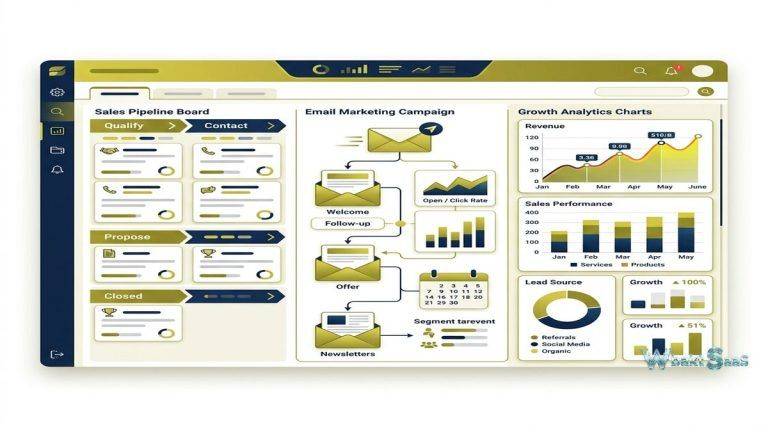
Visual pipeline management displays deals in customizable kanban-style boards with drag-and-drop stage progression. Multiple pipelines support different sales processes for different products, services, or business segments. Deal records store value, expected close date, probability, associated contacts and companies, activity history, notes, files, and custom fields. Pipeline analytics show conversion rates between stages, average deal value, deal velocity, win/loss analysis, and revenue forecasting through dashboard widgets. Deal milestones define specific actions or criteria that should be completed at each pipeline stage, providing guided selling that ensures consistent process execution.

Sales Automation
Sales automation creates trigger-based workflows that automate routine sales tasks — creating follow-up tasks when deals reach specific stages, sending notification emails when new leads are assigned, advancing deals through stages when milestone criteria are met, and routing leads based on configurable rules. Appointment scheduling enables prospects to book meetings directly from the representative’s calendar, eliminating scheduling friction. Call scripts provide structured guided conversation frameworks for sales calls, ensuring consistent messaging and qualification criteria across the team.
Marketing Automation
Agile CRM’s marketing automation engine uses a visual workflow builder to create multi-step campaigns that respond to contact behaviors and lifecycle stage changes. Campaign triggers include form submissions, email opens, link clicks, website page visits, tag applications, and custom events. Campaign actions include sending emails, sending SMS, applying tags, updating fields, creating tasks, scoring contacts, and transferring to sales pipelines. Conditional branching creates different paths based on contact behavior — different sequences for contacts who engaged versus those who did not, different workflows based on contact attributes or engagement level.
Marketing automation templates provide pre-built campaign workflows for common scenarios — welcome series, lead nurturing, event promotion, cart abandonment, and re-engagement campaigns. These templates accelerate campaign setup while providing proven workflow patterns that can be customized to match the organization’s specific business requirements.
Email Campaigns
Email marketing provides template-based campaign creation with drag-and-drop design, personalization merge fields, A/B testing, and scheduled sending. Newsletter campaigns send broadcast communications to segmented contact lists. Automated emails execute within marketing automation workflows based on triggers and timing. Email analytics track delivery rates, open rates, click rates, bounce rates, unsubscribe rates, and revenue attribution. Email templates library stores reusable designs for consistent brand presentation across campaigns.
Landing Pages and Web Forms
Landing page builder creates conversion-optimized pages with drag-and-drop design, mobile responsiveness, and A/B testing capabilities. Web form builder creates customizable embeddable forms for lead capture that trigger automation workflows upon submission. Pop-up forms and exit-intent forms capture visitor attention at strategic moments. Form submissions automatically create CRM records with appropriate tags and pipeline placement, ensuring immediate follow-up capability for captured leads.
Social Suite
Agile CRM’s social suite integrates with Twitter, Facebook, and LinkedIn to provide social media monitoring and engagement within the CRM context. Social streams display relevant social activity from contacts and keywords. Social profile data enriches contact records with social media information. Social engagement metrics contribute to lead scoring, identifying socially active contacts who demonstrate higher engagement levels. Social listening capabilities help identify mentions, conversations, and opportunities that inform sales and marketing outreach timing and messaging.
Telephony
Built-in telephony integration with Twilio, RingCentral, and other VoIP providers enables making and receiving calls directly from the CRM. Click-to-call from contact records initiates calls instantly. Call recording automatically captures conversations for coaching and reference. Voicemail automation enables leaving pre-recorded messages efficiently. Call logs automatically attach to contact records, maintaining comprehensive communication history. Automated post-call actions create follow-up tasks, update deal stages, or trigger automation workflows based on call outcomes.
Help Desk and Service
Agile CRM includes Help desk functionality with comprehensive ticket management, ticket categorization, priority assignment, SLA tracking, and resolution workflows. Support tickets link directly to CRM contact records, providing support agents with complete customer context — purchase history, deal status, interaction history, and relationship details — when resolving support requests. Canned responses accelerate common ticket resolutions. Knowledge base provides self-service support content that reduces ticket volume for frequently asked questions. Support analytics track ticket volume, resolution time, agent performance, and customer satisfaction metrics.
Lead Scoring
Lead scoring assigns numerical values to contacts based on demographic attributes (company size, industry, job title) and behavioral engagement (email opens, website visits, form submissions, content downloads). Scoring rules are configurable — organizations define which attributes and behaviors contribute to scores and the weight assigned to each factor. Score thresholds trigger automated actions — high-scoring leads can be automatically assigned to sales representatives, enrolled in priority follow-up sequences, or flagged for immediate personal outreach. Lead scoring helps teams focus limited sales capacity on the contacts most likely to convert.
Gamification
Sales gamification features create competitive dynamics within sales teams through leaderboards, achievements, and performance challenges. Leaderboards rank team members by activity metrics — calls made, emails sent, deals closed, revenue generated — creating transparency, visibility, and healthy competition. Custom challenges define specific objectives with timeframes and rewards. Gamification is particularly effective for maintaining selling momentum and activity discipline in small teams where informal management structures may not provide the structured performance accountability that larger organizations maintain through formal management hierarchies.
Integrations
Agile CRM integrates with popular business tools including Google Workspace, Microsoft 365, Stripe, PayPal, Shopify, WordPress, Twilio, Zapier, and many more. Plugin ecosystem provides CRM functionality extensions for specific business needs. Zapier connectivity extends integration to thousands of additional applications. The Agile CRM API provides comprehensive programmatic access for custom integrations and data synchronization with proprietary business systems.
Chrome Extension
Agile CRM’s Chrome extension provides CRM functionality within the browser — displaying contact information when viewing emails in Gmail, enabling one-click contact creation from web pages, and providing quick and convenient access to CRM records without navigating to the main application. The extension integrates with LinkedIn for contact enrichment and prospecting activities, enabling sales teams to research and capture prospects during natural web browsing activities without switching between browser tabs and CRM windows.
Custom Fields and Data Model
Custom fields extend contact, company, and deal records with organization-specific data. Field types include text, number, date, dropdown, checkbox, and formula fields. Custom fields integrate with filters, reports, automation conditions, and lead scoring rules, providing flexible data capture that adapts to each organization’s unique business context and information requirements. Custom data panels organize fields into logical groups for clean visual presentation on record pages.
Reports and Dashboards
Agile CRM provides built-in reporting covering pipeline analysis, sales activity metrics, marketing campaign performance, support ticket analytics, and revenue tracking. Cohort analysis tracks contact groups over time, identifying engagement patterns and conversion trends. Growth reports display contact database growth, lead source distribution, and funnel conversion metrics. Custom report builder enables creating filtered and grouped views for specific analytical questions. Dashboard widgets combine key metrics into role-specific performance displays that update in real time as underlying data changes.
Roles and Permissions
Role-based access control defines data visibility and feature access for different user types. Administrative roles manage platform configuration, user management, and data governance. Sales roles access pipeline management, contact records, and sales automation. Marketing roles access campaign management, landing pages, and email tools. Support roles access help desk tickets and knowledge base. Custom roles enable defining specific permission combinations that align with the organization’s structure and data governance requirements.
Two-Way Email Integration
Bi-directional email integration with Gmail and Office 365 synchronizes email conversations with CRM contact records automatically. Emails sent and received through connected email accounts appear in contact timelines, providing complete communication history without manual forwarding or logging. Email tracking provides real-time notifications when recipients open messages or click links, enabling timely follow-up based on demonstrated engagement. Convenient email scheduling enables composing messages and scheduling delivery for optimal send times.
Mobile Application
Agile CRM’s mobile app provides CRM access on iOS and Android with contact lookup, deal pipeline management, activity logging, calling, and notification capabilities. Mobile dashboard displays key performance metrics. Google Calendar and Outlook integration synchronize appointments across platforms. Push notifications alert users to important events including new lead assignments, deal updates, and support ticket escalations.
Web Analytics
Website visitor tracking identifies known contacts visiting the website and tracks their page-by-page browsing behavior. Visitor activity data — pages viewed, time spent, visit frequency, and content engagement — enriches contact records with behavioral intelligence that informs sales outreach timing and messaging relevance. Real-time visitor alerts immediately notify sales teams when high-value prospects or active pipeline contacts visit the website, enabling timely follow-up based on demonstrated purchase interest. Web analytics integration transforms anonymous website traffic into actionable sales intelligence within the CRM context.
Common Use Cases
Small Business Growth: Growing businesses use Agile CRM’s free tier to establish CRM discipline before scaling to paid tiers as their requirements expand, avoiding the financial risk of committing to expensive platforms before proving CRM value.
SaaS Companies: Software companies use Agile CRM to manage the complete customer lifecycle — marketing lead generation, sales pipeline management, and post-sale customer support — within a single platform.
E-Commerce: Online retailers use Agile CRM’s marketing automation for cart abandonment recovery, post-purchase follow-up, loyalty campaigns, and customer segmentation based on purchase behavior and engagement patterns.
Professional Services: Consulting firms and agencies use Agile CRM to manage client acquisition, project-based pipeline tracking, and ongoing client support with the integrated help desk.
Real Estate: Real estate professionals use Agile CRM for lead nurturing, property pipeline management, automated drip campaigns, and client relationship tracking throughout the property transaction lifecycle.
Education: Education companies use Agile CRM to manage enrollment pipelines, automate applicant nurturing sequences, and provide student support through the integrated help desk.
Pricing
Agile CRM offers Free, Starter, Regular, and Enterprise tiers. The free tier supports up to 10 users and 1,000 contacts with basic CRM, marketing, and service features — providing meaningful functionality without financial commitment. Starter adds marketing automation, social suite, and additional integrations. Regular adds telephony, help desk, and advanced reporting. Enterprise provides custom integrations, SLA-based support, and dedicated account management. Per-user, per-month pricing on paid tiers remains competitive with small business CRM alternatives.
Pricing and features are subject to change. Please verify current plan details on the official Agile CRM website before making purchasing decisions.
Limitations
- User interface: Some users find Agile CRM’s interface less modern and polished than newer CRM platforms like HubSpot or Monday Sales CRM, potentially affecting user adoption and daily experience.
- Enterprise scale: Very large organizations with complex hierarchies, territory management, and advanced forecasting needs may outgrow Agile CRM’s capabilities.
- Email deliverability: Some users report email deliverability challenges that can affect marketing campaign effectiveness compared to dedicated email marketing platforms.
- Customer support: Support response times vary by tier, and free tier users may experience longer wait times for assistance.
- Learning curve: The breadth of features across sales, marketing, and service creates a learning curve for teams new to all-in-one CRM platforms.
Summary
Agile CRM provides a comprehensive all-in-one platform that combines sales CRM, marketing automation, and help desk functionality at pricing designed for small and medium-sized businesses — including a genuinely useful free tier that enables organizations to adopt CRM without financial risk. The integration of sales, marketing, and service within a single platform eliminates the tool sprawl, integration complexity, and data fragmentation that occur when organizations use separate tools for each business function.
The platform’s free tier for up to 10 users distinguishes Agile CRM from competitors that offer limited free versions or no free option. For small teams evaluating CRM for the first time, the ability to use a full-featured platform without subscription costs removes the financial barrier that prevents many small businesses from adopting professional CRM tools.
CRM platforms including Agile CRM, HubSpot, Zoho, Freshsales, and Keap each approach the small business CRM market with different feature combinations, pricing models, and design philosophies. Agile CRM’s advantages center on affordable all-in-one functionality, generous free tier, sales-marketing-service integration, and gamification features that maintain team engagement. Organizations evaluating CRM should consider whether Agile CRM’s comprehensive feature set at competitive pricing meets their growth requirements or whether more specialized or modern platforms better serve their specific workflow needs.
Features, pricing, and availability discussed in this review reflect information available at the time of writing. Software products evolve continuously, and details may have changed since publication. Please verify current information directly on the official Agile CRM website. WBAKT SaaS is an independent review platform with no affiliate relationships with any software company mentioned in this article.
For related CRM tools, see our reviews of HubSpot CRM, Zoho CRM Suite, and Keap CRM.
About the Author