Scheduling a meeting should be simple. In practice, it often involves a frustrating chain of emails: “Are you free Tuesday at 2pm?” “No, how about Wednesday at 10am?” “That doesn’t work either. What about Thursday?” This back-and-forth scheduling dance wastes time, creates friction in business relationships, and delays conversations that could have happened days earlier. Calendly addresses this universal professional pain point by providing a scheduling platform that allows people to share their availability and let others book time directly — eliminating the negotiation entirely.
What began as a simple scheduling link tool has evolved into a comprehensive scheduling platform serving individuals, teams, and organizations across sales, recruiting, customer success, education, and professional services. Calendly now handles not just one-on-one meeting scheduling but also round-robin team scheduling, collective availability coordination, routing forms that direct prospects to the right team members, and automated workflows that execute before and after meetings. Understanding the full scope of Calendly’s capabilities — and where simpler or more specialized alternatives might serve better — helps professionals and organizations evaluate whether Calendly fits their scheduling needs.
How Calendly Works
Calendly’s core function connects a user’s calendar availability with a shareable booking interface. Users connect their Google Calendar, Outlook, iCloud, or Exchange calendar to Calendly, which reads existing appointments to determine available time slots. Users then configure event types — defining meeting durations, buffer times between meetings, availability windows, and booking rules — and share a unique scheduling link that others use to book meetings.
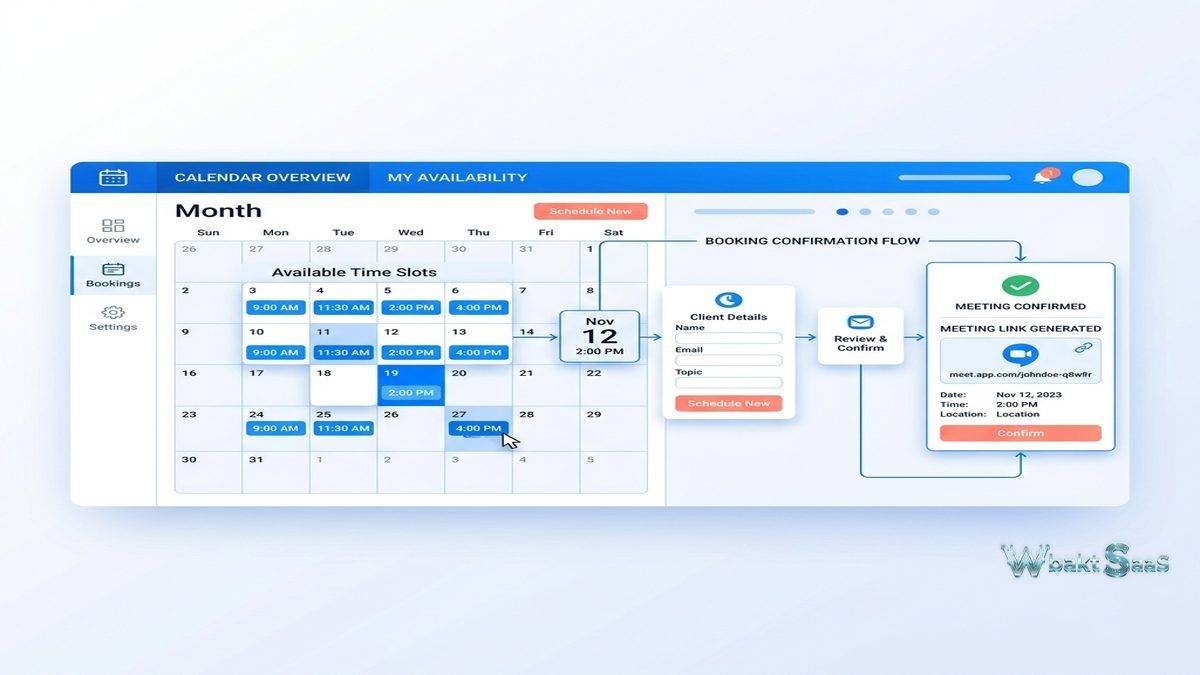
When someone visits a Calendly scheduling link, they see a clean calendar interface showing available time slots based on the host’s real-time availability. The invitee selects a time, provides required information (name, email, and any custom questions), and confirms the booking. Calendly automatically creates a calendar event for both parties, sends confirmation emails, and can generate video conferencing links for virtual meetings. The entire process typically takes less than 30 seconds for the invitee — a dramatic improvement over the multi-email scheduling chain it replaces.
Timezone handling is automatic and transparent. Calendly detects the invitee’s timezone and displays available times in their local timezone, eliminating the confusion and errors that plague cross-timezone scheduling when done manually. This automatic timezone conversion is particularly valuable for professionals who schedule meetings with people across the globe — international sales teams, global consulting firms, and remote organizations with members in multiple time zones.
Event Types
Calendly organizes scheduling around event types — predefined meeting formats with specific configurations. Common event type configurations include:
One-on-One Meetings: Standard meetings between the host and one invitee. Durations, availability windows, and buffer times are configured per event type. A sales professional might have separate event types for “15-Minute Discovery Call,” “30-Minute Demo,” and “60-Minute Strategy Session,” each with different availability windows and pre-meeting questions.
Group Events: Sessions where multiple invitees book the same time slot independently. Useful for webinars, office hours, training sessions, and group coaching where the host meets with multiple attendees simultaneously. Maximum attendee limits prevent overbooking.
Round Robin: Meetings distributed automatically across team members based on availability, priority weighting, or equal distribution. When a prospect books through a round-robin link, Calendly assigns the meeting to the available team member according to the configured distribution rules. Sales and customer success teams use round robin to distribute incoming meeting requests fairly across the team without manual assignment.
Collective Scheduling: Meetings requiring multiple team members to attend simultaneously. Calendly finds time slots where all required participants are available, presenting only times that work for everyone. Useful for panel interviews, committee meetings, and multi-stakeholder consultations where every participant’s attendance is necessary.

Routing Forms
Routing forms add a qualification and direction layer before the scheduling interface. Instead of sharing a direct scheduling link, organizations share a routing form link that asks qualifying questions before presenting scheduling options. Based on the responses, the form directs the invitee to the appropriate event type and team member.
A software company’s routing form might ask the invitee’s company size, use case, and current solution. Based on responses, enterprise prospects route to senior account executives while small business prospects route to a different team. Custom questions, website URLs, or phone call options can serve as routing destinations alongside Calendly event types.
Routing forms serve sales qualification, customer support triage, and intake processes where the type of meeting and the appropriate host depend on the invitee’s situation. Without routing, organizations either share generic scheduling links that create mismatched meetings or maintain multiple links that confuse prospects navigating to the right one.
Workflows and Automations
Calendly workflows automate actions before and after meetings. Pre-meeting actions include confirmation emails with custom content, reminder notifications at configurable intervals, and SMS reminders for mobile-preferred contacts. These automated reminders reduce no-show rates significantly — missing a meeting because you forgot about it becomes less likely when you receive reminders the day before, the morning of, and 15 minutes before the scheduled time.
Post-meeting automations include follow-up emails with next steps, survey links for meeting feedback, and thank-you messages with relevant resources. These automated touchpoints maintain professional communication standards without requiring manual email composition after every meeting. Sales teams use post-meeting workflows to automatically send proposals, case studies, or next-step scheduling links based on the meeting type.
Integration-triggered workflows connect Calendly events with external systems. Meeting bookings can automatically create CRM records in Salesforce or HubSpot, add contacts to email marketing sequences, create tasks in project management tools, or trigger custom webhook actions. These integration workflows reduce the manual data entry that follows meetings and ensure that meeting information flows into the systems where teams manage their ongoing relationships and projects.
Calendar Integration
Calendly connects with Google Calendar, Microsoft Outlook (including Office 365 and Exchange), and iCloud Calendar for availability checking and event creation. Multiple calendar connections allow Calendly to check availability across both personal and professional calendars, preventing double-booking across different calendar systems. A user with separate personal Google Calendar and corporate Outlook accounts can connect both, ensuring that personal appointments block Calendly availability just as work meetings do.
Video conferencing integrations automatically generate meeting links for Zoom, Google Meet, Microsoft Teams, GoTo Meeting, and Webex. When an invitee books a meeting, Calendly creates the video conferencing session and includes the join link in the calendar invitation — no manual meeting creation required. Location intelligence can also assign physical meeting rooms, phone call instructions, or custom locations based on event type configuration.
Analytics and Reporting
Calendly analytics provide visibility into scheduling patterns and meeting metrics. Individual users see booking volume, popular time slots, and event type distribution. Team administrators see per-member booking metrics, round-robin distribution fairness, and overall team scheduling volume. These insights help teams understand demand patterns, optimize availability windows, and identify team members who may be over or under-booked.
Conversion tracking for embedded scheduling links reveals how many website visitors view the scheduling page versus how many complete bookings, helping teams optimize their scheduling page placement, event type descriptions, and form field requirements. Integration with Google Analytics and marketing attribution tools connects scheduling conversions to broader marketing and sales funnel metrics.
Customization and Branding
Calendly’s scheduling pages can be customized to match organizational branding. Custom colors, logos, and profile images create a branded scheduling experience that feels like a natural extension of the organization’s website rather than a third-party tool. Custom domains allow organizations to serve scheduling pages from their own domain (e.g., schedule.company.com), further strengthening brand consistency and building trust with invitees who might be unfamiliar with the Calendly brand.
Custom questions on scheduling forms collect information that the host needs before the meeting. Sales teams might ask about company size and current challenges. Consultants might request a brief description of the project scope. Recruiters might ask for portfolio links or salary expectations. These pre-meeting questions ensure that hosts enter meetings with relevant context, making the meeting time more productive. Question types include text input, multi-line text, radio buttons, checkboxes, dropdown selections, and phone number fields.
Confirmation and reminder emails can be customized with organization-specific messaging, meeting preparation instructions, and relevant resources. A financial advisor’s confirmation email might include a checklist of documents to prepare. A sales team’s confirmation might include a brief introduction to the company and the specific representative the prospect will meet. These customized touchpoints set expectations and ensure productive meeting preparation from both sides.
Cancellation and rescheduling policies can be configured to require minimum notice periods, limit the number of reschedules, or collect cancellation reasons. These policies protect host time while maintaining flexibility for invitees who need to adjust their schedules.
Embedding and Distribution
Calendly scheduling can be embedded directly into websites, email signatures, and landing pages through inline embeds, popup widgets, and popup text links. Website embedding is particularly valuable for service businesses, consultancies, and SaaS companies where website visitors should be able to schedule consultations directly from product or service pages without navigating to an external scheduling site.
The Calendly browser extension and mobile applications provide scheduling link access from any context. The browser extension adds Calendly availability insertion to email compose windows, allowing users to include specific available time slots directly in email messages rather than just the generic scheduling link. Recipients see proposed times and can accept with a single click, combining the convenience of scheduling links with the personal touch of direct time proposals. Mobile applications support scheduling management, availability configuration, and meeting detail review from smartphones, ensuring that professionals can manage their scheduling infrastructure from anywhere.
Team Management
Calendly’s team features extend beyond individual scheduling to organizational scheduling management. Team pages display all team members’ scheduling links in a single directory, allowing invitees to browse and select the most appropriate person to meet with. Managed events allow administrators to create standardized event types that team members cannot modify, ensuring brand consistency and process compliance across the organization.
Admin roles manage team membership, event type templates, integration configurations, and usage policies. User groups organize team members by department, function, or region for targeted event type assignment and reporting. Activity logs track booking events, cancellations, and rescheduling across the team, providing audit trails for compliance-sensitive organizations.
SSO integration through SAML enables enterprise authentication, allowing organizations to manage Calendly access through their existing identity provider. SCIM provisioning automates user account creation and deactivation when employees join or leave the organization, maintaining security without manual account management. These enterprise administration features support the governance and security requirements of larger organizations deploying Calendly across multiple departments.
Common Use Cases
Sales Pipeline Acceleration: Sales teams embed Calendly links in email outreach, website CTAs, and marketing materials. Prospects book discovery calls and demos directly without waiting for a sales representative to respond. Round-robin distribution ensures fair lead assignment, and routing forms qualify prospects before they reach the scheduling interface. CRM integrations automatically create contact records and opportunity updates when meetings are booked.
Recruiting and Hiring: Recruiting teams send Calendly links to candidates for interview scheduling, eliminating the coordinator-intensive back-and-forth that slows hiring processes. Collective scheduling finds times when all interview panel members are available. Post-interview workflows automatically send feedback forms to interviewers and thank-you messages to candidates, maintaining communication standards at scale.
Customer Success: Customer success managers share scheduling links for quarterly business reviews, onboarding sessions, and support escalations. Automated workflows send preparation materials before meetings and follow-up summaries afterward. Meeting analytics reveal engagement patterns — declining meeting frequency with a customer might indicate satisfaction issues that warrant proactive attention.
Professional Services: Consultants, therapists, coaches, financial advisors, and other service providers use Calendly to manage client appointment booking. Buffer times between appointments prevent back-to-back scheduling. Minimum scheduling notice prevents last-minute bookings that disrupt preparation. Payment integration through Stripe or PayPal enables upfront payment collection at booking time, reducing no-shows and streamlining billing.
Education and Office Hours: Professors, tutors, and academic advisors offer bookable office hours through Calendly. Students select from available time slots, reducing the crowding and wait times associated with traditional drop-in office hours. Group events support seminar sessions where multiple students register for the same time slot.
Security and Compliance
Calendly maintains SOC 2 Type II certification and complies with GDPR requirements for organizations operating in the European Union. Data encryption protects information in transit and at rest. Invitee data collection is configurable — organizations control which fields are required versus optional, and privacy-focused configurations can minimize data collection to only what is necessary for scheduling.
Custom data retention policies allow organizations to define how long meeting data is retained after events conclude. GDPR subject access requests and data deletion requests can be processed through administrative tools. For organizations in regulated industries, these compliance capabilities ensure that scheduling operations align with data protection requirements without requiring manual compliance management for each meeting.
Pricing
Calendly’s free tier provides basic one-event-type scheduling with core calendar integration — sufficient for individuals with simple scheduling needs. Paid plans unlock multiple event types, group scheduling, workflows, routing forms, team features, integrations, and analytics. Team and enterprise plans add round-robin scheduling, collective availability, administrative controls, and advanced integration capabilities.
Pricing and features are subject to change. Please verify current plan details on the official Calendly website before making purchasing decisions.
Limitations
- Scheduling-focused scope: Calendly handles scheduling excellently but does not extend into broader meeting management, agenda creation, note-taking, or action item tracking that some meeting management platforms provide.
- Free tier constraints: The single event type limit on the free plan quickly becomes restrictive for users with multiple meeting types.
- Invitee experience: Some invitees may find the scheduling link approach impersonal or unfamiliar, particularly in cultures or industries where direct calendar invitation or phone-based scheduling is the norm.
- Calendar dependency: Calendly’s accuracy depends entirely on the accuracy of connected calendars. Users who do not maintain their calendars consistently may encounter double-booking issues.
- Cost at scale: Per-seat pricing for teams can accumulate quickly as organizations scale scheduling across multiple departments.
Best For
Calendly serves professionals and teams for whom scheduling meetings is a frequent, high-volume activity that consumes meaningful time and attention. Sales teams scheduling discovery calls and demos, recruiters coordinating candidate interviews, consultants booking client sessions, customer success managers scheduling check-ins, educators offering office hours, and service providers accepting client appointments represent the core user profiles that benefit most from Calendly’s scheduling automation.
Scheduling platforms such as Calendly, SavvyCal, Acuity Scheduling, Doodle, and Cal.com each approach the scheduling problem with different feature emphases. Calendly’s combination of ease of use, team scheduling capabilities, routing forms, and integration ecosystem positions it as the most widely adopted option in the professional scheduling category. Organizations should evaluate their scheduling volume, team coordination needs, and integration requirements when selecting a scheduling platform.
Features, pricing, and availability discussed in this review reflect information available at the time of writing. Software products evolve continuously, and details may have changed since publication. Please verify current information directly on the official Calendly website. WBAKT SaaS is an independent review platform with no affiliate relationships with any software company mentioned in this article.
For related productivity tools, see our reviews of Zoom video conferencing, Google Workspace productivity, and Slack team communication.
About the Author