Organizations deeply embedded in Google Workspace face a persistent friction when adopting CRM tools — the constant context switching between Gmail, Google Calendar, Google Drive, and a separate CRM application that stores duplicate contact information and requires manual synchronization to keep records current. This friction creates two undesirable outcomes: either sales teams maintain meticulous CRM records at the expense of productivity lost to data entry and application switching, or they abandon CRM discipline because the overhead of maintaining a separate system outweighs the perceived value. Copper CRM eliminates this friction by building CRM functionality natively into Google Workspace, appearing as a natural extension of Gmail rather than a separate application that competes for attention and requires tedious parallel data management.
Originally launched as ProsperWorks, Copper rebranded to reflect its focus on relationship-centric CRM that captures and organizes customer interactions automatically rather than depending on manual data entry. Copper is the only CRM recommended by Google as a Google Workspace partner, reflecting the exceptional depth of its integration with Google’s productivity suite. The platform serves primarily small and medium-sized businesses, agencies, consulting firms, and professional services organizations where relationship quality and communication history matter more than complex enterprise sales process management. Thoroughly understanding Copper’s capabilities helps Google Workspace organizations evaluate whether this native integration approach delivers sufficient CRM functionality while eliminating the adoption friction that undermines CRM value in many organizations.
Google Workspace Integration
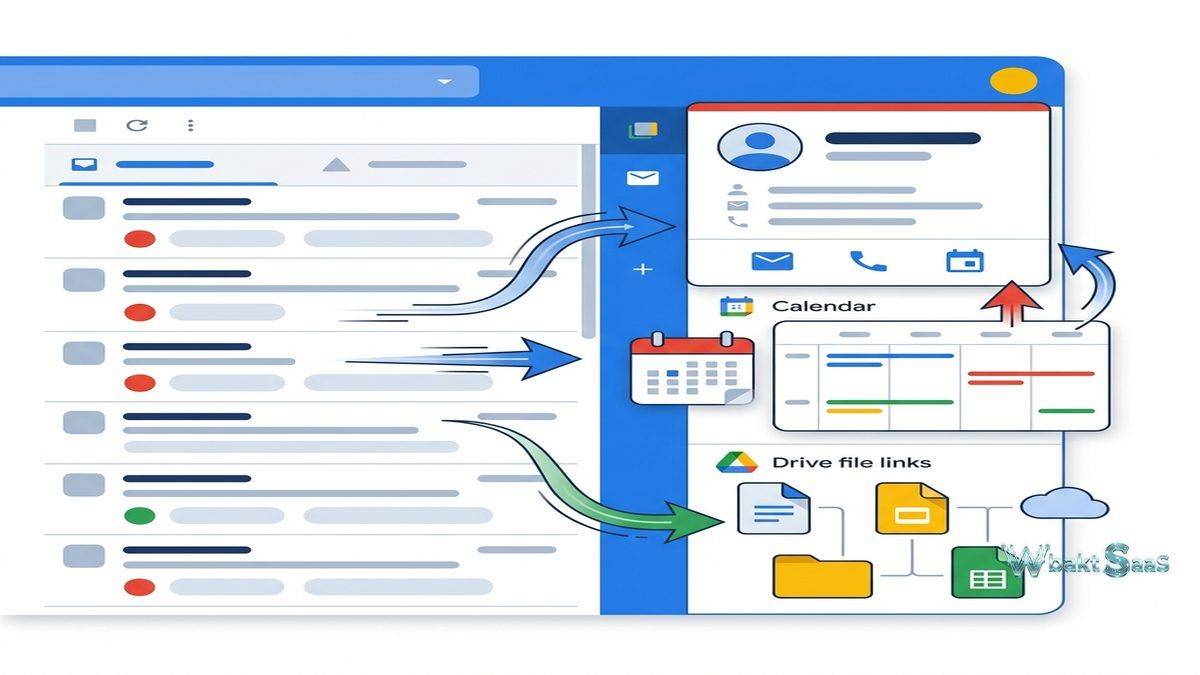
Copper’s integration with Google Workspace is not a surface-level connection through APIs — it is a deeply embedded native experience that makes CRM functionality feel like part of Google Workspace itself. The Gmail sidebar displays complete CRM context when viewing or composing emails — contact details, company information, related deals, activity history, files, and tasks — without leaving the Gmail interface. This valuable contextual display ensures that every email interaction benefits from full CRM awareness without requiring a separate browser tab or application.
Google Calendar integration synchronizes meetings with CRM records, automatically creating activity entries when meetings are scheduled with CRM contacts. Google Drive integration connects files to CRM records — proposals stored in Drive link to the deals they support, contracts link to the accounts they govern, and presentation files connect to the opportunities where they were shared. This file-CRM connection ensures that document context is always available within the customer record.
Google Contacts synchronization maintains consistency between Google Contacts and Copper contact records, eliminating the duplicate contact management that creates data quality issues in CRM implementations. The Chrome extension functionality brings Copper CRM features directly into the browser experience, providing CRM access from any web context without requiring navigation to a separate CRM URL.
Automatic Data Capture
Copper automatically captures and logs emails, meetings, files, and other interactions to the appropriate CRM records without requiring manual entry. When a user sends or receives an email with a known CRM contact, the email is automatically associated with that contact’s record. Calendar events with CRM contacts are automatically logged as activities. This automatic capture addresses the fundamental CRM adoption challenge — the data entry overhead that causes sales teams to stop using their CRM. By eliminating manual logging, Copper ensures that CRM records remain comprehensive and current without requiring behavioral change from users who naturally communicate through Gmail and Google Calendar.

Pipeline Management
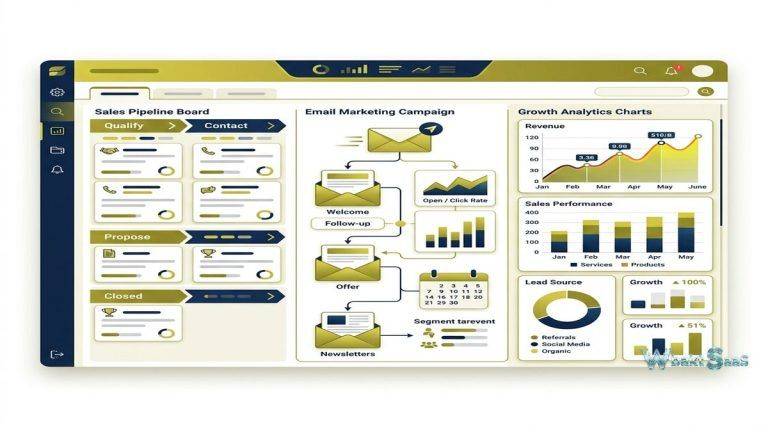
Copper provides visual pipeline management with customizable stages, drag-and-drop deal progression, and pipeline analytics. Multiple pipelines support different processes — sales pipelines, project pipelines, partnership pipelines — each with independent stage configurations. Pipeline metrics include total value, weighted value, conversion rates, stage duration, and win/loss analysis. Deal cards display key information at a glance including value, expected close date, associated contacts, and custom fields.
Pipeline views can be filtered by owner, date range, value range, and custom fields, enabling managers to analyze specific pipeline segments. Stale deal indicators visually highlight deals that have remained in the same stage beyond configurable thresholds, prompting attention to stalled opportunities.
Relationship Tracking
Copper’s relationship-centric design emphasizes the quality and history of customer relationships rather than purely transactional pipeline metrics. Relationship timelines display every interaction chronologically — emails, meetings, calls, notes, file shares, and deal activities — providing complete relationship context for any conversation. Contact relationship mapping visually shows connections between individuals within organizations, helping teams understand organizational structures and identify additional stakeholders in complex sales or service situations.
Workflow Automation
Workflow automation triggers actions based on record events and conditions — creating follow-up tasks when deals move between stages, sending notification emails when new leads are created, updating fields when specific criteria are met, and assigning records based on configurable rules. Task automation creates structured follow-up workflows that ensure consistent process execution across the team. While Copper’s automation is effective for common CRM workflows, organizations with complex multi-step automation requirements may find the automation engine less sophisticated than platforms like HubSpot or Salesforce that offer more advanced automation capabilities.
Project Management
Copper Projects extends the platform beyond pre-sale CRM into post-sale project delivery. When deals close, they can transition into projects with task boards, milestones, and deliverable tracking — maintaining the complete client relationship context from the sales process through project execution. This continuity prevents the information loss that typically occurs when deals transition from sales CRM to separate project management tools, ensuring that delivery teams have full visibility into the promises and expectations established during the sales process.
Reporting and Insights
Copper provides built-in reporting covering pipeline analysis, activity metrics, revenue tracking, lead conversion, and goal progress. Pre-built reports address common analytical needs — pipeline health, sales forecast, activity summary, and leaderboard rankings. Custom reports enable filtered and grouped views of CRM data for specific analytical questions. Dashboard views combine report widgets into role-specific performance displays. Google Sheets integration enables exporting CRM data to Google Sheets for advanced analysis, pivot table creation, and custom reporting beyond Copper’s built-in analytics capabilities.
Email Templates and Sequences
Email templates store reusable email content with merge fields that personalize messages with recipient-specific information. Email sequences automate multi-step outreach workflows — sending scheduled emails at defined intervals with automatic pause when recipients reply. Sequence analytics track open rates, reply rates, and conversion metrics for each template and sequence. These email tools enable systematic outreach within the Gmail environment without requiring external email automation platforms.
Integrations
Beyond the core Google Workspace integration, Copper connects with popular business tools including Slack, Mailchimp, Zendesk, QuickBooks, DocuSign, RingCentral, Zapier, and many more. Zapier integration extends connectivity to thousands of additional applications. The Copper API provides programmatic access for custom integrations. The Copper integration ecosystem is smaller than Salesforce or HubSpot ecosystems but covers the most common and popular business tool categories.
Mobile Application
Copper’s mobile app provides CRM access on iOS and Android with contact lookup, pipeline management, comprehensive activity logging, and full email access. Mobile notifications alert users to important CRM events. The mobile experience maintains the relationship-centric design of the desktop application, providing quick access to contact histories and relationship timelines during field meetings and travel.
Tags and Filtering
Tags provide flexible categorization that supplements structured data fields, enabling organizations to tag contacts, companies, and deals with any classification relevant to their workflow — industry labels, interest areas, campaign sources, or custom categories. Tag-based filtering creates dynamic lists for targeted outreach, reporting, and workflow automation. Combined with custom fields and pipeline stages, tags provide the organizational flexibility that smaller CRM platforms sometimes lack.
Custom Fields and Data Model
Custom fields extend Copper’s data model to capture information specific to the organization’s context. Field types include text, number, currency, date, dropdown, multi-select, URL, and percentage. Custom fields appear on record pages alongside standard fields, and they can be used in filters, reports, and workflow automation conditions. The custom field system enables adapting Copper to industry-specific or process-specific requirements without the complexity of full custom module development that enterprise CRM platforms require.
Web Forms
Copper’s web form builder creates embeddable lead capture forms that feed directly into the CRM. Form submissions automatically create contact and lead records with the submitted information, eliminating the manual import process that creates delays between lead capture and sales follow-up. Form customization includes field selection, validation rules, and thank-you page configuration, enabling organizations to quickly create professional lead capture experiences that maintain brand consistency.
Interaction Logging
Beyond automatic email and calendar capture, Copper enables manual activity logging for interactions that occur outside Google Workspace — phone calls, in-person meetings, LinkedIn messages, conference conversations, and other touchpoints. Activity types are customizable to match the organization’s interaction categories. Notes capture unstructured information — meeting summaries, strategic observations, follow-up commitments — that contextualizes the quantitative activity data with qualitative relationship intelligence. The combination of automatic and manual logging creates comprehensive interaction histories without burdening users with excessive data entry for the interactions that the system can capture automatically.
Security and Administration
Copper provides role-based access control with configurable permissions for different user types. Data visibility settings control which records users can access — their own records, team records, or organization-wide records. Two-factor authentication secures account access. IP-based access restrictions limit CRM access to approved network locations. SOC 2 compliance demonstrates adherence to security and availability standards relevant to organizations handling customer data. Administrative controls enable managing user provisioning, data export policies, and integration permissions.
Activity Goals
Activity goals establish targets for individual users and teams — calls to make, emails to send, meetings to schedule, deals to create — providing quantitative benchmarks for daily and weekly selling activity. Goal progress tracking displays real-time achievement against targets, enabling representatives to self-monitor their activity levels and managers to identify team members who may need support or coaching. Goal-based accountability creates the consistent activity execution discipline that drives pipeline generation and revenue outcomes.
Google Data Studio Integration
Copper’s integration with Google Data Studio (now Looker Studio) enables creating advanced, interactive dashboards and reports that combine CRM data with data from other Google and non-Google sources. This integration extends Copper’s reporting capabilities significantly, providing the visualization depth and cross-source analytics that Copper’s built-in reporting does not offer natively. organizations that need more sophisticated business intelligence and advanced analytical capabilities can leverage this integration rather than adopting separate BI tools.
Common Use Cases
Google Workspace Organizations: Companies fully committed to Google Workspace use Copper for CRM that integrates seamlessly with their existing productivity environment, eliminating the significant friction of managing a separate CRM system alongside their Google tools.
Agencies and Consulting: Marketing agencies, consulting firms, and professional services organizations use Copper’s relationship tracking and project management to manage client relationships from initial engagement through ongoing service delivery and project execution.
Real Estate: Real estate professionals use Copper to track property deals, manage buyer and seller relationships, and coordinate transactions through customized pipeline stages that reflect real estate selling processes.
Technology Startups: Early-stage startups already using Google Workspace adopt Copper for its minimal setup requirements and automatic data capture, getting CRM benefits without the implementation overhead that larger platforms require.
Nonprofit Organizations: Nonprofits use Copper to manage donor relationships, track fundraising pipelines, and coordinate volunteer engagement through the relationship-centric design that emphasizes connection history over transactional metrics.
Venture Capital and Private Equity: Investment firms use Copper to track deal flow pipelines, manage portfolio company relationships, and maintain detailed interaction histories with founders and co-investors through relationship-focused CRM workflows that prioritize connection quality over transaction volume.
Legal Firms: Law firms and legal practices use Copper to manage client intake pipelines, track matter progression, and maintain detailed client communication records within the Google Workspace environment that many legal professionals already use daily.
Pricing
Copper offers three tiers — Basic, Professional, and Business — with per-user, per-month pricing. Each tier adds features: Professional includes workflow automation, bulk email, activity reporting, and integrations; Business adds advanced reporting, goal tracking, email sequences, LinkedIn integration, and custom reports. Google Workspace subscription is required for Copper usage since the platform is built natively on the Google Workspace foundation. A 14-day free trial is available for all plans. Annual billing provides savings over monthly payment options.
Pricing and features are subject to change. Please verify current plan details on the official Copper website before making purchasing decisions.
Limitations
- Google Workspace dependency: Copper requires Google Workspace — organizations using Microsoft 365, Outlook, or other email platforms cannot use Copper, significantly limiting its addressable market and creating vendor lock-in to the Google ecosystem.
- Enterprise features: Copper lacks the advanced customization, territory management, complex approval workflows, and organizational hierarchy support that enterprise CRM platforms provide for large-scale deployments.
- Marketing automation: Copper does not include marketing automation capabilities. Organizations needing lead nurturing, campaign orchestration, or marketing analytics require separate marketing tools and integration.
- Advanced reporting: While reporting has improved and Looker Studio integration helps, organizations with complex analytical requirements may find Copper’s native reporting less capable than larger CRM platforms.
- Scalability ceiling: Very large sales organizations with hundreds of users and complex process requirements may outgrow Copper’s capabilities and need to migrate to enterprise platforms.
Summary
Copper CRM provides a uniquely Google-native customer relationship management experience that eliminates the adoption friction that undermines CRM value in many organizations. By building CRM functionality directly into Gmail and Google Workspace rather than creating a separate application that competes for user attention, Copper ensures that CRM usage requires minimal behavioral change from teams already working within Google’s productivity ecosystem.
Automatic data capture represents Copper’s most practically valuable feature — eliminating the manual logging that CRM users consistently identify as their primary source of CRM frustration and the leading cause of CRM abandonment. When emails, meetings, and files are automatically associated with CRM records, CRM data stays current without requiring conscious effort from users, solving the adoption problem that plagues every CRM implementation regardless of the platform chosen.
The platform’s relationship-centric design philosophy makes Copper particularly well-suited for professional services, agencies, and organizations where relationship quality matters more than transaction volume. The emphasis on interaction history, relationship context, and communication continuity supports relationship-driven selling and service delivery better than transaction-focused CRM platforms that prioritize pipeline metrics over relationship depth.
CRM platforms including Copper, HubSpot, Salesforce, Pipedrive, and Zoho each serve different market contexts with different integration priorities and design philosophies. Copper’s advantages center on Google Workspace integration depth, automatic data capture, relationship-centric design, and the minimal adoption friction that comes from CRM functionality embedded within the existing productivity workflow. Organizations evaluating CRM platforms should consider whether deep Google Workspace integration and automatic data capture outweigh the broader feature sets available from platform-independent CRM solutions.
Features, pricing, and availability discussed in this review reflect information available at the time of writing. Software products evolve continuously, and details may have changed since publication. Please verify current information directly on the official Copper website. WBAKT SaaS is an independent review platform with no affiliate relationships with any software company mentioned in this article.
For related CRM tools, see our reviews of HubSpot CRM, Pipedrive CRM, and Freshsales CRM.
About the Author