The cost of business intelligence software has historically been a significant and persistent barrier for small businesses, startups, marketing agencies, freelancers, and non-profit organizations that need data-driven reporting capabilities but cannot justify the per-user subscription fees that enterprise BI platforms require. Many of these organizations resort to tedious manual spreadsheet-based reporting — copying data into spreadsheets, creating charts in Excel or Google Sheets, formatting reports manually, and distributing them via email — a process that consumes valuable time, frequently introduces errors, and produces static reports that cannot be interactively explored. Google Data Studio, now officially rebranded as Looker Studio, directly addresses this accessibility gap by providing a completely free data visualization and reporting platform that connects to popular data sources and creates interactive, shareable reports with professional presentation quality that genuinely rivals paid BI platforms.
Originally launched by Google in 2016 as a free component of the Google Marketing Platform, Data Studio was designed to make Google Analytics and Google Ads performance data accessible through visual, interactive reports. The platform expanded significantly and rapidly beyond Google marketing data to support databases, spreadsheets, social media platforms, and hundreds of additional data sources through community connectors. Google officially rebranded Data Studio to Looker Studio in 2022 as part of integrating it with the broader Looker analytics platform acquired from Google Cloud. Despite the Looker branding, Looker Studio maintains its completely free pricing model and accessibility-focused design philosophy. Understanding Looker Studio’s visualization capabilities, data connectivity, and collaborative features helps organizations and teams organizations evaluate whether this free reporting platform meets their analytics needs or whether paid platforms offer necessary capabilities beyond what free tooling provides.
Free Platform
Looker Studio is completely free to use with no user limits, no report limits, no feature restrictions, and no data source limits — a truly remarkable distinction in the business intelligence market where even “freemium” platforms impose significant functionality restrictions on free tiers. The free model completely eliminates budget barriers for organizations of all sizes, enabling comprehensive data visualization and reporting without software procurement processes, vendor negotiations, or ongoing subscription management. For organizations evaluating business intelligence tools, Looker Studio provides a completely no-risk entry point for data visualization that can serve as either a permanent reporting solution or a stepping stone to more advanced analytics platforms as organizational needs grow beyond free tool capabilities.

Google Ecosystem Integration
Looker Studio integrates natively with Google services including Google Analytics 4, Google Ads, Google Search Console, YouTube Analytics, Google Sheets, Google BigQuery, Google Cloud Storage, and Campaign Manager 360. Native connectors provide optimized, zero-configuration connectivity to all Google data sources — users simply authenticate and select the data to visualize. for digital marketing teams, digital agencies, and organizations heavily invested in the Google ecosystem, this native integration provides immediate reporting capability without data pipeline configuration, third-party connector costs, or custom integration development effort. The Google Sheets connector, in particular, enables visualizing virtually any data that can be organized in a spreadsheet, providing a universal data integration path through the familiar spreadsheet interface.
Community Connectors
Beyond Google-native data sources, Looker Studio supports over 800 community and partner connectors that provide connectivity to databases, cloud applications, social media platforms, advertising networks, CRM systems, and custom data sources. community connectors are developed and maintained by third-party partners and developers, extending Looker Studio’s data reach far beyond the Google ecosystem into enterprise applications. Some community connectors are entirely free while others require paid subscriptions from the connector provider. Popular community connectors include Facebook Ads, LinkedIn Ads, Instagram, Salesforce, HubSpot, Shopify, MySQL, PostgreSQL, and many more. The connector marketplace enables Looker Studio to function effectively as a multi-source reporting platform rather than a Google-only visualization tool.
Report Design
Looker Studio provides a flexible canvas-based report designer with drag-and-drop placement of charts, tables, text, images, shapes, and embedded content. Chart types include bar charts, line charts, area charts, pie charts, donut charts, scatter plots, geographic maps, treemaps, pivot tables, scorecards, bullet charts, and community visualizations. Custom themes control consistent visual styling across all report elements including colors, fonts, and borders. Multi-page reports organize content across multiple navigable pages and sections with table of contents navigation. Report layout supports fixed-size and responsive designs. The visual design capabilities produce professional-quality reports and dashboards suitable for client presentations, stakeholder reporting, and public dashboard sharing.
Interactive Controls
Looker Studio reports include interactive elements that enable viewer-driven data exploration. Date range controls allow viewers to adjust the time period for all connected charts. Drop-down list controls enable filtering by specific dimensions like country, product category, or campaign name. Data controls allow viewers to dynamically switch the connected data source, enabling template-style reports that work with different datasets. Cross-chart filtering enables clicking data points in one chart to filter other charts on the same page. Interactive controls effectively transform static reports into dynamic analytical experiences where viewers explore data within the designed report structure without requiring report editing access or technical skills.
Calculated Fields and Blending
Calculated fields create derived metrics and dimensions using Looker Studio’s formula language. Functions support arithmetic operations, string manipulation, date calculations and comparison,, conditional logic (CASE statements), and geographic calculations. calculated fields enable creating custom metrics like conversion rates and ratios, year-over-year growth, custom categorizations, and normalized comparisons without modifying or altering source data. Data blending combines data from multiple data sources within a single chart, enabling cross-platform analysis — for example, combining Google Analytics traffic data with Google Ads spend data to calculate cost-per-acquisition metrics. Blending operates through join keys that connect corresponding records across data sources based on shared dimensions.
Sharing and Collaboration
Looker Studio reports share through Google’s familiar sharing model — the same view/edit permission model used across Google Drive, Docs, and Sheets. Reports can be shared with specific users, shared via link, or embedded in websites. Collaborative editing enables multiple users to work on reports simultaneously in real-time with real-time updates, similar to Google Docs collaboration. Email scheduling automatically delivers report snapshots to recipients on configured intervals. Embedding provides simple iframe-based integration for placing reports within websites, intranets, and external platforms. For organizations already using Google Workspace, Looker Studio’s sharing integrates naturally with existing collaboration workflows without additional account management or permission infrastructure.
Templates
The Looker Studio Template Gallery provides pre-built report templates for common reporting scenarios including Google Analytics dashboards, Google Ads performance reports, YouTube channel analytics, social media reporting, SEO dashboards, and e-commerce performance tracking. Templates provide professional report designs that users can easily copy and connect to their own data sources, significantly accelerating report creation for common use cases. Community-contributed templates expand the available starting points beyond official Google templates. For agencies and consultants regularly creating similar reports for multiple clients, templates enable rapid deployment of standardized reporting packages.
Performance and Caching
Looker Studio provides data freshness controls that balance report performance with data currency. Auto-refresh intervals determine how frequently data updates and refreshes when reports are viewed. Data caching stores query results for faster report loading on repeated views. For BigQuery data sources, Looker Studio leverages BigQuery’s caching and optimization to minimize query costs. Data extract mode creates scheduled data snapshots of data source content for faster query performance with large datasets. For reports with high viewership, caching ensures responsive loading performance without excessive data source queries that could impact source system performance or incur query-based costs.
Community Visualizations
Community visualizations extend Looker Studio’s chart library with custom visualization types developed by third-party creators. Community visualizations include Sankey diagrams, radar charts, Gantt charts, word clouds, heatmaps, organizational charts, and many specialized display types not included in the built-in chart library. Visualizations install from the Community Visualization Gallery and function as standard chart elements within reports. For reporting requirements that need specific and specialized visualization types beyond standard charts, community visualizations provide useful extensibility without custom development, though quality and maintenance vary across community-contributed options.
Explorer
Looker Studio Explorer provides a lightweight, ad-hoc exploration mode that enables viewers to modify charts and create temporary analytical views without editing the underlying report. Viewers can change chart types, add or remove dimensions and metrics, sort data,, adjust date ranges, and apply filters within an exploration session without affecting the published report that other viewers see. Explorer sessions are temporary and can optionally be saved as separate views. For scenarios where report viewers need analytical flexibility beyond the designed report structure but should not modify published content, Explorer provides a middle ground between rigid static viewing and full report editing access.
Parameters
Parameters create user-controllable variables that modify report behavior and calculations dynamically. Unlike filters that restrict data, parameters pass values into calculated fields, data source queries, and BigQuery SQL, enabling scenarios like currency conversion selection, comparison baseline selection, scenario modeling inputs, and user-defined calculation adjustments. Parameters render as interactive controls (text inputs, dropdowns, sliders, checkboxes) in the report interface, enabling viewer-driven report customization that goes beyond simple data filtering. For reports that serve diverse audiences with different analytical perspectives, parameters provide powerful customization flexibility within designed report structures.
BigQuery Integration
Looker Studio provides optimized integration with Google BigQuery that enables analyzing large-scale cloud data warehouse datasets. BigQuery BI Engine acceleration provides sub-second query performance for interactive dashboards over BigQuery data. Custom SQL queries enable writing BigQuery SQL directly within Looker Studio data source configuration for complex analytical requirements. BigQuery ML integration enables incorporating machine learning model predictions into visualization reports. The BigQuery connection provides enterprise-scale analytical capability within the free Looker Studio platform, enabling organizations with BigQuery data warehouses to create interactive analytical dashboards without additional BI licensing costs beyond their existing BigQuery investment.
API and Automation
The Looker Studio API provides programmatic report management capabilities including listing reports, managing permissions, and retrieving report metadata. Google Apps Script integration enables automating report creation, data source configuration, and distribution workflows. Scheduled email delivery automates regular report distribution to configured recipient lists on daily, weekly, or monthly intervals. For organizations managing large numbers of reports — particularly agencies serving multiple clients — automation capabilities significantly reduce manual report management overhead and ensure consistent, timely report delivery.
Accessibility and Localization
Looker Studio reports support internationalization with date formatting, number formatting, and currency display adapted for different regional conventions. Multi-language report creation enables building reports and dashboards with content appropriate for different geographic audiences. The web-based platform provides accessibility through standard web browser rendering without requiring software installation, making reports accessible from any device with a web browser and internet connection. For organizations with geographically distributed teams, clients, and stakeholders, the platform’s accessibility and localization capabilities support global reporting requirements without region-specific tool deployment.
Common Use Cases
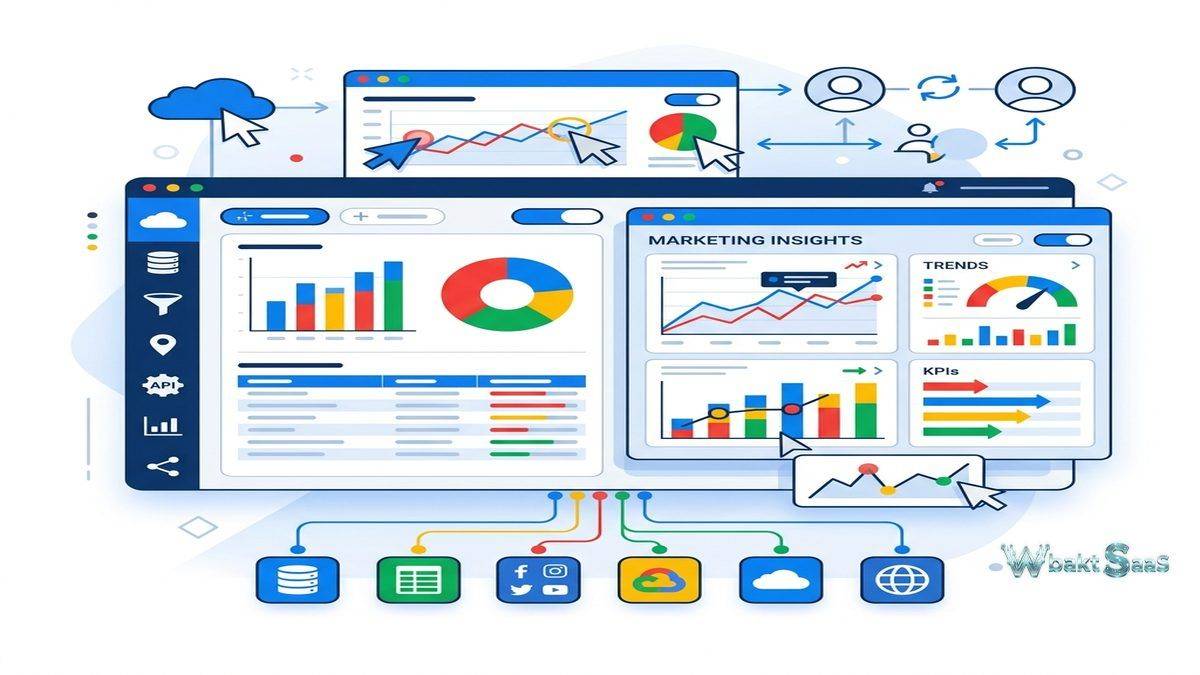
Marketing Reporting: Digital marketing teams create comprehensive campaign performance dashboards combining Google Analytics 4, Google Ads, Search Console, social media analytics, and email marketing data into unified marketing reports with automated email delivery to stakeholders.
Agency Client Reporting: Marketing agencies create branded, template-based reports for clients using data controls that enable deploying standardized reporting packages across multiple client accounts with consistent professional design and automated monthly delivery.
SEO Monitoring: SEO professionals combine Search Console, Google Analytics, and third-party SEO tool data to monitor organic search performance, keyword ranking trends, technical SEO health, content performance, and competitive positioning.
E-Commerce Analytics: Online retailers visualize sales performance, product analytics, customer acquisition metrics, conversion funnel analysis, and inventory status by connecting Shopify, WooCommerce, Google Analytics, and advertising platform data.
Executive Dashboards: Organizations create summary dashboards for leadership review, combining key business metrics from Google Sheets, databases, CRM exports, and cloud applications into accessible, shareable executive views.
Public Data Visualization: Researchers, journalists, government agencies, and non-profit organizations create public-facing interactive data visualizations embedded in websites to communicate findings, trends, and impact metrics to broad audiences.
Education: Educational institutions create student performance dashboards, enrollment analytics, and institutional effectiveness reports using Google Sheets and Google Workspace data sources with collaborative sharing across faculty and administration.
Pricing
Looker Studio is completely free for all users. Looker Studio Pro provides enterprise administration features, team workspaces, and Google Cloud support integration for organizations requiring additional governance capabilities. Some community connectors require paid subscriptions from their respective providers. BigQuery usage may incur Google Cloud query costs based on data processing volumes.
Pricing for Looker Studio Pro and associated services may vary. Please verify current details on the official Google Cloud website.
Limitations
- Advanced analytics: Looker Studio does not provide the sophisticated calculated fields, statistical functions, or data modeling capabilities that dedicated BI platforms offer for complex analytical requirements.
- Data preparation: Limited data transformation capabilities mean that complex data preparation must happen before data reaches Looker Studio, requiring external tools or BigQuery SQL.
- Governance: The free edition lacks enterprise governance features like row-level security, audit logging, and centralized administration that regulated organizations require.
- Performance with large data: Reports connected to large datasets or complex queries may experience slower loading performance compared to platforms with dedicated analytical engines.
- Connector costs: While the platform is free, premium third-party connectors may require paid subscriptions, adding cost for multi-source reporting requirements.
Summary
Looker Studio provides an exceptionally valuable completely free data visualization and reporting platform that democratizes business intelligence by eliminating the cost barrier that prevents many organizations from adopting data-driven reporting. The native Google ecosystem integration creates effortless connectivity for organizations using Google Analytics, Google Ads, and Google Workspace, while community connectors extend reach to hundreds of additional data sources across the broader business technology landscape.
The collaborative sharing model, rich template gallery, and professional report design capabilities create a practical reporting platform for marketing teams, agencies, small businesses, and organizations at any scale that need visual data communication without enterprise BI investment. Interactive controls enable viewers to explore data within report structures, elevating the reporting experience well beyond static chart distribution.
Free and accessible analytics platforms and tools including Looker Studio, Metabase, and basic Tableau Public each serve organizations seeking analytics without significant software investment. Looker Studio’s key advantages center on zero cost, Google ecosystem depth, collaborative sharing, template availability, professional design quality, and the accessibility that enables any Google account holder to create and share interactive data reports immediately. Organizations evaluating reporting platforms should carefully consider whether Looker Studio’s reporting capabilities meet their analytical depth requirements or whether more advanced platforms justify their cost for additional analytical sophistication and governance capabilities.
Features, pricing, and availability discussed in this review reflect information available at the time of writing. Google products evolve continuously, and details may have changed since publication. Please verify current information directly on the official Google Looker Studio website. WBAKT SaaS is an independent review platform with no affiliate relationships with any software company mentioned in this article.
For related analytics tools, see our reviews of Tableau, Power BI, and Zoho Analytics.
About the Author