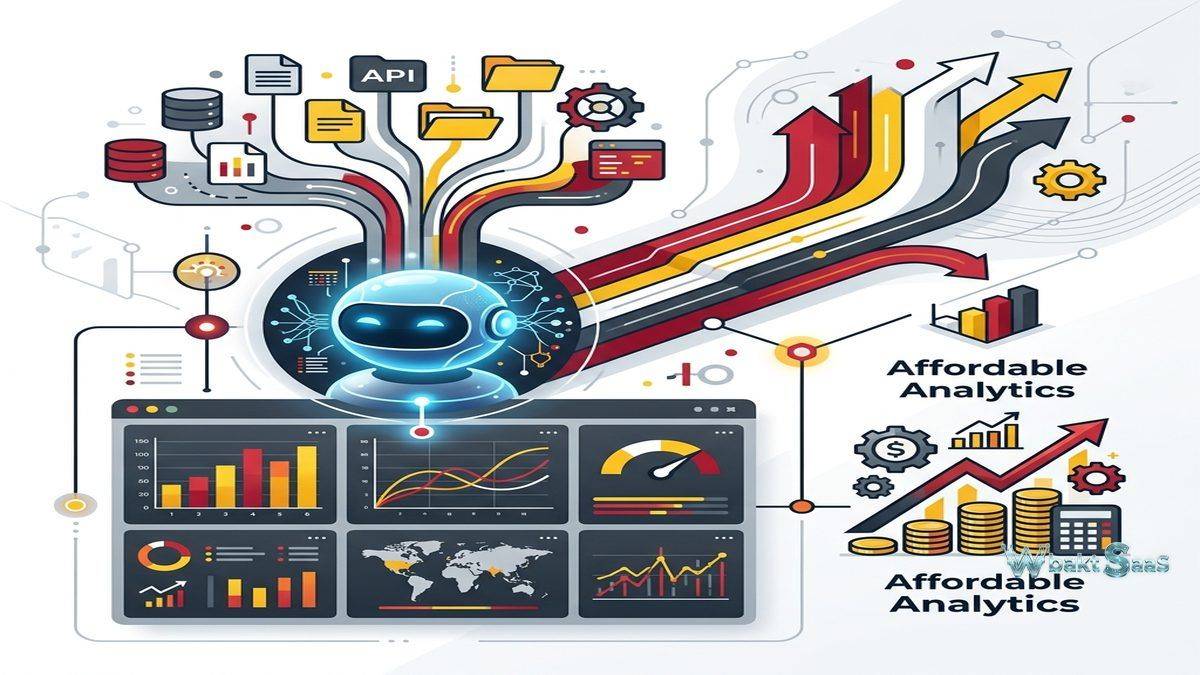
The business intelligence market is increasingly and sharply segmented between enterprise platforms with powerful capabilities at enterprise prices and free tools with limited analytical depth. Organizations that genuinely need meaningful analytical capabilities — data blending from multiple sources, AI-powered insights, embedded analytics, and collaborative reporting — but cannot justify enterprise-tier BI pricing face a difficult choice between overspending on capability they only partially need or undershooting on platforms that lack essential features. Zoho Analytics strategically positions itself in this critical middle ground, providing genuinely comprehensive self-service business intelligence capabilities at pricing that makes advanced analytics accessible to small and medium businesses, growing startups, and departmental teams within larger organizations that operate within constrained software budgets.
Zoho Analytics is part of the broader Zoho ecosystem — a suite of over 55 tightly integrated business applications spanning CRM, project management, HR, finance, marketing, and operations. This ecosystem context provides Zoho Analytics with deep native integration across dozens of business applications, creating a uniquely connected analytics experience for organizations using multiple Zoho products. Originally launched as Zoho Reports in 2009 for simple data reporting,, the platform was rebranded and significantly expanded and enhanced as Zoho Analytics, incorporating AI capabilities through Zia (Zoho’s AI assistant), advanced data blending, white-label embedding, and enhanced self-service features. Understanding Zoho Analytics’ comprehensive capabilities, Zoho ecosystem integration, and pricing accessibility helps organizations evaluate whether this affordable yet capable BI platform meets their analytical requirements.
Data Connectivity
Zoho Analytics connects to an extensive library of over 250 data sources including databases (MySQL, PostgreSQL, SQL Server, Oracle, Amazon Redshift, Google BigQuery, Snowflake), cloud applications (Salesforce, HubSpot, Shopify, QuickBooks, Xero, Google Analytics, Facebook Ads), files (CSV, Excel, JSON, HTML), and custom REST APIs. Zoho application connectors provide seamless native integration with Zoho CRM, Zoho Desk, Zoho Projects, Zoho People, Zoho Books, and other Zoho products with fully automated data synchronization. Data synchronization schedules automate periodic data refresh intervals from connected sources. For organizations using the broader Zoho ecosystem, the native application connectors provide seamless analytical integration without custom development, third-party connector costs, or manual data export processes.

Data Preparation and Blending
Zoho Analytics provides data preparation capabilities that clean, transform, and combine data from multiple sources within the platform. Auto-merge intelligently identifies matching columns across different data sources automatically and suggests automatic table joins. Data blending combines data from different connectors into unified analytical views, enabling cross-source analysis such as combining CRM sales data with accounting financial data or merging marketing campaign metrics with customer support ticket trends. Query tables enable creating analytical views using standard SQL syntax for users who prefer code-based data manipulation approaches. Formula columns create calculated fields using Zoho Analytics’ formula language, supporting arithmetic operations, string functions, date calculations, conditional logic, aggregate computations, and type conversions without modifying source data.
Visualization and Dashboards
Zoho Analytics provides an intuitive drag-and-drop report builder that creates visualizations from connected data sources. Chart types include bar charts, line charts, area charts, pie charts, ring charts, scatter plots, bubble charts, funnel charts, web charts, combination charts, KPI widgets, pivot tables, summary views, and tabular reports. The dashboard designer combines multiple reports, KPI widgets, text, images, and embedded content into interactive analytical displays. Dashboard filters enable viewer-driven exploration through date range controls, dimension selectors, and user input parameters. Drill-down enables clicking data points to explore underlying details progressively. The visualization capabilities provide sufficient chart variety and depth and customization for most analytical reporting requirements.
Zia AI Assistant
Zia is Zoho’s AI-powered analytics assistant that provides natural language querying, automated insights, and predictive analytics within Zoho Analytics. Users type questions in plain English or other supported languages (or other supported languages) and Zia generates appropriate visualizations with interpreted results. Automated insight generation identifies trends, outliers, anomalies, and correlations in data without explicit user configuration. Forecasting capabilities predict future metric values based on historical data patterns using built-in time-series analysis. Narrative insights provide text-based explanations of data patterns and changes and significant changes, making analytical findings accessible to users who may not deeply analyze visualizations. For organizations wanting AI-assisted analytics without data science expertise, Zia reduces the analytical skill threshold needed for meaningful data exploration.
Collaborative Analytics
Zoho Analytics supports collaborative analytics through shared workspaces, commenting, and collaborative report development. Workspaces organize analytical content with role-based access controls. Users can share individual reports, dashboards, or entire analytical workspaces with specific colleagues, groups, or external stakeholders. Comments enable contextual discussions on specific reports and data points. Shared views provide read-only access for stakeholders who need to view analytical content without editing capabilities. Collaborative development enables multiple team members to contribute to analytical workspaces, building comprehensive analytical resources through collaborative team-based efforts rather than individual analyst output.
White-Label Embedding
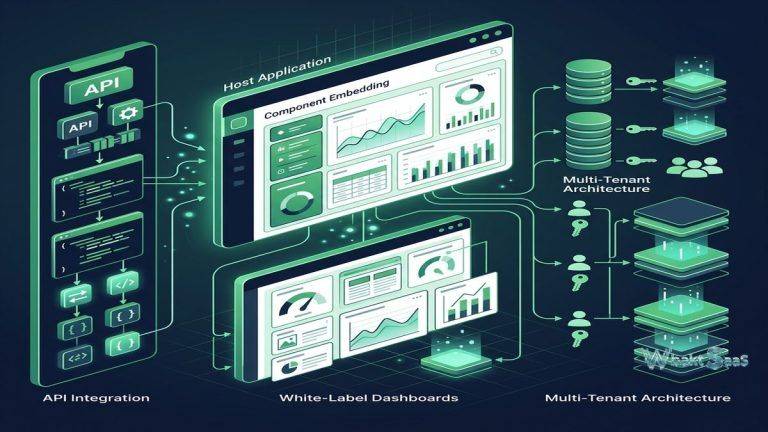
Zoho Analytics provides embedded analytics capabilities with white-label customization for integrating reports and dashboards into external applications, customer portals, and websites. Embedding supports iframe integration, JavaScript API embedding, REST API integration, and Zoho Analytics SDK embedding for deeper integration control. white-label capabilities enable completely removing Zoho branding and applying custom colors, fonts, and logos that match host application aesthetics. Multi-tenant embedding enables securely serving analytics to different customer segments with isolated data access from shared analytical infrastructure. For SaaS companies, agencies, and service providers wanting to add analytics capabilities to their products and portals, Zoho Analytics’ affordable embedded analytics provides a cost-effective alternative to premium embedded BI platforms.
Automated Reporting
Zoho Analytics provides scheduled report delivery through email with attached reports in PDF, Excel, CSV, and image formats. Dashboard snapshots deliver complete dashboard views and summaries on configured schedules. alert notifications trigger automatically when metric values cross defined thresholds, enabling proactive monitoring without manual dashboard review. Bulk report generation enables creating parameterized reports automatically for multiple entities (clients, regions, products) in a single automated operation. For organizations distributing regular reports to stakeholders, automated delivery ensures consistent, timely report distribution without manual effort for recurring reporting obligations.
Security and Governance
Zoho Analytics implements data security through organization-level administration, workspace-level permissions, and row-level security that restricts data visibility based on user identity and role attributes. SSO support includes SAML and Zoho Directory integration. IP restriction controls platform access exclusively from authorized network locations. Audit trail records user activities for compliance monitoring. SOC 2 Type II compliance and GDPR readiness provide regulatory compliance assurance. Data encryption at rest and in transit protects data throughout the entire analytical pipeline. For organizations with compliance requirements, Zoho Analytics provides enterprise-grade security controls at pricing accessible to organizations of all sizes.
Ask Zia Deep Dive
Zia’s powerful conversational analytics capability extends beyond simple question-answering to support multi-turn analytical conversations where follow-up questions refine and extend previous analyses. Users can ask initial questions, then progressively narrow, expand, or pivot their analysis through natural language follow-ups without starting new queries. Zia’s anomaly detection engine continuously monitors data for significant changes and proactively alerts users to unusual patterns in metrics they track regularly. Correlation analysis identifies relationships between different metrics, surfacing connections that may not be apparent from individual metric examination. For organizations wanting to make analytics accessible to non-technical business users, Zia’s conversational AI approach removes the barrier of needing to understand query construction, data models, and visualization selection.
Data Modeling
Zoho Analytics provides data modeling capabilities that define relationships between tables, create lookup columns, and establish data hierarchies for analytical navigation. Table relationships support one-to-one, one-to-many, and many-to-many join types. Auto-modeling intelligently suggests relationships based on column name matching and data content analysis. Aggregate formula columns create pre-computed summary metrics that span related tables. Query tables provide SQL-based analytical views for complex multi-table analysis. The data modeling layer provides sufficient structure for most business analytics requirements while maintaining the accessibility that characterizes the Zoho Analytics platform experience.
Slideshow Presentation
Zoho Analytics enables creating slideshow presentations directly from dashboards and reports, combining analytical visualizations with narrative context for stakeholder presentations. Slides capture specific analytical views with annotations and commentary. Presentation mode displays slideshows in immersive full-screen format for meeting presentations and executive reviews. The integrated presentation capability eliminates the manual process of exporting charts, importing them into PowerPoint, and manually updating presentations when data changes — analytical slideshows automatically reflect current data, ensuring that presentations always display the most current analytical findings.
Backup and Recovery
Zoho Analytics provides data backup capabilities that protect analytical workspaces against accidental deletion, configuration errors, and data corruption. Workspace backups capture complete analytical environments and content including data, reports, dashboards, formulas, and configurations. Restore capabilities enable recovering from backups to previous states. Version history for reports and dashboards tracks changes over time, enabling rollback to previous report designs. For organizations depending on analytical content for business operations and decision-making, backup and recovery capabilities provide the data protection assurance that mission-critical analytics infrastructure requires.
Custom Domains and Branding
Zoho Analytics supports custom domain configuration that enables organizations to serve analytical portals from their own domain names rather than Zoho-branded URLs. Custom branding controls logos, color schemes, and visual identity across the analytics platform and embedded content. For agencies, service providers, and organizations presenting analytics to external stakeholders, custom domain and branding capabilities create professional, branded analytical experiences that reinforce organizational identity rather than exposing third-party platform branding to clients and partners.
Zoho Ecosystem Integration
Zoho Analytics’ position within the broader Zoho ecosystem provides unique and powerful integration advantages for organizations using multiple Zoho applications. Pre-built analytical templates for Zoho CRM, Zoho Desk, Zoho Projects, Zoho Books, Zoho People, Zoho Inventory, and other Zoho products provide immediate analytics dashboards with curated KPIs, reports, and analytical views without manual configuration or data pipeline development. Cross-application analytics combine data from multiple Zoho products — merging CRM pipeline data with accounting revenue data, connecting project management metrics with HR resource allocation, or correlating customer support trends with sales activity — creating comprehensive organizational analytics that span functional boundaries. For organizations standardized on the Zoho ecosystem, this native cross-application analytics capability is a significant and compelling differentiator that competing analytics platforms cannot replicate without substantial custom integration work.
Mobile Analytics
Zoho Analytics mobile applications for iOS and Android provide comprehensive and responsive access to dashboards, reports, and KPI widgets from smartphones and tablets. Mobile-optimized layouts adapt report designs for smaller screens while maintaining full interactive capabilities including filtering, drilling, and touch-based exploration. Favorites enable quick access to frequently referenced dashboards. Push notifications deliver alert triggers and scheduled report notifications directly to mobile devices in real-time. Offline access enables viewing previously cached reports without network connectivity. For decision-makers and field personnel who need analytics access beyond desktop environments, mobile applications ensure that analytical insights are available on smartphones and tablets wherever decisions need to be made.
Common Use Cases
Sales Analytics: Sales teams analyze CRM pipeline metrics, revenue trends, deal conversion rates, territory performance, forecast accuracy, and representative productivity through pre-built Zoho CRM analytics templates enhanced with custom reports and cross-source data analysis for comprehensive sales intelligence.
Marketing Analytics: Marketing teams combine campaign performance data from Google Ads, Facebook Ads, Zoho Campaigns, web analytics, and social media platforms to create unified marketing ROI dashboards, attribution reports, and customer acquisition cost analysis across all marketing channels.
Financial Reporting: Finance teams create automated financial dashboards connecting to accounting systems (Zoho Books, QuickBooks, Xero) for cash flow monitoring, budget tracking, expense analysis, profitability reporting, revenue trending, and financial forecasting.
Customer Support: Support teams analyze ticket volumes, resolution times, satisfaction scores, agent performance, escalation patterns, and service level compliance through Zoho Desk analytics integration with custom reporting for operational monitoring.
HR Analytics: Human resources teams analyze workforce demographics, recruitment pipeline effectiveness, attrition trends, compensation analysis, training completion, and employee satisfaction through Zoho People analytics with department-level access controls.
Agency Reporting: Marketing and consulting agencies use white-label embedded analytics to create branded client reporting portals that display campaign performance, business metrics, and ROI analytics under the agency’s own branding and custom domain.
Education: Educational institutions create enrollment analytics, student performance dashboards, faculty workload analysis, and institutional effectiveness reports using Zoho Analytics’ affordable pricing tiers that accommodate academic budget constraints.
Pricing
Zoho Analytics offers tiered pricing based on data rows and user count. Basic, Standard, Premium, and Enterprise plans provide increasing data capacity, user counts, and feature access. Self-hosted (on-premises) deployment is available for organizations requiring data sovereignty. Pricing is significantly more affordable than enterprise BI platforms while providing comparable feature sets.
Pricing varies by plan and deployment model. Please verify current pricing on the official Zoho Analytics website.
Limitations
- Visualization depth: While comprehensive, visualization customization is less extensive than Tableau’s visual formatting depth for highly specialized analytical display requirements.
- Advanced modeling: Data modeling capabilities are less sophisticated than Looker’s LookML or Power BI’s DAX for complex dimensional modeling and advanced calculations.
- Ecosystem dependency: Maximum value from Zoho Analytics is achieved within the Zoho ecosystem; organizations not using other Zoho products may not benefit from the native integration advantages.
- Scale considerations: Very large-scale enterprise deployments with thousands of concurrent users may require careful architecture planning beyond standard deployment options.
- Community size: Zoho’s analytics community is smaller than Tableau or Power BI communities, providing fewer third-party resources and community support options.
Summary
Zoho Analytics provides a comprehensive and capable self-service business intelligence platform that delivers meaningful analytical capabilities — AI-powered insights through Zia, multi-source data blending, white-label embedding, collaborative workspaces, and automated reporting — at pricing that makes advanced analytics accessible to organizations of all sizes. The platform effectively bridges the gap between free tools with limited capabilities and enterprise BI platforms with enterprise pricing, providing a practical middle-ground analytics solution.
The Zoho ecosystem integration provides distinctive value for organizations using multiple Zoho applications, creating cross-functional analytics that span CRM, accounting, support, project management, HR, and inventory data without custom integration development. For organizations standardized on the Zoho ecosystem, Zoho Analytics provides analytical capabilities that are both deeply integrated and immediately productive.
Affordable business intelligence platforms including Zoho Analytics, Metabase, and Google Looker Studio each serve organizations seeking capable analytics at accessible price points. Zoho Analytics’ key advantages center on the Zoho ecosystem integration, AI assistant capabilities, white-label embedding affordability, comprehensive data connectivity, and the practical balance between feature completeness and pricing accessibility. Organizations evaluating BI platforms should carefully consider their existing application ecosystem, budget constraints, and the importance of embedded analytics and AI capabilities when comparing platform options.
Features, pricing, and availability discussed in this review reflect information available at the time of writing. Software products evolve continuously, and details may have changed since publication. Please verify current information directly on the official Zoho Analytics website. WBAKT SaaS is an independent review platform with no affiliate relationships with any software company mentioned in this article.
For related analytics tools, see our reviews of Google Looker Studio, Metabase, and Power BI.
About the Author