Modern business relationships extend far beyond email inboxes and phone calls — they develop through LinkedIn connections, Twitter interactions, Facebook conversations, and dozens of other social and professional platforms where business professionals build and maintain their networks. Traditional CRM platforms capture contact information and track direct communications but remain fundamentally blind to the social context that increasingly shapes business relationships. Nimble CRM addresses this social intelligence gap by automatically aggregating contact information, social profiles, interaction history, and engagement signals from across the web and social networks into unified contact records that provide comprehensive relationship intelligence without requiring manual data entry or research.
Founded by Jon Ferrara, who previously co-founded GoldMine (one of the earliest CRM platforms), Nimble was built on the philosophy that CRM should work the way modern business relationships actually work — across multiple channels, platforms, and touchpoints rather than being confined to a single communication channel. Nimble’s approach is particularly relevant for solopreneurs, small business owners, sales professionals, and business development specialists who build relationships through social selling and need CRM that understands the social and professional context surrounding each business contact. Understanding Nimble’s capabilities helps relationship-driven professionals evaluate whether this social-first CRM approach provides the relationship intelligence and workflow efficiency that their networking and selling activities require.
Contact Enrichment and Social Intelligence
Nimble automatically enriches contact records with publicly available information aggregated from social networks, business databases, and web sources. When a contact is added — from email, social media, or manual entry — Nimble searches for matching social profiles (LinkedIn, Twitter, Facebook, Instagram), company information, job titles, location data, and other professional details, populating the contact record with comprehensive information that would require significant manual research to compile. This automatic enrichment transforms basic contact details into rich relationship profiles that provide context for every interaction.
Social profile integration displays recent social media activity directly within contact records — recent tweets, LinkedIn posts, shared articles, and professional updates — enabling users to see what their contacts are publicly sharing and discussing. This social awareness creates natural conversation starters, identifies shared interests, and reveals business developments that provide relevant context for outreach and follow-up. For sales professionals practicing social selling, this integrated social intelligence enables personalized, contextually relevant engagement rather than generic cold outreach.

Nimble Prospector
Nimble Prospector is a browser extension that works across the web — on social media platforms, company websites, email applications, and any web page — to instantly display CRM contact information and enable record creation from any online context. When browsing LinkedIn and viewing a potential prospect’s profile, Prospector displays the existing CRM record if one exists or enables creating a new enriched contact record with a single click. When reading a company’s website, Prospector identifies team members and enables adding them to the CRM. This “work anywhere” capability eliminates the context switching between web browsing and CRM data entry that slows prospecting workflows.
Unified Inbox
Nimble’s Today Page provides a unified view of daily priorities — scheduled activities, deals requiring attention, contacts to follow up with, social signals, and upcoming events. The unified message view aggregates communications across email accounts and social channels, enabling users to manage all relationship interactions from a single interface. This centralized communication view prevents the fragmented attention that occurs when monitoring multiple communication platforms separately and ensures that no important message or engagement signal goes unnoticed across the various channels where business conversations occur.
Deal Pipeline
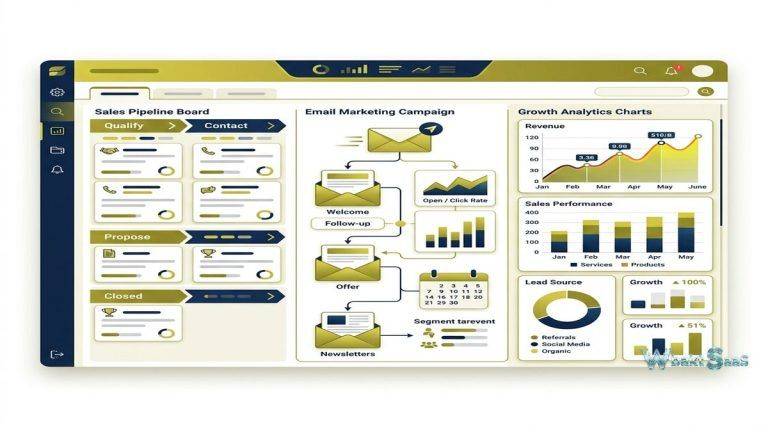
Nimble provides visual deal pipeline management with customizable stages, drag-and-drop progression, and pipeline analytics. Deal records store value, expected close date, probability, associated contacts, activity history, notes, and custom fields. Pipeline views can be filtered by owner, stage, date range, and custom criteria. Pipeline reports show total value, weighted value, conversion rates, and win/loss analysis. While Nimble’s pipeline is functional for relationship-based selling, organizations with complex multi-pipeline requirements may find dedicated CRM platforms like Pipedrive offer more sophisticated pipeline management capabilities.
Group Messaging
Group messaging enables sending personalized email messages to segmented contact groups with merge field personalization and open/click tracking. Unlike bulk email marketing tools, group messaging maintains the personal, one-to-one feel of individual emails while enabling scale through template-based personalization. Contact segmentation creates targeted groups based on tags, custom fields, location, company, and relationship attributes. Message tracking provides engagement analytics — open rates, click rates, and recipient engagement details — that inform follow-up prioritization and content optimization for future outreach.
Workflow Automation
Nimble Workflows provide structured sales processes and task automation. Workflow templates define sequences of tasks and activities that execute for specific business processes — new client onboarding, prospect follow-up, partnership development, and event follow-up. When a contact enters a workflow, the system creates tasks at defined intervals, sends reminders, and tracks completion through the workflow stages. Workflow analytics show completion rates, bottlenecks, and activity timing, enabling process optimization based on execution data rather than assumptions.
Tags and Segmentation
Tags provide flexible contact categorization that enables creating dynamic segments for targeted outreach, reporting, and workflow automation. Tags can represent any classification relevant to the organization — industry, interest area, lead source, event attendance, product interest, engagement level, or any custom categorization. Tag-based segments update dynamically as contacts are tagged or untagged, maintaining current lists without manual list management. Multiple tag combinations enable creating highly targeted micro-segments for personalized outreach campaigns.
Calendar and Activity Management
Calendar integration with Google Calendar and Outlook Calendar synchronizes events with CRM contact records, automatically creating activity entries for meetings with known contacts. Task management provides assignment, due dates, priority levels, and completion tracking. Today Page’s activity feed shows pending tasks, overdue items, upcoming events, and follow-up reminders in a prioritized daily view. Stay-in-touch reminders prompt users to reach out to important contacts who have not been contacted within specified periods, preventing relationship decay through inactivity.
Email Integration
Nimble integrates with Gmail, Microsoft 365, and Outlook, enabling email interaction within the CRM context. Email tracking provides open and click notifications. Email templates with merge fields enable personalized outreach. The Nimble sidebar within Gmail and Outlook displays CRM contact information alongside email messages, providing relationship context during email composition and response without leaving the email application. Two-way email sync ensures that email correspondence is logged to CRM contact records automatically.
Custom Fields and Data Model
Custom fields extend contact, company, and deal records with organization-specific data fields. Field types include text, number, date, dropdown, multi-select, and address. Custom fields can be used in filters, saved searches, group messaging segmentation, and reporting. While Nimble’s custom field system is effective for small business needs, organizations with complex data model requirements may need more advanced customization capabilities available in platforms like Salesforce or Zoho CRM.
Integrations
Nimble integrates with popular business tools including Mailchimp, HubSpot, Hootsuite, QuickBooks, FreshBooks, Zendesk, and many more. Zapier integration extends connectivity to thousands of additional applications. The Nimble API provides programmatic access for custom integrations. PieSync integration enables bidirectional contact synchronization between Nimble and other platforms, maintaining consistent contact data across the business technology stack.
Smart Contacts App
The Smart Contacts widget provides instant contact identification and enrichment from within email applications and web browsers. When hovering over email addresses in Gmail or Outlook, Smart Contacts displays the full CRM record including social profiles, company information, relationship history, and recent interactions. For unknown contacts, Smart Contacts performs real-time enrichment to gather available information, enabling users to make informed decisions about engaging with unfamiliar contacts before responding. This contextual intelligence ensures that every email interaction benefits from relationship awareness without requiring proactive CRM lookup.
Saved Searches and Smart Segments
Saved searches create persistent contact queries that can be accessed repeatedly without reconfiguring filter criteria. Advanced search combines multiple criteria — tags, custom fields, location, company attributes, last contacted date, social activity, and engagement level — into complex queries that identify specific contact segments. Smart segments dynamically update as contact data changes, ensuring that segmented lists always reflect current relationship status. These saved searches and segments provide the foundation for targeted group messaging, workflow enrollment, and systematic relationship management across the entire contact database.
Company Intelligence
Company records aggregate information from public sources — employee count, revenue range, industry classification, social media presence, technology stack, and recent news — providing business intelligence that informs selling strategy and account prioritization. Company records automatically link to associated contacts, creating organizational views that show all known contacts within each company. Company news feeds display recent press mentions, blog posts, and social updates from company accounts, providing current awareness of business developments that create timely outreach opportunities or conversation starters.
Social Listening and Engagement Signals
Nimble monitors social media activity from contacts and companies, surfacing engagement signals that indicate relationship opportunities. When a contact publishes a blog post, shares an article, announces a job change, or posts about a topic relevant to the user’s business, these signals appear in the Today Page activity feed. Engagement signals create natural, contextually relevant reasons to reach out — congratulating a promotion, commenting on a shared article, or responding to a business announcement — replacing generic follow-up outreach with personalized, timely engagement that strengthens relationships.
Data Import and Export
Nimble imports contacts from CSV files, Google Contacts, Outlook contacts, LinkedIn connections, and other contact sources. Import tools include field mapping, duplicate detection, and tag assignment during import. Bulk contact operations enable tagging, updating, and managing large contact groups efficiently. Export capabilities provide data portability for reporting, backup, and migration purposes. For organizations transitioning from other CRM platforms, import tools facilitate migration while maintaining data quality and preventing duplicate record creation that degrades CRM usability.
Permissions and Teams
Team management features support collaboration by controlling contact visibility and activity access across team members. Shared contact views enable teams to see and collaborate on relationship management while maintaining individual activity ownership. Deal sharing enables collaborative pipeline management where multiple team members contribute to deal progression. Administrative controls manage user access, data visibility policies, and platform configuration settings.
Mobile Application
Nimble’s mobile app provides CRM access on iOS and Android with contact lookup, deal pipeline management, activity logging, business card scanning, and social profile viewing. Mobile contact enrichment enables adding contacts from anywhere and receiving automatic profile completion. Push notifications alert users to important events, follow-up reminders, and engagement signals, maintaining relationship awareness during field work and travel.
Common Use Cases
Solopreneurs and Consultants: Independent professionals use Nimble’s automatic enrichment and social intelligence to maintain comprehensive relationship records without dedicating time to manual CRM data entry.
Social Sellers: Sales professionals who build relationships through LinkedIn, Twitter, and other social platforms use Nimble’s social integration to convert social connections into managed business relationships with full interaction context.
Small Business Networking: Small business owners who grow their business through networking, referrals, and relationship-building use Nimble to systematize their relationship management and ensure consistent follow-up across their growing contact network.
Business Development: Business development professionals managing partner, referral, and strategic alliance relationships use Nimble’s relationship-centric design to track multi-stakeholder relationships with comprehensive interaction histories.
PR and Media Relations: Public relations professionals use Nimble to manage journalist, influencer, and media relationships with social profile tracking that keeps them current on each contact’s recent coverage, interests, and publishing activity.
Real Estate Agents: Real estate professionals use Nimble to manage buyer and seller relationships, leveraging social enrichment to understand client interests, lifestyle preferences, and market engagement while stay-in-touch reminders maintain relationships with past clients for referral business generation.
Recruitment and Talent: Recruiters and talent acquisition professionals use Nimble’s social enrichment and LinkedIn integration to build comprehensive candidate profiles, track candidate pipelines, and maintain ongoing relationships with talent networks for future placement opportunities.
Event Networking: Professionals who attend conferences, trade shows, and networking events use Nimble’s business card scanning, quick contact creation, and automatic enrichment to convert event connections into managed CRM relationships with follow-up workflows that maintain post-event engagement momentum.
Pricing
Nimble offers a single pricing plan — Nimble Business — with per-user, per-month billing that includes contact enrichment credits, group messaging, pipeline management, Prospector browser extension, and all core features. This simplified pricing eliminates the tier-comparison complexity that many CRM platforms introduce and ensures that all users access the same feature set. Additional contact enrichment credits can be purchased for organizations with high-volume prospecting needs that exceed the included monthly allocation. A 14-day free trial is available without credit card requirements. Annual billing provides savings over monthly payment options.
Pricing and features are subject to change. Please verify current plan details on the official Nimble website before making purchasing decisions.
Limitations
- Sales process depth: Nimble’s pipeline management is less sophisticated than dedicated sales CRM platforms like Pipedrive, Close, or Salesforce for complex, multi-stage selling processes with advanced forecasting requirements.
- Team scalability: Nimble is designed primarily for small teams and individual professionals. Organizations with larger sales teams and complex management hierarchies may need more scalable enterprise CRM platforms.
- Marketing automation: Nimble provides group messaging but lacks the sophisticated marketing automation workflows, landing pages, and campaign orchestration that platforms like HubSpot or Mailchimp provide.
- Reporting depth: Reporting capabilities are functional but less comprehensive than the advanced analytics, custom dashboards, and cross-object reporting available in larger CRM platforms.
- Social API limitations: Social media platform API changes and privacy restrictions can affect the depth and currency of social profile data that Nimble can access, aggregate, and display.
Summary
Nimble CRM provides a social-first relationship management platform that automatically enriches contacts with social and professional intelligence, creating comprehensive relationship profiles without the manual data entry that undermines CRM adoption in small businesses and solo professional practices. The combination of automatic contact enrichment, Prospector browser extension, social profile integration, engagement signal monitoring, and relationship-centric design creates a CRM that understands relationships the way modern business professionals actually build and maintain them across multiple digital channels.
The platform’s social intelligence capabilities make it particularly valuable for professionals who practice social selling, relationship-based business development, and networking-driven growth strategies. By integrating social context directly into the CRM experience, Nimble enables personalized, contextually relevant engagement that generic CRM contact records without social awareness cannot support effectively.
Nimble’s Prospector browser extension represents a uniquely practical capability — enabling CRM interaction from any web context without requiring navigation to a separate CRM application. This “work anywhere” approach reduces the friction that prevents professionals from maintaining CRM records during their natural web-based workflow, ensuring that contacts and interactions are captured at the moment they occur rather than being lost to the memory gap between web activity and CRM data entry sessions.
CRM platforms including Nimble, HubSpot, Pipedrive, Zoho, and Salesforce each approach relationship management with different design philosophies and target audiences. Nimble’s advantages center on automatic contact enrichment, social intelligence, relationship-centric design, and the minimal data entry requirement that makes CRM adoption practical for professionals who lack the time or inclination for extensive manual CRM maintenance. Organizations evaluating CRM platforms should consider whether social intelligence and relationship context priorities align with their business development approach and selling methodology.
Features, pricing, and availability discussed in this review reflect information available at the time of writing. Software products evolve continuously, and details may have changed since publication. Please verify current information directly on the official Nimble website. WBAKT SaaS is an independent review platform with no affiliate relationships with any software company mentioned in this article.
For related CRM tools, see our reviews of HubSpot CRM, Copper CRM, and Pipedrive CRM.
About the Author