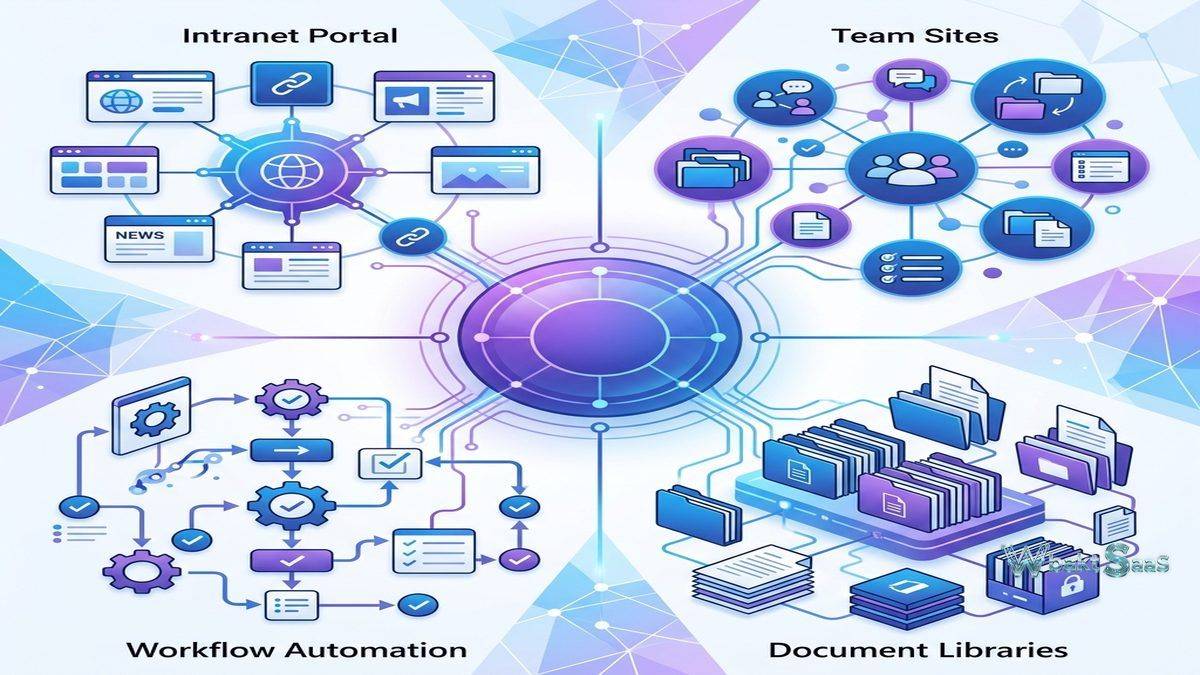
Enterprise content management requires more than file storage — it demands structured document organization, metadata-driven content discovery, automated workflows, permission governance, and the ability to create structured intranet experiences that serve as the organization’s central information hub. Microsoft SharePoint provides this enterprise content management infrastructure, functioning as both a document management platform and an intranet creation toolkit that integrates deeply with the broader Microsoft 365 ecosystem. Unlike simple cloud storage platforms that organize content primarily through folder hierarchies, SharePoint combines folder structures with document libraries, metadata columns, content types, views, and search-driven navigation that enable sophisticated content organization tailored to how each department, team, and process actually works. This structural flexibility is SharePoint’s defining characteristic — and simultaneously its primary source of complexity.
SharePoint has evolved through multiple generations since its original release in 2001, transforming from an on-premises document management server into a cloud-native component of Microsoft 365. SharePoint Online, the modern cloud version included with Microsoft 365 subscriptions, provides document management, team collaboration, intranet portals, and workflow automation without requiring on-premises server infrastructure. The platform’s deep integration with Microsoft Teams (which uses SharePoint for document storage), OneDrive (which shares SharePoint’s synchronization infrastructure), and Power Platform (which extends SharePoint with custom applications, workflows, and analytics) creates a truly comprehensive collaboration ecosystem. understanding SharePoint’s extensive capabilities helps organizations evaluate whether this mature, deeply integrated platform provides the content management infrastructure they specifically need or whether significantly simpler alternatives better serve teams that do not require SharePoint’s structural sophistication.
Document Libraries
Document libraries provide structured file storage with metadata columns, content types, views, versioning, and check-in/check-out controls. Unlike folder-only storage, document libraries attach structured metadata to every file — document type, status, owner, department, project, date, and custom attributes that enable faceted search, filtered views, and automated workflows based on document properties. Content types define templates and metadata schemas for different document categories, ensuring consistent metadata capture and formatting across the organization. Comprehensive version history preserves every file change with timestamps and user attribution, enabling detailed comparison and restoration of previous versions.

Team Sites
Team sites provide dedicated collaboration workspaces for projects, departments, and working groups. Each team site includes document libraries, lists, pages, and a news feed that create a focused collaboration environment. Team site membership carefully controls content access through Microsoft 365 Groups integration. Modern team sites provide responsive, mobile-friendly interfaces with web parts that display documents, lists, news, events, calendars, and custom content. Teams integration connects team sites with Microsoft Teams channels, providing both a structured SharePoint content experience and a conversational Teams collaboration experience for the same team content.
Communication Sites
Communication sites create branded, visually rich pages for organizational communication — company news, departmental announcements, event promotions, and knowledge sharing. Unlike team sites designed for collaborative work, communication sites are designed for content publication and consumption — publishing information from a smaller group of authors to a larger audience. Flexible page layouts include hero sections, news displays, image galleries, quick links, and custom web part arrangements that create visually engaging content presentations. Communication sites serve as intranet homepages, departmental portals, and event sites that provide structured, branded information delivery across the organization.
SharePoint Lists
SharePoint Lists provide structured data management for tracking information beyond document storage — project tasks, issue tracking, inventory management, event calendars, contact directories, and any tabular data that benefits from structured columns, views, and automation. Lists support column types including single-line text, number, date, choice, person, lookup, calculated, and managed metadata. Views filter and sort list items for role-specific or status-specific displays. Conditional formatting visually highlights items based on values — overdue tasks in red, high-priority items in bold, completed items in green — providing visual status communication without requiring report generation.
Search and Content Discovery
SharePoint Search leverages Microsoft Search to provide enterprise-wide content discovery across document libraries, lists, pages, and connected Microsoft 365 content. Search results include documents, people, sites, news, answers, and bookmarks. Managed metadata and taxonomy services create consistent classification vocabularies that span the organization, enabling content categorization and discovery that transcends individual team boundaries. Search verticals create focused search experiences for specific content types — searching only within HR documents, only within project files, or only within policy documents — reducing search noise and significantly improving content discovery precision.
Power Automate Integration
SharePoint’s integration with Power Automate (formerly Microsoft Flow) enables creating automated workflows triggered by SharePoint events — document uploads, metadata changes, approval requests, and list item modifications. Common automated workflows include document approval routing, notification delivery when content changes, automatic file organization based on metadata values, and multi-step business processes that coordinate actions across SharePoint, Outlook, Teams, and other Microsoft 365 services and third-party platforms. Templates provide ready-to-use pre-built workflow starting points for common scenarios that can be customized without development expertise.
Permission Management
SharePoint provides granular permission management at the site, library, folder, and item level. Permission inheritance naturally flows from site level through libraries and folders, with the ability to explicitly break inheritance and define unique permissions at any level. Security groups and Microsoft 365 Groups greatly simplify permission assignment for teams and departments. External sharing controls configure whether content can be shared with people outside the organization, with configurable domain restrictions and authentication requirements. Permission management complexity is arguably one of SharePoint’s most challenging aspects — the same flexibility that enables precise access control also creates the potential for permission inconsistencies that require careful and ongoing governance.
Intranet and Portal Creation
SharePoint serves as the primary intranet platform for many organizations worldwide, providing the page creation, navigation, and branding tools needed to build organizational information portals. Hub sites connect multiple related SharePoint sites into navigational hierarchies that create coherent and unified intranet experiences across departments and topics. Global navigation provides consistent menu structures across connected sites. Page templates and web parts enable creating rich intranet pages without development skills. Modern SharePoint pages support responsive design, multimedia content, embedded applications, and dynamic content feeds that create engaging employee information experiences.
Compliance and Records Management
SharePoint provides records management capabilities including retention labels, retention policies, disposition reviews, and records center functionality. Retention labels classify content for automated lifecycle management — preserving content for mandatory periods and managing disposition when retention requirements expire. Information barriers proactively prevent content sharing between designated groups for regulatory compliance. Sensitivity labels integrate with Microsoft Purview to classify and protect sensitive content with encryption and access controls. eDiscovery capabilities fully support legal hold, content search, and export for litigation support.
Customization and Development
SharePoint supports multiple customization approaches — no-code configuration through the browser for sites, pages, and lists; low-code extension through Power Apps for custom forms and applications; and pro-code development through the SharePoint Framework (SPFx) for custom web parts, extensions, and full-page applications built with modern web technologies. SPFx enables professional developers to create rich, responsive client-side applications that integrate seamlessly with the SharePoint user experience.
Mobile Access
SharePoint mobile app provides access to sites, document libraries, lists, and intranet content on iOS and Android devices. Push notifications automatically alert users to content changes, approval requests, and collaboration activity. Offline access enables viewing previously accessed content without network connectivity. The responsive design of modern SharePoint sites ensures usable experiences across device sizes in mobile browsers as well.
Power Apps Integration
SharePoint’s integration with Power Apps enables creating custom forms and applications that extend SharePoint’s native capabilities without traditional development. Custom list forms replace SharePoint’s default data entry forms with tailored interfaces that include conditional visibility, input validation, calculated fields, and multi-step data entry experiences. Standalone Power Apps connect to SharePoint lists and libraries as data sources, creating responsive mobile and web applications that provide custom interfaces for SharePoint-managed data. For organizations needing specialized data entry, approval, or reporting experiences beyond SharePoint’s built-in capabilities, Power Apps provides customization without requiring developer resources.
SharePoint Syntex and AI
SharePoint Syntex (now part of Microsoft Syntex) provides AI-powered content processing that automatically classifies documents, extracts structured information from unstructured content, and applies metadata based on content analysis. Advanced document understanding models identify document types and extract specific data fields — invoice amounts, contract dates, vendor names, policy numbers — from uploaded documents without manual data entry. Prebuilt models handle common document types (invoices, receipts, contracts) immediately, while custom models can be trained on organization-specific document formats. Content assembly creates documents from templates populated with extracted or entered data, automating document generation for standard business documents.
Viva Connections
Microsoft Viva Connections integrates SharePoint intranet content into Microsoft Teams, providing comprehensive employee experience features including a company feed, dashboard, and resources within the Teams interface. Organizations create customized Viva Connections experiences that surface SharePoint news, intranet resources, and targeted communications within the Teams environment where employees spend their working time. Dashboard cards provide quick access to common tasks, personal information, and organizational resources without navigating to the full SharePoint intranet.
Migration and Modernization
SharePoint provides comprehensive migration tools for transitioning from SharePoint Server (on-premises), file shares, and other content platforms. SharePoint Migration Tool and Migration Manager efficiently handle bulk content migration with permission mapping, metadata preservation, and scheduling capabilities. Classic-to-modern site transformation automatically converts legacy SharePoint sites to modern experiences with responsive design and current web part capabilities. For organizations with large on-premises SharePoint deployments, migration to SharePoint Online represents a significant infrastructure modernization that requires careful planning, content auditing, and governance review.
Governance Framework
Effective and successful SharePoint deployment requires governance — policies and processes that guide site creation, naming conventions, permission management, content classification, and lifecycle management. Site creation policies control who can create sites, what templates are available, and what classification and expiration policies apply. Naming policies enforce consistent site and group naming conventions. Content lifecycle policies proactively manage inactive sites through automated notifications, access reviews, and eventual archival or deletion. Without deliberate intentional governance, SharePoint environments can grow into unmanaged sprawl that undermines the very content organization benefits the platform is designed to provide.
Managed Metadata and Taxonomy
SharePoint’s managed metadata service provides a centralized taxonomy that creates consistent and reliable content classification across the entire organization. Term sets define comprehensive hierarchical classification vocabularies — departments, document types, projects, regions, product lines — that apply uniformly across all SharePoint sites and libraries. Managed metadata columns in document libraries directly connect files to the organizational taxonomy, enabling cross-site content discovery and consistent classification that simple folder structures cannot achieve. Content organizer automatically routes documents to appropriate libraries based on metadata values, automating content organization based on defined classification rules.
External Collaboration
SharePoint enables sharing content with external users — partners, clients, vendors, and contractors — through configurable external sharing policies. External users securely access shared content through authenticated guest access or configurable anonymous links depending on organizational policy. External sharing can be controlled at the organization, site, and library level, providing granular control over which content can be shared externally. Guest user management carefully tracks external user access, enables access reviews, and supports automated deprovisioning of inactive guest accounts.
Common Use Cases
Corporate Intranet: Organizations use SharePoint as their primary intranet platform, creating employee portals with company news, HR resources, policy documents, department pages, organizational directories, and executive communications through communication sites.
Document Management: Departments use SharePoint document libraries with metadata columns, content types, automated workflows, and retention policies for structured document management that significantly exceeds folder-based file organization capabilities.
Project Collaboration: Project teams use team sites for document sharing, task tracking through Lists, milestone management, stakeholder communication through news, and structured reporting within dedicated project workspaces.
Knowledge Management: Organizations use SharePoint as a knowledge base platform, organizing institutional knowledge in searchable, categorized content structures with managed metadata navigation and taxonomy-driven content discovery.
Compliance and Records: Regulated organizations use SharePoint’s retention labels, legal hold capabilities, and records management features for compliance-driven content lifecycle management across departments and business units.
Extranet: Organizations create external-facing SharePoint sites for partner collaboration, client document sharing, vendor coordination, and project delivery with controlled, auditable external access.
Department Portals: Individual departments use communication sites to create self-service portals for their services — IT service catalogs, HR policy libraries, finance reporting portals, and marketing asset libraries that serve the broader organization.
Pricing
SharePoint Online is included with Microsoft 365 Business and Enterprise subscriptions. Standalone SharePoint Online plans are available for organizations needing document management without the full Microsoft 365 suite. Storage is allocated per organization with additional storage available for purchase. SharePoint Server remains available for on-premises deployment for organizations requiring local data storage. Pricing varies by plan tier, feature set, and user count.
Pricing and features are subject to change. Please verify current plan details on the official Microsoft SharePoint website before making purchasing decisions.
Limitations
- Complexity: SharePoint’s flexibility creates significant complexity. Effective deployment typically requires governance planning, information architecture design, and often professional consulting services.
- Learning curve: Users, administrators, and developers each face substantial learning curves. SharePoint’s feature depth means that training is typically required for productive usage beyond basic document storage.
- Performance with large libraries: Document libraries with very large file counts can experience performance challenges that require careful library architecture and indexing to address.
- Migration complexity: Migrating between SharePoint versions or from other platforms involves complexity around permissions, metadata, workflows, and customizations that rarely transfer seamlessly.
- Design limitations: While modern SharePoint sites are more visually capable than previous versions, design flexibility still remains more limited than purpose-built intranet or web content management platforms.
Summary
SharePoint provides a comprehensive and mature enterprise content management and collaboration platform that integrates deeply with Microsoft 365, serving simultaneously as document management system, intranet platform, and collaboration infrastructure. The platform’s metadata-driven content organization, powerful automated workflows through Power Automate, and structured permission management provide capabilities that simple cloud storage platforms cannot match for organizations with complex content management requirements.
The integration between SharePoint, Teams, OneDrive, and Power Platform creates a collaboration ecosystem where content management, communication, and workflow automation function as interconnected capabilities rather than separate tools. For organizations firmly committed to the Microsoft ecosystem, SharePoint provides enterprise content infrastructure that leverages existing Microsoft 365 investments.
Content management platforms including SharePoint, Box, Google Drive, Confluence, and Notion each approach organizational content with different architectural philosophies. SharePoint’s advantages center on enterprise-grade document management, intranet capabilities, Microsoft 365 integration depth, enterprise compliance and records management, and the customization flexibility that enables tailoring the platform to organizational requirements. Organizations evaluating content management should consider whether SharePoint’s structural capabilities serve their needs or whether significantly simpler platforms better match their team’s complexity tolerance and content management ambitions.
Features, pricing, and availability discussed in this review reflect information available at the time of writing. Software products evolve continuously, and details may have changed since publication. Please verify current information directly on the official Microsoft SharePoint website. WBAKT SaaS is an independent review platform with no affiliate relationships with any software company mentioned in this article.
For related tools, see our reviews of Microsoft OneDrive, Box Enterprise, and Google Drive.
About the Author