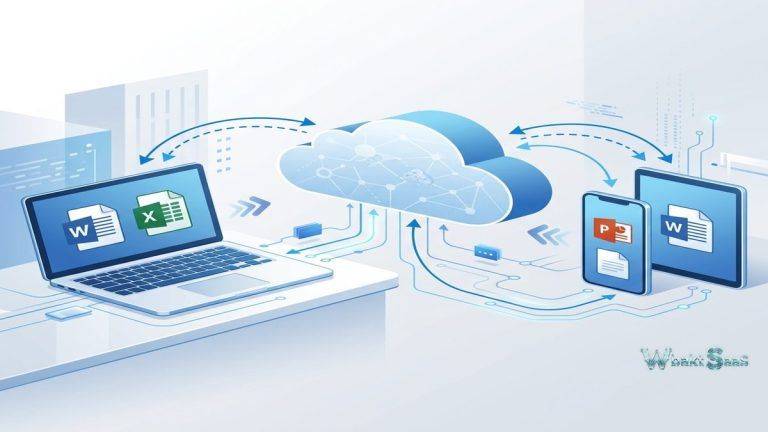
Comprehensive data protection requires backing up more than just desktop computers. Modern organizations operate across diverse device ecosystems — Windows desktops, macOS laptops, Linux servers, mobile phones, tablets, network-attached storage devices, and cloud-hosted applications — each containing critical and irreplaceable data that requires protection against hardware failure, ransomware, accidental deletion, and natural disasters. Most backup platforms force organizations to purchase separate solutions for different device types and data sources, creating fragmented and difficult-to-manage backup infrastructure with inconsistent policies, multiple management interfaces, and compounding and unpredictable licensing costs. iDrive directly addresses this fragmentation by providing a unified backup platform that protects computers, servers, NAS devices, mobile devices, and cloud applications from a single unified account with centralized management and predictable, transparent, and affordable pricing.
Founded in 1995, iDrive (developed by Pro Softnet Corporation) has evolved from a simple personal backup utility into a comprehensive cloud backup platform serving individuals, small businesses, and enterprises. The platform’s distinctive and differentiating approach centers on multi-device backup from a single account — a single subscription protects unlimited devices across all supported platforms, with storage capacity shared across all backed-up devices rather than allocated per device. This innovative shared storage model creates significant cost advantages for organizations backing up many devices, as competing platforms that instead charge per device or per server can become prohibitively expensive as device counts grow. Thoroughly understanding iDrive’s capabilities, device coverage, and pricing model helps organizations evaluate whether this affordable, multi-device backup platform adequately meets their data protection requirements or whether more specialized backup solutions offer advantages for specific enterprise scenarios.
Multi-Device Backup
iDrive backs up unlimited devices from a single account across Windows, macOS, Linux, iOS, and Android platforms. Desktop and laptop backup comprehensively protects user files, application data, and system settings with configurable file selection and exclusion rules. The unlimited device model means organizations pay for storage capacity rather than device count — for example a 5 TB plan protects one device or fifty devices with the same subscription cost, creating very compelling economics for organizations with large device fleets. Each individual device’s backup is managed independently within the unified account, with device-specific schedules, retention settings, and recovery options.
Server Backup
iDrive supports server backup for Windows Server, Linux Server, and VMware/Hyper-V virtual machines. Windows Server backup includes native support for Microsoft SQL Server, Microsoft Exchange, and system state backup. Linux server backup protects files, directories, and databases through the iDrive command-line interface and scheduled scripts. Virtual machine backup captures complete and consistent VM images for full system recovery. Server backup additionally includes continuous data protection (CDP) that monitors file changes and backs up modified files in near-real-time, minimizing data loss exposure for critical server data that changes frequently throughout the business day.
NAS Backup
iDrive backs up network-attached storage devices from popular brands including Synology, QNAP, Netgear ReadyNAS, Western Digital, and other NAS platforms. NAS backup operates directly from the NAS device itself using native packages, without requiring a separate computer to manage the backup process. Direct NAS-to-cloud backup effectively eliminates the performance bottleneck and single point of failure that proxy-based NAS backup approaches create. for organizations that centralize their file storage on NAS devices, direct cloud backup provides off-site protection without the complexity of configuring intermediate backup servers.
Cloud-to-Cloud Backup
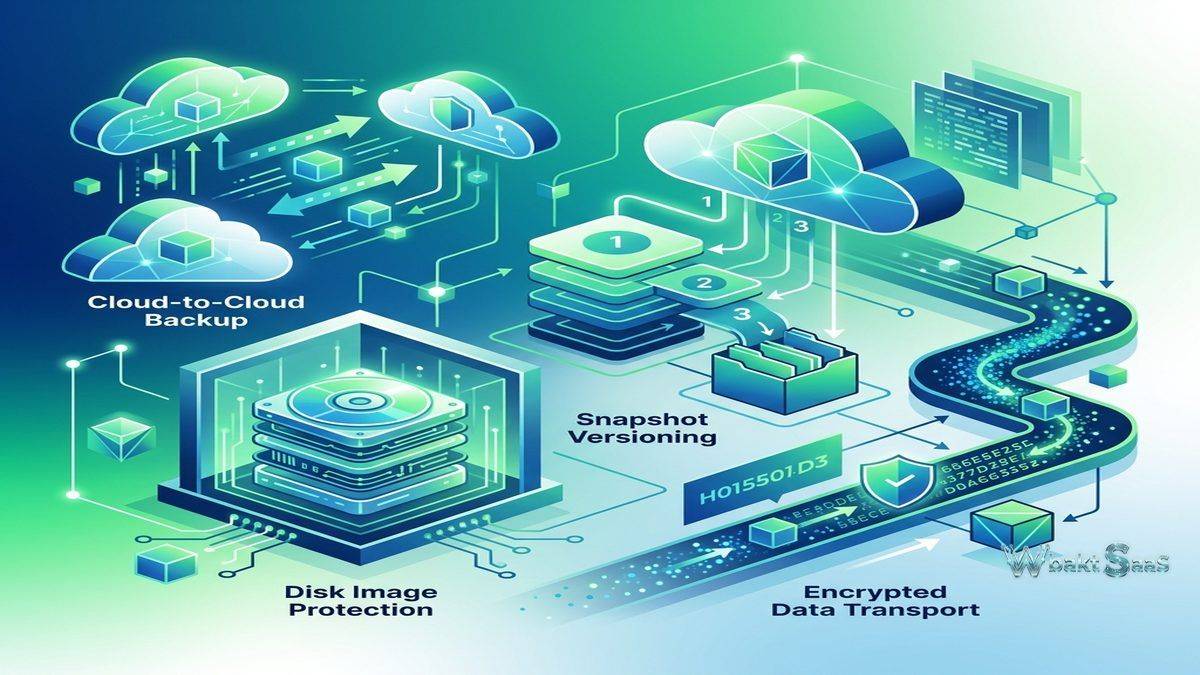
iDrive provides cloud-to-cloud backup for Microsoft 365 (Exchange, OneDrive, SharePoint, Teams) and Google Workspace (Gmail, Drive, Calendar, Contacts). Cloud-to-cloud backup addresses the common misconception that data stored in cloud productivity platforms is automatically protected against deletion, corruption, and ransomware. While Microsoft and Google maintain infrastructure-level redundancy, they do not protect against user-level data loss — accidental deletion, malicious deletion by compromised accounts, and application-level corruption require independent backup protection. iDrive’s cloud-to-cloud backup provides this protection with configurable backup frequency, retention policies, and granular recovery capabilities.
Snapshots and Versioning
iDrive Snapshots provide point-in-time recovery by preserving the state of backed-up data at specific moments. Historical snapshots enable restoring the complete and exact backup state as it existed at any previous snapshot point — critical for ransomware recovery where organizations need to identify and restore the last clean backup before encryption occurred. File versioning independently preserves multiple previous versions of individual files, enabling recovery of specific file versions without requiring full snapshot restoration. The combination of snapshots and file versioning provides flexible recovery options for different data loss scenarios — from individual file recovery to complete point-in-time restoration.
iDrive Express
iDrive Express provides physical data transport for initial backup seeding and large-scale data recovery. For initial backup seeding, iDrive ships a physical storage device to the customer, who copies their data to the device and ships it back — dramatically accelerating the initial backup process compared to internet upload for organizations with terabytes of data that would take weeks or months to upload over typical internet connections. For large-scale recovery, iDrive ships a physical device containing the backed-up data for rapid restoration. Express service directly addresses the fundamental bandwidth limitation that makes cloud backup impractical for very large datasets over standard internet connections, providing a practical bootstrap mechanism for cloud backup adoption.
Encryption and Security
iDrive encrypts data using 256-bit AES encryption during transfer and storage. The private encryption key option enables users to set personal encryption keys that iDrive cannot access, ensuring complete data confidentiality. Two-factor authentication additionally protects account access. Data center security includes SOC 2 Type II compliance, physical access controls, redundant power and cooling, and geographic distribution for disaster resilience. For regulated industries, the private encryption key option ensures that backup data remains encrypted with customer-controlled keys, providing assurance that the backup provider cannot access or decrypt protected data under any circumstances.
Admin Console
The web-based admin console provides centralized management of all backed-up devices, users, and policies. Comprehensive dashboard views show backup status across all devices, identifying machines that have not backed up recently, backup completion rates, storage usage distribution, and any backup errors requiring attention. User management controls individual account access, device authorization, and administrative permissions. Reporting capabilities provide backup status summaries, storage usage trends, and activity logs for compliance documentation and IT management oversight. Alert notifications inform administrators of backup failures, missed schedules, and storage capacity thresholds through email and mobile push notifications.
File Sharing and Sync
iDrive includes file synchronization and sharing capabilities beyond backup functionality. file sync automatically maintains consistent file versions across multiple devices through a designated sync folder. File sharing enables conveniently sharing backed-up files and folders with external recipients through secure links with configurable access controls and expiration dates. While iDrive’s file sync and sharing capabilities do not match the depth of dedicated collaboration platforms like Dropbox or Google Drive, they provide useful basic file access and sharing functionality that supplements the primary backup service without requiring separate subscriptions.
Compliance Features
iDrive supports compliance requirements through encryption, access controls, retention policies, and audit logging. HIPAA compliance support includes signed Business Associate Agreements (BAA) for healthcare organizations. Data retention policies precisely configure how long backup data and previous versions are preserved. Activity logs provide comprehensive audit trails for access and modification events. For organizations in regulated industries requiring documented data protection practices, iDrive’s compliance features provide the controls and documentation needed to demonstrate regulatory adherence.
Disk Image Backup
iDrive supports full disk image backup that captures complete system states including operating system, applications, settings, and data for bare-metal recovery. Disk image backup enables restoring an entire system state to identical or replacement hardware without reinstalling the operating system and applications individually. For servers and critical workstations where rapid full-system recovery is essential, disk image backup provides significantly faster recovery than file-level backup that requires rebuilding the system environment before restoring data files.
Mobile Device Backup
iDrive mobile apps on iOS and Android back up contacts, calendar events, photos, and videos to the same cloud account that protects computers and servers. Mobile backup provides protection against device loss, theft, and damage — the common scenarios where mobile data loss most commonly occurs. Photos and videos captured on mobile devices seamlessly and automatically upload to cloud backup without manual transfer to computers. The unified account model means that mobile device backup shares storage allocation with all other devices, providing consistent data protection across the complete device ecosystem from a single centralized management interface.
Bandwidth Management
iDrive provides bandwidth throttling controls that limit backup data transfer speeds during specified time periods. Organizations can configure reduced bandwidth usage during business hours when network capacity is needed for productive work, with full-speed backup during off-hours when bandwidth is available. Scheduled backup windows define specific preferred times when backup operations run, enabling alignment with organizational network usage patterns and maintenance windows. For organizations with limited internet bandwidth, these controls prevent backup traffic from degrading the user experience for other network-dependent business activities during peak usage periods.
Data Center Infrastructure
iDrive operates geographically distributed data centers with redundant infrastructure for data durability and availability. Data replication across multiple geographically separated physical locations provides geographic resilience against localized disasters. Data centers feature enterprise-grade security including biometric access controls, 24/7 surveillance monitoring, redundant power systems with generator backup, climate control systems, and fire suppression safety infrastructure. Redundant network connectivity through multiple internet service providers ensures availability during provider outages. The distributed infrastructure ensures that backed-up data remains accessible and recoverable even in scenarios involving facility-level disruptions.
Archival Storage
iDrive provides dedicated archival storage options for long-term data preservation at optimized pricing. Archive storage serves organizations needing to retain historical data for regulatory compliance, legal preservation, and institutional knowledge management without consuming primary backup storage capacity. Archived data remains fully searchable and recoverable but is stored on infrastructure optimized for durability and cost efficiency rather than rapid access performance. For organizations with data retention obligations spanning years or decades, archival storage provides an economical approach to long-term preservation alongside active backup protection.
Disaster Recovery Planning
iDrive supports disaster recovery planning through multiple recovery mechanisms — file-level restore for individual file recovery, snapshot restore for point-in-time system recovery, disk image restore for complete system reconstruction, and iDrive Express physical shipment for large-scale rapid recovery when internet-based download would be too slow. The diversity of recovery options ensures that organizations can match recovery approaches to specific disaster scenarios and urgency requirements. Regular and proactive backup verification through restore testing confirms that backed-up data is complete, consistent, and recoverable before an actual disaster scenario demands successful restoration.
Common Use Cases
Small Business: Small businesses use iDrive for comprehensive endpoint and server backup with affordable per-storage pricing that protects unlimited devices without per-device licensing costs that scale linearly with business growth and device proliferation.
Professional Services: Law firms, accounting practices, and consulting firms use iDrive for protecting client data across workstations, servers, and cloud applications with encryption, compliance controls, and retention policies that support professional data handling and confidentiality requirements.
Healthcare: Healthcare organizations use iDrive with HIPAA BAA support for protecting patient data across clinical workstations, administrative servers, and cloud-hosted healthcare applications with compliant encryption, access controls, and documented data protection procedures.
Creative Professionals: Photographers, videographers, and designers use iDrive for backing up large creative asset libraries across workstations and NAS devices with iDrive Express for practical initial backup of multi-terabyte media collections that would be impractical to upload over standard internet connections.
Remote Workers: Distributed workforces use iDrive for consistent backup protection across employee laptops and desktops regardless of geographic location, with centralized IT visibility into backup status and compliance across the entire remote workforce.
Microsoft 365 Protection: Organizations use iDrive’s cloud-to-cloud backup for independent protection of Microsoft 365 data including Exchange, OneDrive, SharePoint, and Teams, addressing the significant backup gap that Microsoft’s native retention policies leave for user-level data loss events.
Education: Educational institutions use iDrive for protecting administrative systems, faculty workstations, student project servers, and institutional Microsoft 365 or Google Workspace data with affordable storage-based pricing that accommodates education budget constraints.
Pricing
iDrive offers Personal, Team, and Business plans with storage capacities ranging from individual to multi-terabyte allocations. All plans support unlimited device backup within the storage allocation. Business plans include priority support, centralized admin console, and server backup capabilities. Annual pricing provides very significant savings over monthly billing. First-year promotional pricing is often available for new subscribers. iDrive Express physical transport is included as a complimentary service for qualifying plan tiers.
Pricing and features are subject to change. Please verify current plan details on the official iDrive website before making purchasing decisions.
Limitations
- Upload speeds: Initial backup of large datasets can be slow over typical internet connections, though iDrive Express addresses this limitation through physical data transport for initial seeding.
- Interface complexity: The desktop application interface, while functional, is less visually polished than competing backup platforms, potentially creating a less intuitive user experience.
- Enterprise features: Very large enterprises may find iDrive’s administration and policy management capabilities less comprehensive than enterprise-specific backup platforms designed for thousands of endpoints.
- Sync limitations: File sync and sharing capabilities are basic compared to dedicated collaboration platforms and may not fully satisfy organizations needing advanced sharing and collaboration features.
- Linux GUI: Linux backup relies primarily on command-line tools rather than a graphical interface, requiring more technical expertise for Linux backup environment management.
Summary
iDrive provides a comprehensive, affordable, and versatile cloud backup platform that distinguishes itself through unlimited multi-device backup from a single account, broad device and platform coverage spanning computers, servers, NAS devices, mobile devices, and cloud applications, and transparent pricing that scales with storage capacity rather than device count. This approach creates particular value for organizations with many devices that need consistent backup protection without the per-device licensing costs that make competing platforms expensive at scale.
The cloud-to-cloud backup capability for Microsoft 365 and Google Workspace addresses a critical data protection gap that many organizations unfortunately overlook — the widespread assumption that cloud-hosted data is automatically protected against all forms of data loss. iDrive’s independent backup of cloud application data provides the critical protection layer that cloud productivity platforms do not natively include for user-level data loss scenarios.
Cloud backup platforms including iDrive, Backblaze, Carbonite, Acronis, and Veeam each serve different backup philosophies and strategies, device coverage strategies, and pricing models. iDrive’s advantages center on multi-device unlimited backup, broad platform coverage, cloud-to-cloud protection, affordable storage-based pricing, and the physical data transport option that makes cloud backup practical for organizations with very large initial backup requirements. Organizations evaluating backup solutions should carefully consider their device diversity, storage requirements, and budget constraints when comparing backup platform options and total cost of ownership.
Features, pricing, and availability discussed in this review reflect information available at the time of writing. Software products evolve continuously, and details may have changed since publication. Please verify current information directly on the official iDrive website. WBAKT SaaS is an independent review platform with no affiliate relationships with any software company mentioned in this article.
For related tools, see our reviews of Backblaze Backup, Wasabi Object Storage, and Dropbox Enterprise.
About the Author