Every website that depends on organic search traffic needs direct insight into how Google sees, crawls, indexes, and ranks its pages. While third-party SEO tools like Ahrefs and SEMrush provide estimated search data based on their own crawling and modeling, Google Search Console provides actual search performance data directly from Google — real impressions, real clicks, real ranking positions, and real indexing status. This fundamental distinction between estimated and actual first-party data makes Search Console an irreplaceable tool in any SEO professional’s workflow, regardless of what other third-party tools they use.
Google Search Console (formerly Google Webmaster Tools) is a free service provided by Google that helps website owners monitor, maintain, and troubleshoot their site’s presence in Google Search results. The platform provides data and tools that no third-party service can replicate because the data comes directly from Google’s search infrastructure. Search Console provides transparency into exactly which specific queries trigger a site’s appearance in search results, which pages Google has indexed, what technical issues prevent proper crawling, and how the site performs against Google’s quality standards. Understanding Search Console’s capabilities is essential for any organization that considers organic search a meaningful traffic source.
Search Performance Reports
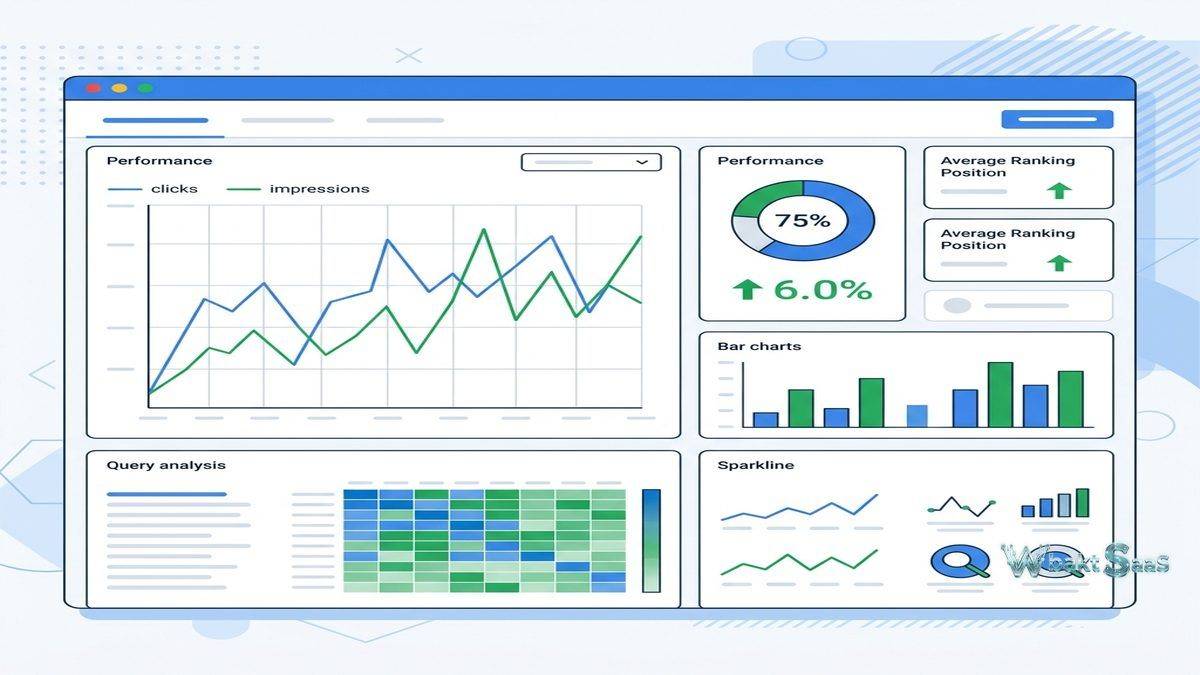
The Performance report is Search Console’s most frequently used feature, showing how the site performs in Google Search over time. Four primary metrics are tracked: Total Clicks (how many times users clicked through to the site from search results), Total Impressions (how many times the site appeared in search results), Average CTR (click-through rate — the percentage of impressions that resulted in clicks), and Average Position (the average ranking position across all queries and pages).
These metrics can be analyzed across multiple dimensions: Queries (which search terms trigger the site’s appearance), Pages (which pages appear in results), Countries (geographic distribution of search visibility), Devices (desktop, mobile, tablet performance), Search Appearance (rich results, AMP, video), and Dates (performance trends over time). The ability to filter and combine these dimensions enables precise analysis — for example, identifying which mobile queries in a specific country drive the most clicks to a specific page.
Query-level data reveals the actual search terms that users type when they find the site in Google results. This data is uniquely valuable because it shows real user search behavior rather than estimated search volumes. A page might rank for hundreds of queries that keyword research tools never suggested, revealing unexpected audience interests and content opportunities that only actual search data can uncover. Comparing impressions to clicks at the query level identifies high-impression, low-click queries where improved title tags or meta descriptions might increase click-through rates without requiring ranking improvements.
Date comparison features show performance changes between two time periods, highlighting which queries gained or lost traffic, which pages improved or declined in rankings, and how seasonal patterns affect search visibility. These comparative insights help diagnose traffic changes — whether a traffic decline results from ranking drops on specific queries, seasonal search volume decreases, or algorithm update impacts affecting specific page types.
URL Inspection Tool
The URL Inspection tool provides detailed information about how Google sees a specific URL on the site. For any submitted URL, the tool shows whether the page is indexed, when it was last crawled, what canonical URL Google selected, whether the page has mobile usability issues, and what structured data Google detected. This page-level diagnostic capability is essential for troubleshooting individual pages that are not appearing in search results as expected.
The live URL test fetches the page in real-time using Google’s rendering engine, showing exactly how Googlebot sees the page — including JavaScript-rendered content. This capability is critical for websites that rely on client-side JavaScript rendering, as it reveals whether Google can actually see and index the dynamic content that the page produces. The rendered HTML view shows the complete DOM that Google processes, enabling comparison between what the developer intended and what Google actually receives.
Request indexing functionality within the URL Inspection tool asks Google to prioritize crawling and indexing a specific URL. While this does not guarantee immediate indexing, it accelerates the process for new or updated pages that need to appear in search results promptly — product pages, time-sensitive announcements, or recently published content that addresses trending topics.

Index Coverage Report
The Index Coverage report shows which pages from the site Google has successfully indexed, which pages it has excluded, and why excluded pages were not indexed. Pages are categorized as Valid (successfully indexed), Valid with Warnings (indexed but with potential issues), Excluded (intentionally or unintentionally not indexed), and Error (pages that Google attempted to index but encountered problems).
Error categories include server errors (5xx), redirect errors, soft 404s (pages that return 200 status codes but appear to be error pages), and submitted URL blocked by robots.txt. Each error category links to the specific affected URLs, enabling systematic identification and resolution of indexing problems. For large websites with thousands of pages, the Index Coverage report provides the only reliable way to understand what percentage of the site Google has actually indexed and why certain pages are excluded.
Excluded page reasons include pages blocked by robots.txt, noindex tags, canonical to another URL, duplicate content detection, crawl anomalies, and pages discovered but not yet indexed. Understanding exclusion reasons helps webmasters distinguish between intentional exclusions (noindex on admin pages, canonical consolidation of duplicate content) and unintentional exclusions that require correction (important pages accidentally blocked or pages Google cannot access due to technical issues).
Core Web Vitals
The Core Web Vitals report tracks real-user performance metrics that Google uses as ranking signals: Largest Contentful Paint (LCP — loading performance), First Input Delay (FID — interactivity responsiveness, being replaced by Interaction to Next Paint), and Cumulative Layout Shift (CLS — visual stability). These metrics are measured from actual Chrome user sessions rather than synthetic lab tests, providing real-world performance data that reflects how users actually experience the site.
URLs are classified as Good, Needs Improvement, or Poor based on their Core Web Vitals scores. The report groups URLs by similar performance patterns, showing how many URLs fall into each category and identifying the specific metric that causes poor classification. Performance improvement recommendations connect Core Web Vitals issues with actionable optimization guidance, though implementing improvements typically requires developer involvement to address rendering, resource loading, and layout stability at the code level.
Mobile Usability
The Mobile Usability report identifies pages with mobile experience issues: content wider than screen, clickable elements too close together, text too small to read, and viewport not configured. As mobile traffic exceeds desktop traffic for most websites and Google uses mobile-first indexing, mobile usability issues directly impact both user experience and search ranking potential. The report lists specific affected URLs for each issue type, enabling targeted remediation of mobile experience problems.
Sitemaps
Sitemap management allows submitting XML sitemaps that tell Google which URLs exist on the site and when they were last modified. Sitemap status shows whether Google successfully processed the sitemap, how many URLs the sitemap contains, how many of those URLs Google has indexed, and when the sitemap was last read. For large websites, sitemap submission ensures that Google discovers all important pages rather than relying solely on crawl-based discovery that may miss pages with limited internal linking.
Links Report
The Links report shows both external links pointing to the site (backlinks from other websites) and internal links within the site. External link data shows top linked pages, top linking sites, and top linking anchor text — providing Google’s own perspective on the site’s backlink profile. While third-party tools provide more detailed backlink analysis, Search Console’s link data represents what Google actually knows about and considers when evaluating the site’s link profile.
Internal link data shows how the site’s own pages link to each other, revealing the internal link distribution that affects how Google understands page importance and topic relationships within the site. Pages with few internal links may struggle to rank because Google interprets low internal linking as a signal of lower page importance within the site’s information architecture.
Security and Manual Actions
The Security Issues report alerts webmasters when Google detects security problems on the site — malware, phishing, hacked content, or deceptive pages. These security issues can result in warning labels in search results or complete removal from search results, making immediate remediation critical. The Manual Actions report shows whether Google’s human reviewers have applied penalties to the site for violating Google’s webmaster guidelines — thin content, unnatural links, cloaking, or other policy violations that automated systems flagged for human review.
Removals
The Removals tool enables temporary removal of URLs from Google Search results — useful for removing outdated content, pages with sensitive information that was accidentally published, or URLs that should not appear in search results while permanent solutions are implemented. Temporary removals last approximately six months, during which permanent solutions (noindex tags, 404 responses, or content updates) should be implemented to prevent reappearance.
Structured Data and Rich Results
Enhancement reports track the validity of structured data markup (Schema.org) that enables rich results in Google Search — recipe cards, product ratings, FAQ accordions, event listings, how-to steps, and other enhanced search result presentations. Valid structured data increases the visual prominence and information density of search results, potentially improving click-through rates. Error and warning identification shows which pages have invalid structured data that prevents rich result eligibility.
Discover Performance
Google Discover delivers personalized content recommendations to mobile users based on their interests and browsing history, appearing in the Google app and mobile browser homepage. Search Console’s Discover Performance report shows how the site’s content performs in Discover — impressions, clicks, and CTR for content that Google surfaces through this interest-based content feed. Discover can drive significant traffic to content-heavy websites, and the performance report reveals which content topics, formats, and images generate the strongest Discover engagement.
Unlike traditional search where users actively search for information, Discover proactively surfaces content based on inferred user interests. Content that performs well in Discover typically features high-quality imagery, engaging headlines, and comprehensive coverage of topics that match user interest patterns. Understanding Discover performance helps content teams optimize specifically for this discovery-based traffic channel that operates by different engagement principles than search-intent-based traffic.
International Targeting
The International Targeting report helps websites that serve content in multiple languages or target multiple countries configure their international SEO settings correctly. Hreflang tag validation ensures that language and regional targeting annotations are implemented correctly, preventing the duplicate content issues and targeting errors that commonly affect multilingual websites. Country targeting settings for generic top-level domains (.com, .net, .org) indicate geographic targeting preferences to Google’s search algorithms.
AMP Status
For websites implementing Accelerated Mobile Pages, the AMP Status report tracks the validity of AMP pages, identifying markup errors, required component issues, and layout problems that prevent AMP pages from appearing in AMP-eligible search result features. While AMP is no longer required for top stories eligibility, properly implemented AMP pages continue to provide performance benefits that improve mobile user experience and may positively influence Core Web Vitals scores.
Search Console API
The Search Console API provides programmatic access to search performance data, URL inspection, and sitemap management. API access enables custom reporting dashboards, automated monitoring systems, and integration with business intelligence tools that combine search performance data with other marketing and business metrics. Large organizations and agencies use the API to automate performance tracking across many properties, generate custom reports that exceed the web interface’s built-in reporting capabilities, and build alerting systems that monitor for significant performance changes.
The API’s search analytics endpoint provides access to the same query, page, country, device, and date dimension data available in the web interface, enabling programmatic analysis of search performance patterns across dimensions that manual web interface analysis cannot efficiently process at scale.
Common Use Cases
SEO Performance Monitoring: SEO teams monitor search performance daily to track ranking changes, traffic trends, and content performance. Query-level data informs keyword strategy, while page-level data guides content optimization priorities.
Technical SEO Auditing: Development teams use Index Coverage, Core Web Vitals, and Mobile Usability reports to identify and resolve technical issues that affect search visibility and user experience.
Content Strategy: Content teams analyze query data to discover new content opportunities — queries where the site appears but ranks poorly indicate topics where improved or new content could capture additional search traffic. Comparing query data against existing content identifies content gaps where audience search demand exists but the site lacks adequate coverage.
Site Migration Monitoring: During website redesigns, domain migrations, or platform changes, Search Console provides critical monitoring of indexing status changes, crawl error spikes, and traffic impact that indicate migration issues requiring immediate attention. Monitoring both the old and new properties during migration ensures complete visibility into the transition process.
Summary
Google Search Console is an essential, free tool for any website that depends on organic search traffic. Its unique value lies in providing actual Google search data rather than third-party estimates — real queries, real impressions, real clicks, and real detailed indexing status that no other available tool can replicate. While Search Console lacks the competitive analysis, keyword research, and backlink analysis capabilities of paid SEO platforms, its first-party data complements those tools by providing ground truth against which estimates can be calibrated.
Property verification — confirming site ownership through DNS records, HTML file upload, meta tag, Google Analytics, or Google Tag Manager — is required before accessing any Search Console data. Multiple verification methods accommodate different levels of technical access, from domain-level DNS verification (covering all subdomains and protocols) to URL-prefix verification for specific site sections. Organizations should verify properties at the domain level when possible, as this provides comprehensive data across all URL variations.
Regular Search Console monitoring should be a foundational practice for any organization’s SEO workflow. Weekly performance review, monthly index coverage audits, and immediate response to security or manual action alerts ensure that technical issues are identified and resolved before they significantly impact search visibility. The platform’s email notification system alerts verified site owners to critical issues, but proactive monitoring catches problems earlier than reactive notification-based approaches.
Search Console’s integration with other Google tools — Google Analytics 4, Google Ads, and Looker Studio — enables comprehensive digital marketing analysis that combines search performance data with website behavior data, advertising performance, and custom reporting. This Google ecosystem integration makes Search Console data accessible within the broader analytical frameworks that marketing teams use for holistic digital performance measurement.
Features, pricing, and availability discussed in this review reflect information available at the time of writing. Software products evolve continuously, and details may have changed since publication. Please verify current information directly on the official Google Search Console website. WBAKT SaaS is an independent review platform with no affiliate relationships with any software company mentioned in this article.
For related SEO and analytics tools, see our reviews of Google Analytics 4, Ahrefs SEO platform, and SEMrush marketing toolkit.
About the Author