Product analytics differs fundamentally from web analytics. While web analytics platforms like Google Analytics measure website traffic — visits, pageviews, bounce rates, and traffic sources — product analytics platforms measure how users interact with a product after they arrive. Product analytics answers questions about feature adoption, user engagement depth, conversion funnel performance, retention patterns, and the behavioral differences between users who succeed with the product and those who do not. Mixpanel is one of the leading product analytics platforms, providing event-based tracking, funnel analysis, retention measurement, and user segmentation designed specifically for understanding product usage rather than website traffic.
Founded in 2009, Mixpanel pioneered the event-based analytics approach that has since become the standard for product analytics. Rather than measuring pageviews as the primary interaction unit, Mixpanel tracks events — discrete user actions like completing a signup, creating a project, inviting a team member, or making a purchase — with associated properties that provide context about each interaction. This event-based model captures the granular behavioral data that product teams need to understand feature engagement, optimize conversion flows, and identify the user behaviors that correlate with long-term retention and value creation.
Event Tracking Architecture
Mixpanel’s data model centers on three core concepts: events, properties, and user profiles. Events represent user actions — “Sign Up,” “Create Project,” “Send Message,” “Complete Purchase” — that the application sends to Mixpanel when users perform trackable interactions. Properties are key-value pairs attached to events that provide context — a “Complete Purchase” event might carry properties for item name, price, category, payment method, and discount applied. User profiles store persistent attributes about individual users — plan type, account creation date, company size, geographic location — that enable user-level analysis and segmentation.
Implementation requires instrumenting the application code to send events and properties to Mixpanel’s tracking endpoints through SDKs available for web (JavaScript), iOS, Android, React Native, Flutter, Python, Ruby, Node.js, Java, and other platforms. The quality of Mixpanel analytics depends directly on the quality of event instrumentation — thoughtful event naming conventions, comprehensive property selection, and consistent implementation across platforms determine whether the resulting data supports the analysis questions that product teams need to answer.
Mixpanel’s data governance features help organizations maintain data quality as their tracking implementation grows. Lexicon provides a data dictionary that documents events, properties, and their intended meanings, serving as a shared reference for product, engineering, and data teams. Data classification identifies unused events, duplicate properties, and inconsistencies across platforms. These governance tools become increasingly important as tracking implementations grow complex, preventing the data quality deterioration that makes analytics unreliable over time.
Funnel Analysis
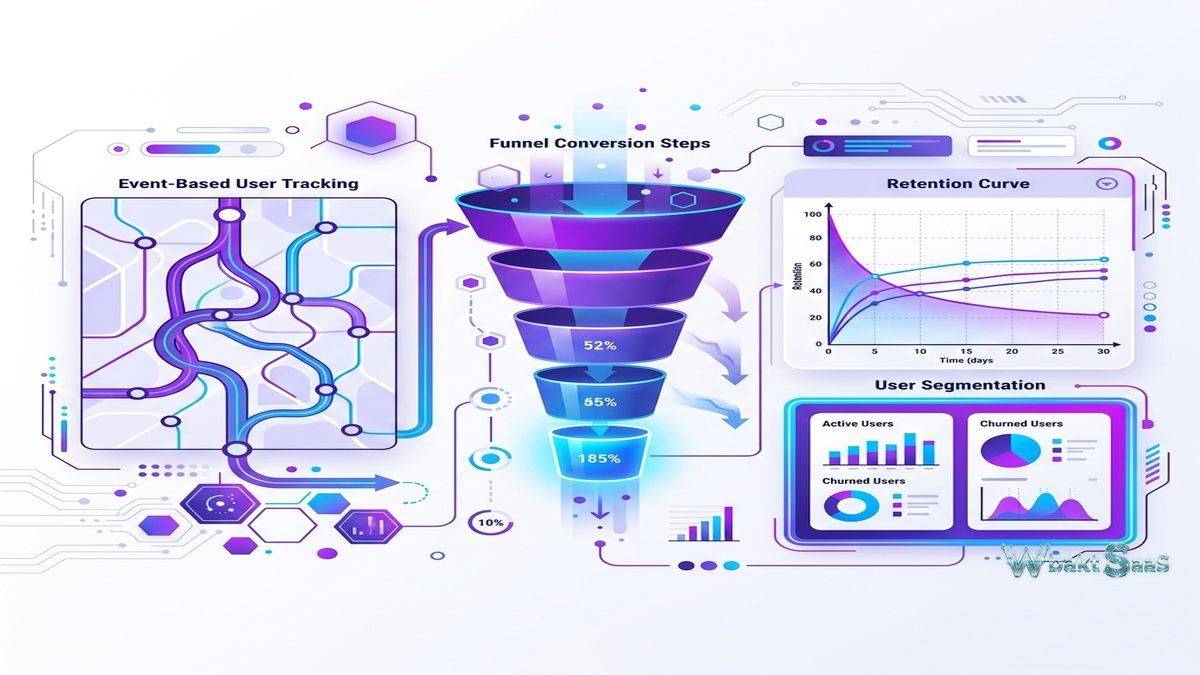
Mixpanel Funnels measure conversion rates through defined sequences of events. A SaaS onboarding funnel might track progression through Sign Up → Complete Profile → Create First Project → Invite Team Member → Activate Feature. The funnel visualization shows the conversion rate between each step, revealing where users drop out of the intended workflow. If 60% of users who sign up complete their profile but only 20% create a first project, the profile-to-project transition represents the highest-impact optimization opportunity.
Funnel segmentation breaks down conversion rates by user properties, revealing how conversion patterns differ across user segments. Enterprise users might convert through onboarding at different rates than individual users. Users from paid advertising might have different funnel behavior than organic search users. Mobile users might exhibit different conversion patterns than desktop users. These segmented funnel insights reveal whether conversion optimization should target specific user segments with tailored experiences rather than applying universal changes.
Time-to-convert analysis measures how long users take to progress between funnel steps, revealing whether conversion happens quickly or requires multiple sessions over days or weeks. Understanding conversion timing informs follow-up communication timing — if most conversions from trial to paid happen between day 5 and day 10, that window represents the optimal period for conversion-focused messaging.

Retention Analysis
Retention reports measure whether users return to the product after their initial experience. Mixpanel’s retention analysis shows what percentage of users who performed an initial action (signup, first visit, feature activation) return to perform a subsequent action (any login, specific feature use, purchase) within defined time windows. N-day retention shows return rates for each day after the initial action. N-week and N-month retention aggregate return patterns over longer periods suitable for products with weekly or monthly usage cycles.
Retention curves visualize the characteristic pattern of user engagement decay over time — the rapid initial drop-off followed by stabilization at a plateau that represents the core retained user base. The retention plateau level is one of the most important product health metrics: a product that retains 40% of users after 90 days demonstrates significantly stronger product-market fit than one that retains 10%. Comparing retention curves across user segments, acquisition channels, and time cohorts reveals which factors contribute to stronger long-term engagement.
Frequency analysis measures how often retained users engage with the product — daily, weekly, or monthly usage patterns that indicate engagement intensity. A product might retain users but see declining visit frequency, indicating waning engagement that precedes eventual churn. Monitoring both retention rate and engagement frequency provides a comprehensive view of user engagement health.
User Segmentation and Cohorts
Mixpanel’s segmentation capabilities create user groups based on behavioral criteria, demographic properties, and computed attributes. Behavioral cohorts group users who performed specific actions within defined timeframes — users who completed onboarding in the last 30 days, users who used a premium feature at least 5 times, or users who have not logged in for 14 days. These behavioral segments enable targeted analysis that reveals how different user groups interact with the product differently.
Cohort comparison shows how product metrics differ across user segments. Comparing retention rates between users who received in-app onboarding guidance and those who did not reveals the onboarding program’s impact. Comparing feature adoption rates between users from different acquisition channels reveals which channels attract users with the strongest product engagement potential.
Flows
Mixpanel Flows visualize the sequences of events that users perform, revealing common navigation patterns, unexpected user journeys, and behavioral divergences between user segments. Unlike funnels that measure progression through a predefined sequence, flows discover the actual sequences users follow — which may differ significantly from the intended user journey that product designers envisioned.
Flow analysis identifies common paths to key outcomes (what do users typically do before making their first purchase?) and common paths away from key points (what do users do after viewing the pricing page — do they sign up, leave, or explore more features?). These discovered behavioral patterns inform product design decisions, feature placement, navigation optimization, and user journey improvements based on actual observed behavior rather than assumed user workflows.
Impact Analysis
Mixpanel’s Impact report measures how feature launches and product changes affect user behavior over time. By comparing behavioral metrics before and after a feature launch — engagement frequency, retention rate, conversion rate, feature adoption — Impact quantifies whether product changes achieve their intended effects. This causal analysis helps product teams distinguish between features that genuinely improve user outcomes and features that generate initial curiosity without sustained behavioral change.
Integrations
Mixpanel integrates with data infrastructure tools including Segment (customer data platform), mParticle (mobile data platform), and Rudderstack (open-source CDP) for centralized event data collection and routing. Data warehouse integrations with BigQuery, Snowflake, and Redshift enable bidirectional data flow — exporting Mixpanel data to warehouses for custom analysis and importing warehouse data to enrich Mixpanel user profiles with data from other business systems.
Marketing integrations with Braze, Iterable, OneSignal, and Customer.io connect behavioral analytics to messaging platforms, enabling behavior-triggered communication campaigns based on Mixpanel cohort membership. Product integrations with LaunchDarkly, Optimizely, and Amplitude Experiment connect analytics with feature flagging and experimentation platforms.
Boards and Dashboards
Mixpanel Boards organize multiple reports — funnels, retention charts, trend analyses, and segmentation breakdowns — into shared dashboards that provide at-a-glance views of key product metrics. Product teams create boards for specific product areas (onboarding metrics, engagement KPIs, revenue analytics), specific audiences (enterprise users, trial users, mobile users), or specific time-sensitive initiatives (launch monitoring, experiment tracking, incident impact assessment).
Board sharing and permissions control who can view, edit, and comment on dashboards, supporting both public organizational dashboards and private analytical workspaces. Scheduled email delivery sends board snapshots to stakeholders on recurring schedules, ensuring that decision-makers receive regular metric updates without requiring active Mixpanel access. The combination of self-service dashboards and scheduled delivery supports both data-curious teams who explore analytics actively and stakeholders who prefer receiving curated metric summaries.
Custom Alerts
Mixpanel Alerts notify teams when metrics cross defined thresholds or deviate significantly from expected patterns. An alert might trigger when daily signups drop below a specified minimum, when checkout conversion rate decreases by more than a defined percentage, or when a key feature’s daily usage changes significantly from its recent average. These automated alerts transform Mixpanel from a tool that teams must actively monitor into a system that proactively identifies situations requiring attention.
Anomaly detection supplements threshold-based alerts by automatically identifying metric values that deviate from historical patterns, catching unexpected changes that manual threshold configuration might miss. Alert delivery through email, Slack, and Microsoft Teams ensures that the right team members are notified through their preferred communication channels.
Group Analytics
Group analytics extends Mixpanel’s analysis beyond individual users to organizational entities — companies, accounts, workspaces, or teams. For B2B SaaS products where multiple users belong to a single customer account, group analytics measures engagement, feature adoption, and retention at the account level rather than the individual user level. An account with ten users is one customer regardless of how many individual users are active, and group analytics ensures that retention, conversion, and engagement metrics reflect customer-level reality rather than being inflated by multiple users from the same organization.
Signal Report
Mixpanel Signal automatically identifies correlations between user behaviors and key outcomes. Signal analyzes which early user actions correlate most strongly with long-term retention, conversion, or other defined success metrics. The analysis might reveal that users who invite a team member within the first three days retain at 3x the rate of users who do not, or that users who complete a specific tutorial sequence convert to paid plans at twice the average rate. These discovered correlations inform product strategy by identifying the specific behaviors that matter most for user success and long-term value creation.
Data Pipeline
Mixpanel’s data pipeline capabilities enable exporting raw event data to cloud storage (Amazon S3, Google Cloud Storage) and data warehouses for analysis that exceeds what the Mixpanel interface provides. Data export supports organizations that need to combine product analytics with data from other business systems — CRM data, financial data, support ticket data — in a centralized data warehouse for comprehensive business intelligence that spans multiple data sources.
Reverse ETL capabilities import data from warehouses back into Mixpanel, enriching user profiles with computed attributes, segmentation data, and business metrics from external systems. This bidirectional data flow ensures that Mixpanel serves as both an analytical destination and an enriched data source that benefits from the broader organizational data infrastructure.
Common Use Cases
SaaS Product Teams: Product managers use Mixpanel to measure feature adoption, track onboarding completion, analyze conversion funnels, and monitor retention — the core metrics that determine SaaS product health and growth trajectory.
Mobile App Development: Mobile app teams track user engagement, screen flows, in-app purchase behavior, and push notification effectiveness. Mobile-specific SDKs capture app lifecycle events, session data, and device context automatically.
E-commerce Optimization: E-commerce teams analyze purchase funnels, product discovery patterns, cart abandonment behavior, and repeat purchase frequency. User profiles enriched with purchase history enable lifetime value analysis, purchase prediction, and personalized marketing segmentation based on demonstrated buying preferences and engagement patterns.
Growth Teams: Growth engineers use Mixpanel to measure experiment outcomes, identify activation metrics, and discover the behavioral patterns that predict long-term user retention and revenue generation.
Pricing
Mixpanel offers a free Starter plan with generous event volume limits, making the platform accessible for smaller applications. Growth and Enterprise plans increase event volume limits, add advanced features (group analytics, data pipelines, SSO), and provide enhanced support. Event-based pricing means costs correlate with tracking volume rather than user seats.
Pricing and features are subject to change. Please verify current plan details on the official Mixpanel website before making purchasing decisions.
Limitations
- Implementation complexity: Meaningful product analytics requires thoughtful event instrumentation that demands engineering resources and planning time.
- Not a web analytics replacement: Mixpanel is designed for product usage analysis, not website traffic measurement. Organizations still need web analytics (GA4) for traffic, SEO, and acquisition analysis.
- Learning curve: Advanced features like formulas, custom properties, and JQL queries require analytical expertise that exceeds casual user capabilities.
- Historical data limitations: Retroactive analysis is limited by what events were instrumented at the time. Events that were not tracked cannot be analyzed historically.
Summary
Mixpanel provides specialized product analytics that helps teams understand how users interact with their products at a granular behavioral level. Its event-based architecture, funnel analysis, retention measurement, and user segmentation capabilities serve the specific analytical needs of product development teams who need deeper behavioral insight than web analytics platforms provide. The platform’s generous free tier — which includes substantial monthly event volume — removes financial barriers to adoption, allowing product teams to implement comprehensive analytics without immediate budget commitment.
Successful Mixpanel implementation requires cross-functional collaboration between product, engineering, and data teams. Product managers define which events and properties to track based on analytical requirements. Engineers implement the tracking code within the application. Data teams ensure data quality, build dashboards, and support advanced analysis. Organizations that approach product analytics as a collaborative discipline across these functions extract significantly more value than those that treat it as solely an engineering or product management responsibility.
The transition from basic analytics (measuring pageviews and sessions) to product analytics (measuring specific user behaviors and their correlation with business outcomes) represents a meaningful analytical maturity step. Organizations at early analytical maturity stages may find Mixpanel’s event-based model more complex than they need, while organizations with mature data practices will appreciate the analytical depth and flexibility that Mixpanel provides.
Product analytics platforms including Mixpanel, Amplitude, Heap, PostHog, and Pendo each approach product analytics with different architectural philosophies and feature priorities. Mixpanel’s advantages center on event-based flexibility, analytical depth, and the generous free tier that enables adoption without immediate financial commitment. Organizations evaluating product analytics should consider their instrumentation capabilities, analysis requirements, team expertise, and integration needs when selecting the platform that best supports their product development decisions.
Features, pricing, and availability discussed in this review reflect information available at the time of writing. Software products evolve continuously, and details may have changed since publication. Please verify current information directly on the official Mixpanel website. WBAKT SaaS is an independent review platform with no affiliate relationships with any software company mentioned in this article.
For related analytics tools, see our reviews of Google Analytics 4, Hotjar user analytics, and VWO testing solution.
About the Author