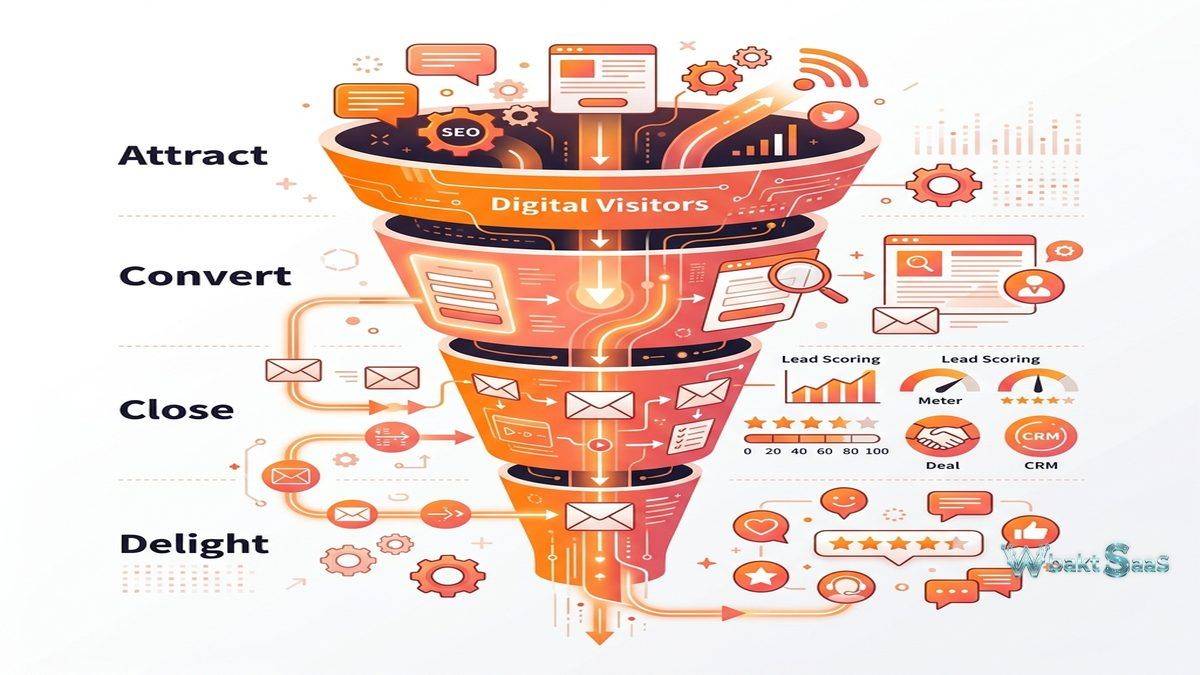
Marketing has shifted fundamentally from interruption-based outreach to permission-based engagement. The inbound marketing methodology — attracting potential customers through valuable content, converting visitors into leads through optimized conversion paths, nurturing those leads through personalized communication, and analyzing the entire journey to improve results — requires software that connects content creation, lead management, email automation, analytics, and customer relationship management into a unified system. HubSpot Marketing Hub is the platform most closely associated with this inbound approach, having both popularized the methodology and built the tools to execute it.
HubSpot’s marketing platform has evolved significantly since the company’s founding in 2006. What began as a blogging and SEO tool has expanded into a comprehensive marketing automation platform that covers content management, social media, email marketing, lead scoring, landing pages, advertising management, and sophisticated analytics. As part of the broader HubSpot CRM Platform — which includes Sales Hub, Service Hub, CMS Hub, and Operations Hub — the Marketing Hub operates within an ecosystem designed to unify marketing, sales, and customer service data in a single customer record. Understanding the Marketing Hub’s capabilities, integration advantages, and limitations helps organizations evaluate whether HubSpot’s approach to marketing automation aligns with their strategy and budget.
Core Marketing Automation
Marketing automation in HubSpot centers on workflows — automated sequences of actions triggered by contact behaviors, property changes, or scheduled timing. A workflow might begin when a contact downloads a whitepaper (trigger), then send a follow-up email two days later (action), wait three days (delay), check whether the contact opened the email (branch), and either send a related case study (yes branch) or re-send with a different subject line (no branch). This visual workflow builder allows marketers to construct sophisticated nurturing sequences without programming knowledge.
Workflow triggers encompass form submissions, page views, email interactions, list membership changes, deal stage changes, custom event triggers, and date-based conditions. Actions include sending emails, updating contact properties, creating tasks for sales representatives, enrolling contacts in other workflows, sending internal notifications, and triggering webhook calls to external systems. The combination of diverse triggers and actions enables automation of virtually any marketing process that follows conditional logic.
Lead scoring assigns numerical values to contacts based on their behaviors and demographic characteristics. A contact visiting the pricing page might receive 15 points, while downloading a product comparison guide adds 10 points, and having a job title containing “Director” or “VP” adds 20 demographic points. When a contact’s score exceeds a defined threshold, automation can notify a sales representative, change the contact’s lifecycle stage to “Marketing Qualified Lead,” and enroll the contact in a sales-focused communication sequence. This scoring mechanism helps marketing teams identify which leads deserve sales attention, improving the efficiency of the marketing-to-sales handoff.
Email Marketing
HubSpot’s email marketing tools support both broadcast emails (newsletters, announcements, promotions sent to contact lists) and automated emails (triggered by workflows based on contact behavior). The drag-and-drop email editor provides template-based design with customizable modules for text, images, buttons, social links, video, and dynamic content blocks that display different content to different recipients based on their properties or behaviors.
Personalization tokens insert contact-specific data — first name, company name, industry, last purchase date — into email content, creating individualized experiences at scale. Smart content goes further, dynamically changing entire content blocks based on contact segmentation: a technology company contact might see a case study from a tech client, while a healthcare contact sees a healthcare-specific success story, all within the same email campaign.
A/B testing capabilities allow marketers to test subject lines, sender names, email content, send times, and calls-to-action against control groups to identify which variations drive higher engagement. Send time optimization uses machine learning to determine the optimal delivery time for each recipient based on their historical engagement patterns, improving open rates by delivering emails when contacts are most likely to check their inbox.

Landing Pages and Forms
HubSpot’s landing page builder creates conversion-focused pages with drag-and-drop design, A/B testing, responsive layouts, and integration with the CRM contact database. Landing pages connect directly to HubSpot forms, ensuring that every form submission creates or updates a contact record with the submitted information automatically associated with the landing page, campaign, and traffic source that generated the conversion.
Forms support progressive profiling — displaying different questions to returning visitors based on information already collected — enabling gradual data enrichment without overwhelming first-time visitors with lengthy forms. Smart forms adapt their fields based on what the platform already knows about the visitor, asking only for new information while pre-filling known fields. This progressive approach increases conversion rates by reducing form friction while still building comprehensive contact profiles over time.
Thank-you pages and inline thank-you messages provide post-submission experiences that can include additional content offers, meeting scheduling links, or next-step instructions. The entire conversion path — ad or content piece → landing page → form → thank-you page — can be tracked and attributed to specific marketing campaigns, providing clear visibility into which campaigns generate the most valuable leads.
Content and SEO Tools
HubSpot’s content tools include a blog platform with SEO recommendations, topic cluster strategy planning, and content performance analytics. The topic cluster model organizes content around pillar pages (comprehensive overview content) linked to related cluster content (detailed subtopic pieces), creating a content architecture that signals topical authority to search engines.
SEO recommendations analyze content for on-page optimization opportunities — title tag length, meta description presence, heading structure, keyword usage, internal linking, and page load performance. These recommendations surface during content creation, allowing writers to address SEO requirements before publishing rather than retroactively optimizing published content.
Social media tools schedule and publish content to Facebook, Instagram, LinkedIn, and Twitter from within HubSpot. Social monitoring tracks brand mentions and keyword conversations. Social analytics measure engagement, reach, and click-through performance across platforms. The integration between social publishing and the CRM means that social interactions — clicks, shares, comments — contribute to contact activity timelines and can trigger workflow automations.
Analytics and Attribution
HubSpot analytics track the full customer journey from first website visit through lead conversion to customer acquisition. Traffic analytics show visitor volume, sources, page performance, and conversion rates. Campaign analytics aggregate performance metrics across all assets associated with a campaign — emails, landing pages, blog posts, social posts, ads — revealing total campaign impact rather than isolated channel metrics.
Multi-touch attribution reporting distributes conversion credit across all marketing touchpoints that influenced a contact’s journey. First-touch attribution credits the initial interaction. Last-touch attribution credits the final interaction before conversion. Linear attribution distributes credit equally. Time-decay attribution weights recent interactions more heavily. Custom attribution models allow organizations to define their own credit distribution logic. These attribution models help marketing teams understand which channels and content pieces contribute most to revenue generation.
Custom report builder creates visualizations from any data within the HubSpot platform — contacts, companies, deals, tickets, marketing activities, website analytics, and custom objects. Report dashboards aggregate multiple reports into executive summaries, team performance views, and campaign monitoring displays that update automatically as new data flows into the system.
Ads Management
HubSpot’s ads management connects Google Ads, Facebook Ads, and LinkedIn Ads accounts directly to the platform, enabling ad creation, audience targeting using CRM data, and closed-loop reporting that connects ad spend to actual revenue generated. Lookalike audiences built from HubSpot contact lists target prospects similar to existing customers. Retargeting audiences re-engage website visitors who did not convert. CRM-based exclusion lists prevent advertising to existing customers, reducing wasted ad spend.
The unique advantage of managing ads within HubSpot is the connection between ad interactions and CRM outcomes. Rather than measuring ad performance by clicks and conversions alone, HubSpot can track whether ad-generated leads ultimately became customers and calculate actual return on ad spend — a metric that standalone ad platforms cannot provide without CRM integration.
Chatbots and Conversational Marketing
HubSpot’s chatbot builder creates automated conversational flows that engage website visitors, qualify leads, and route conversations to appropriate team members. Chatbots can greet visitors, ask qualifying questions, book meetings directly on sales representatives’ calendars, create support tickets, and provide answers to common questions — all without human intervention. Live chat provides a direct communication channel for visitors who prefer real-time conversation over form submissions.
Chatbot conversations create contact records and activity entries in the CRM, ensuring that conversational interactions contribute to the contact profile alongside email, form, and social media activities. The integration between chatbots and workflows allows chatbot interactions to trigger marketing automation — a visitor who asks about enterprise pricing through the chatbot might be enrolled in an enterprise-focused nurturing sequence automatically.
Contact Segmentation and Lists
HubSpot’s list management organizes contacts into static lists (manually curated groups) and active lists (dynamically maintained groups based on criteria that contacts enter and exit automatically). Active lists continuously evaluate contact properties and behaviors, adding contacts who meet criteria and removing those who no longer qualify. A list of “Marketing Qualified Leads” might include contacts with lead scores above 50, who visited the pricing page in the last 30 days, and who are not yet customers — this list updates automatically as contacts’ properties change.
Advanced segmentation enables precise targeting for email campaigns, ad audiences, and workflow enrollment. Boolean logic combining AND/OR conditions across contact properties, company properties, deal properties, and behavioral data creates granular segments that ensure communications reach the right audience with relevant messaging. Segmentation quality directly impacts marketing effectiveness — poorly segmented campaigns waste budget and damage engagement metrics, while precisely segmented communications achieve higher conversion rates and lower unsubscribe rates.
Common Use Cases
B2B Lead Generation: B2B companies use HubSpot to attract prospects through content marketing, capture leads through forms and landing pages, nurture those leads through automated email sequences, score lead readiness for sales engagement, and hand off qualified leads to sales representatives with full interaction history. The complete funnel — from anonymous visitor to closed customer — is tracked within a single platform.
E-commerce Marketing: Online retailers use HubSpot for abandoned cart recovery emails, post-purchase nurturing sequences, loyalty program communication, and customer segmentation based on purchase history. Integration with e-commerce platforms connects order data with marketing automation, enabling purchase-triggered communication that traditional email platforms cannot automate without custom integration.
SaaS Growth Marketing: Software companies leverage HubSpot for trial onboarding sequences, feature adoption campaigns, upgrade nudges, and churn prevention communication. Product usage data integrated through the API enables behavior-triggered marketing — when a trial user completes a key activation milestone, automation sends a congratulatory email with guidance for the next steps in their product journey.
Education and Enrollment: Educational institutions use HubSpot for prospective student nurturing, application tracking, and enrollment communication. Program-specific landing pages capture interest, automated sequences deliver program information tailored to each prospect’s interests, and enrollment pipeline tracking provides visibility into the admissions funnel.
CRM Integration
Marketing Hub’s integration with HubSpot’s free CRM creates a unified view of every contact’s marketing and sales interactions. Marketing activities — email opens, page visits, form submissions, ad clicks — appear alongside sales activities — meetings, calls, deal stages — on a single contact timeline. This unified record ensures that sales representatives have complete context when engaging with marketing-generated leads, and marketing teams can see which leads convert to customers and generate revenue.
The shared CRM eliminates the data synchronization challenges that plague organizations using separate marketing automation and CRM platforms. When marketing and sales data live in the same system, lead handoff is seamless, attribution is accurate, and reporting reflects the complete customer journey from first anonymous visit through closed deal and beyond.
HubSpot Ecosystem
HubSpot Academy provides free certification courses covering inbound marketing, content marketing, email marketing, social media strategy, sales enablement, and HubSpot-specific tool training. These certifications serve both as professional development for marketing practitioners and as adoption accelerators for organizations implementing HubSpot — team members who complete certification courses utilize the platform more effectively and adopt advanced features more quickly.
The HubSpot App Marketplace offers over 1,000 integrations connecting HubSpot with third-party tools across categories including e-commerce (Shopify, WooCommerce), webinar (Zoom, GoTo Webinar), project management (Asana, Monday.com), advertising (Google Ads, LinkedIn), analytics (Google Analytics, Hotjar), and data enrichment (Clearbit, ZoomInfo). These integrations extend HubSpot’s capabilities into specialized areas that the platform does not cover natively.
The HubSpot Solutions Partner network provides implementation, migration, and strategic consulting services for organizations that need professional support in deploying and optimizing their HubSpot investment. For complex enterprise implementations or organizations migrating from other marketing automation platforms, partner support can significantly accelerate time-to-value and reduce the implementation risks associated with platform transitions.
Pricing
HubSpot Marketing Hub pricing scales with both feature tier and contact volume. The free tier provides basic email marketing, forms, and CRM access. Starter, Professional, and Enterprise tiers progressively unlock marketing automation, A/B testing, custom reporting, predictive lead scoring, adaptive testing, and advanced permissions. Contact-based pricing means costs increase as the marketing database grows, which organizations with large contact databases should factor into budget projections.
Pricing and features are subject to change. Please verify current plan details on the official HubSpot website before making purchasing decisions.
Limitations
- Cost escalation: Contact-based pricing combined with feature tier costs can make HubSpot Marketing Hub expensive for organizations with large databases or teams requiring advanced features.
- Feature gating: Core marketing automation features including A/B testing, custom reporting, and workflows require Professional tier or higher, creating a significant price jump from Starter.
- Template customization: While the drag-and-drop editors are accessible, achieving highly custom designs may require HTML/CSS knowledge or developer involvement.
- Learning curve: The platform’s breadth of features creates a meaningful learning curve. Organizations typically require several months to fully utilize the platform’s capabilities.
- Contact pricing model: Organizations must manage their contact database actively to control costs, potentially archiving inactive contacts to avoid paying for contacts that are no longer engaged.
Summary
HubSpot Marketing Hub provides a comprehensive marketing automation platform that excels at connecting marketing activities to business outcomes through its native CRM integration. The platform’s strength lies in unifying content creation, lead generation, email automation, analytics, and CRM data in a single system that eliminates the integration complexity of assembling these capabilities from separate tools.
Marketing automation platforms including HubSpot, Marketo, Pardot (Salesforce Marketing Cloud Account Engagement), ActiveCampaign, and Mailchimp each serve the marketing automation market with different strengths. HubSpot’s advantages center on its unified CRM ecosystem, inbound methodology alignment, and user-friendly interface. Organizations evaluating marketing automation platforms should assess their budget, contact volume, integration requirements, and the importance of a unified marketing-sales platform when making their selection.
Features, pricing, and availability discussed in this review reflect information available at the time of writing. Software products evolve continuously, and details may have changed since publication. Please verify current information directly on the official HubSpot website. WBAKT SaaS is an independent review platform with no affiliate relationships with any software company mentioned in this article.
For related marketing tools, see our reviews of Google Analytics 4, SEMrush SEO toolkit, and Hootsuite social management.
About the Author